QAD Enterprise Asset Management 2017.1
>
User Guide
>
Maintenance
>
Tool Management
Tool Management
Use the Tools module to manage certifications, track movement of tools, and schedule maintenance on tools using PM templates, ensuring that only certified tools are used. Tools are items that are used for a task, such as torque wrenches, hoists, and jacks, and are not consumed or expendable as part of a WO. Tools are not the same as tooling, such as dies, jigs, or molds that are part of a machine.
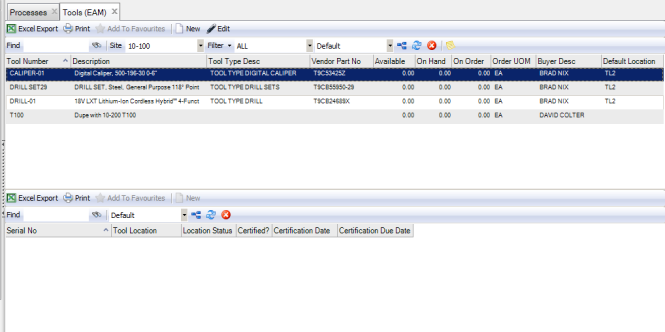
The upper browse of the Tools window displays a list of tools and associated descriptions while the lower browse contains the serialized numbers assigned to each tool.
Note: EAM currently does not contain support for tracking tools in the purchasing process and tool costs are not counted unless they are rebuilt or are part of a CM WO.
Tools
Tool Number
The tool’s ID number, defined when the tool record was created.
Description
A short description of the tool defined on the General tab.
Tool Type Desc
The description associated with the tool type, defined on the Codes tab.
Vendor Part No
The part number the vendor uses to identify this tool, defined on the General tab.
Available
Displays the total quantity on hand at all locations within a site, minus the quantity on reserve.
On Hand
The quantity (in Issue UOM) of this tool currently in all tool locations for this site.
On Order
Reserved for future development.
Order UOM
The unit of measure used when ordering the tool.
Buyer Desc
The description associated with the Buyer defined on the General tab.
Default Location
The location where the tool is stored.
You can view the tool’s serial number and related information in the lower browse.