QAD Enterprise Asset Management 2017.1
>
User Guide
>
Inventory
>
Inventory
>
Part Rebuild Locations
Part Rebuild Locations
Overview
Use Part Rebuild Locations to control serialized part rebuilds, such as for motors.
• Send parts removed from equipment to internal or external vendor locations for repair.
• Generate work orders against a rebuild location, instead of equipment, and the associated serial number for the serialized part at that location. Add work orders to build internal parts linked to a rebuild location.
• Charge costs to the work order. The cost flows to the part serial number. Cost remains with the part when it returns to inventory. It stays with the part until it issues out to a piece of equipment. Then, the cost expenses to the equipment when issued.
Also use Part Rebuild Locations when fabricating internally sourced parts.
Creating a Part Rebuild Location
Follow these steps to create a rebuild location:
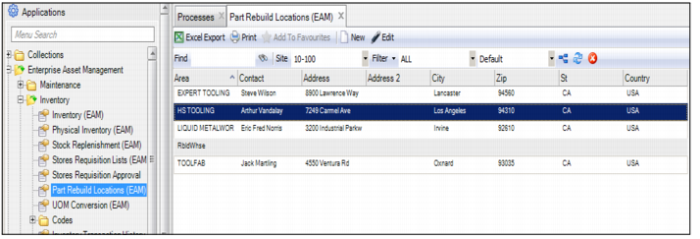
1 Open the Part Rebuild Locations browse located in Inventory|Part Rebuild Locations.
Part Rebuild Locations Browse
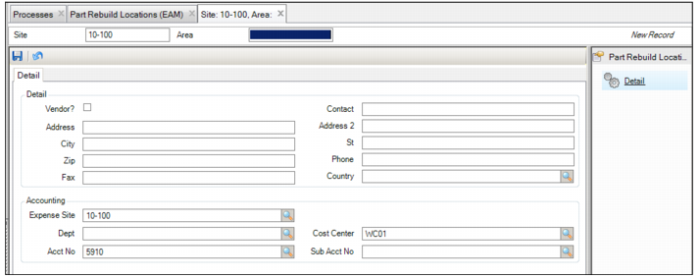
2 Click New. A blank part rebuild location record opens. Enter the area number in the Area field.
Part Rebuild Location Detail
3 Enter the relevant information in the following fields:
Site
Displays the site identified with the rebuild location. When the system creates the rebuild location, the Site field is read-only.
Area
The rebuild location name.
Vendor?
Select this check box to indicate a vendor rebuild location.
Contact
The individual to contact for information at the rebuild location.
Address
The street address of the rebuild location.
Address 2
Additional information about the rebuild location street address such as suite number.
City
The rebuild location city.
St
The rebuild location state.
Zip
The postal code of the rebuild location.
Country
The country of the rebuild location.
Phone Number
The phone number of the rebuild location.
Fax
The fax number for the rebuild location.
Expense Site
Select the site to charge for the rebuild from the lookup.
Dept
The department to use as the default when charging parts, labor, or contractor costs against a rebuild work order.
Cost Center
The default cost center when charging parts, labor, or contractors against a rebuild work order.
Acct No
The account number associated with the expense side of any distribution of labor, issuing of materials, or contracting against a part in a rebuild location.
Sub Acct No
The sub-account number tied back to the account number.
Note: If you create a work order for a serial number in a rebuild location, then the default account structure for the work order comes from the rebuild location. If a serialized part returns to stores, then the account structure in the rebuild location represents the inventory asset account number. When the part is transferred from the rebuild, it is credited against the rebuild. It debits or increases the value of the inventory. Cost transfers to stores until the part is issued to a piece of equipment.
4 Click the Save icon to save.