QAD Enterprise Asset Management 2017.1
>
User Guide
>
Inventory
>
Create Stores Requisition Lists
Create Stores Requisition Lists
Overview
Use Stores Requisition Lists to internally request stock items; create a detailed parts list for a work order or task; print the stores requisition and use it as a stock item pick list; or process it directly online. After the items are pulled, issued, and staged, the transactions are completed, expensing costs directly to the work order, equipment, expense account data, or project code. Use Stores Requisition Lists to attach multiple parts lists to a work order. Pre-plan a work order by identifying all required parts. To separate parts lists by groups of technicians, categorize mechanical parts separately from electrical parts.
EAM automatically creates a stores requisition if you are:
• Issuing a stock part to a work order, and no stores requisition has been designated
• Auto-issuing a non-stock part from a requisition without a contractor to a work order, and no stores requisition has been designated
• Issuing a PM with master parts lists
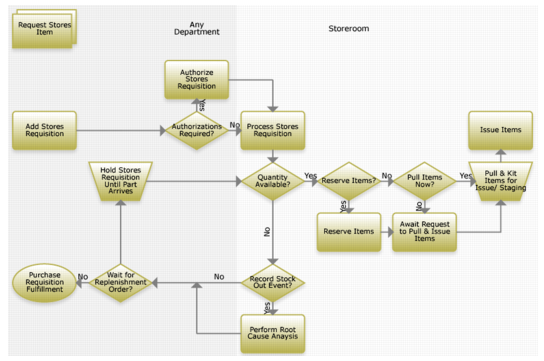
Adding a Stores Requisition Process Flow
Request a stores item following the recommended procedure, and order replenishments if needed.
Request Stores Item Process Flow
1 Add a stores requisition to the system.
2 Acquire authorization and process the requisition.
3 If the quantity is not available:
a Record a stock out event, or
b Hold the requisition until a replenishment order is available.
4 If the quantity is available, reserve or pull the item.
5 Pull the items and kit for issue or staging.
6 Issue the items.
Business Use Cases
A stores requisition list is a request for the withdrawal of parts from stores or a tool room. A stores requisition list can be created for a work order; in that case, it can be accessed from the Work Order Maintenance screen or from the Inventory module. Otherwise, a requisition to purchase the parts can be created for vendor-sourced lists.
Stores Requisition List Browse
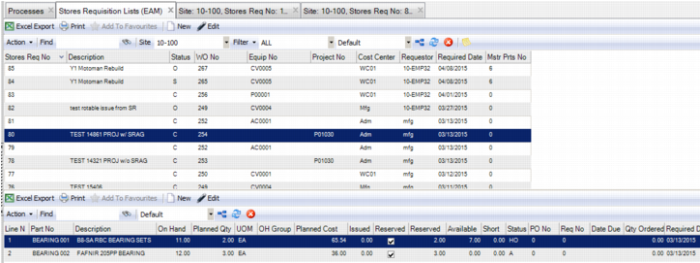
The Stores Requisition List browse, which is located in Inventory|Stores Requisition Lists, contains an upper browse that displays the stores requisition headers and a lower browse that displays the parts that have been added to the list.
Stores Requisition List Browse