QAD Enterprise Asset Management 2017.1
>
User Guide
>
Inventory
>
Update Physical Inventory Count
Update Physical Inventory Count
Overview
Use the physical inventory module to:
• Pick a group of parts based on user-defined criteria to count and print count sheets.
• Verify the quantity in inventory and enter count results.
• Adjust the on-hand inventory quantity automatically after closing count.
EAM includes active and inactive parts in the physical inventory lists and the physical inventory add lookup.
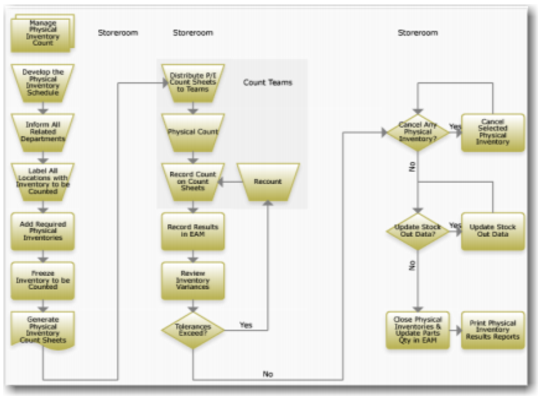
Managing Physical Inventory Process Flow
Periodically, count the inventory in your storeroom.
Manage Physical Inventory Process Flow
1 Develop the physical inventory schedule and inform all affected departments.
2 Label inventory locations with items to count.
3 Add required physical inventories.
4 Freeze inventory to count.
5 Generate physical inventory count sheets and distribute to teams.
6 Perform the physical count and compare it to records on the count sheets.
7 Record the results in EAM.
8 Review variances. If tolerances are exceeded, perform a recount.
9 Cancel physical inventory that requires cancelation and update stock out data.
10 Close physical inventories and update EAM.
11 Print physical inventory results reports.
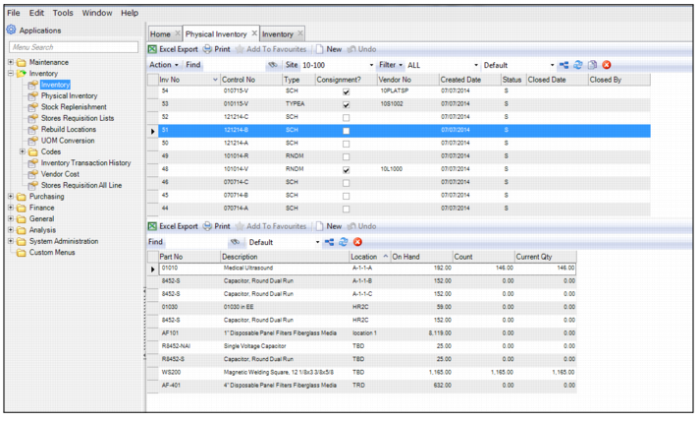
Physical Inventory Browse
The Physical Inventory browse, which is located in Inventory|Physical Inventory, consists of:
• An upper browse, which displays the physical inventory headers
• A lower browse, which displays the parts that have been added to the record
Physical Inventory Browse