QAD Enterprise Asset Management 2017.1
>
User Guide
>
Purchasing
>
Requisitions
Requisitions
Overview
Use requisitions to create and maintain requests in EAM to purchase inventory stock items, non-stock parts, or service work. From this point, requisitions attach to purchase orders. Requisitions represent the detailed line item information on the purchase orders.
Create a header record identifying the expense in terms of cost center, account, sub-account, work order, equipment identification, supplier, and more. The requisition header is unique to the specific supplier entered. EAM automatically manages purchase order consolidation to common suppliers when POs are globally created from multiple requisitions. All the detailed header information copies into the purchase requisition’s line items, but you can modify it.
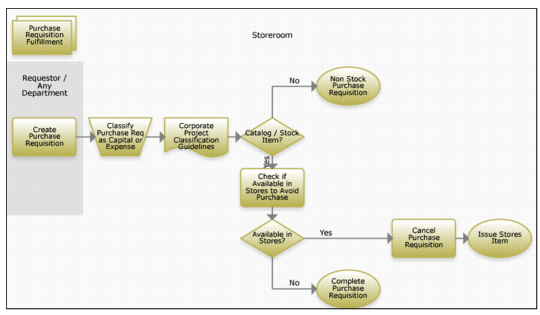
Creating a Requisition Process Flow
1 Create a purchase requisition.
2 Classify the requisition as capital or expense using corporate guidelines.
3 Indicate a non-stock requisition if you are not going to catalog or stock the item.
4 For an item to catalog or stock, check stores for availability.
5 If the item is available, cancel the purchase requisition and issue the item.
6 If the item is not available, complete the purchase requisition.