QAD Enterprise Asset Management 2017.1
>
User Guide
>
Projects
>
Overview
>
Budget and Cost Management
Budget and Cost Management
The EAM Project module within Finance provides a view of budgeted and cost amounts for both the project and jobs in a single view on the Cost tab. This tab also includes the rolled up Total Spend through the Project/Job structure. These amounts are also summarized in the associated Cost Analysis submenu for Projects and Jobs, which provides a supporting view of all the detailed transactions for the summarized costs.
Budget Reallocation
The total budget amounts can be managed among multiple projects using the Reallocate action and tracked on the Requisition Budget tab.
Funding Allocation
Typically in EAM Projects, you can use authorized funding for jobs throughout the project without specific limits at the job levels. The only limitation is that all costs incurred cannot exceed the authorized funding in total for the project.
Funding Allocation allows you to control the amount of funding at each job level through the project job structure. The funding that is allocated to a job limits how much can be spent for the job or how much can be allocated to sub-jobs.
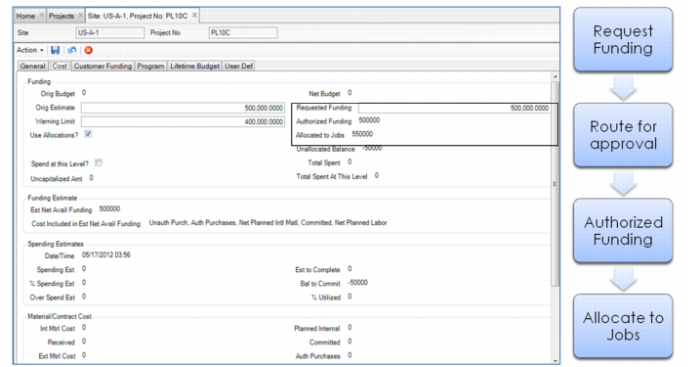
On the project header, the user requests funds and then submits that request for approval. When you select Use Allocations, the authorized funds are allocated to the jobs once the requested funding is approved. If further funding is required, the user updates the Requested Funding amount again and requests approval. The additional approved funds then are available for further allocation.
Requested, Authorized, and Allocated Funds
Allocate funds by going directly into the job and entering an amount. For multilevel job structures, start allocating the funds at the top-job level. To distribute parent job funds to children sub-jobs, enter an allocated amount in those sub-jobs through the depth of the job structure.
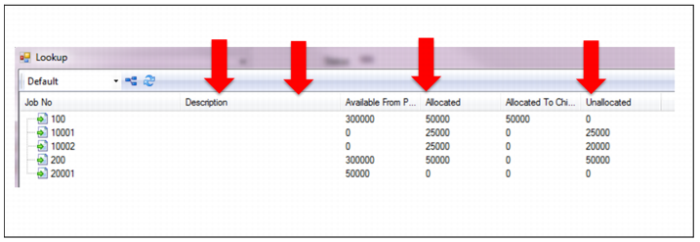
Once the project’s funds have been allocated to the jobs, you can use the Job Allocation viewer to view all the jobs for a specific project and where the funds are allocated. This tool gives you a quick view so that you can easily make updates or changes to the allocation amounts for planned spending.
Job Allocation Viewer