QAD Enterprise Asset Management 2017.1
>
User Guide
>
Projects
>
Setting Up Projects
Setting Up Projects
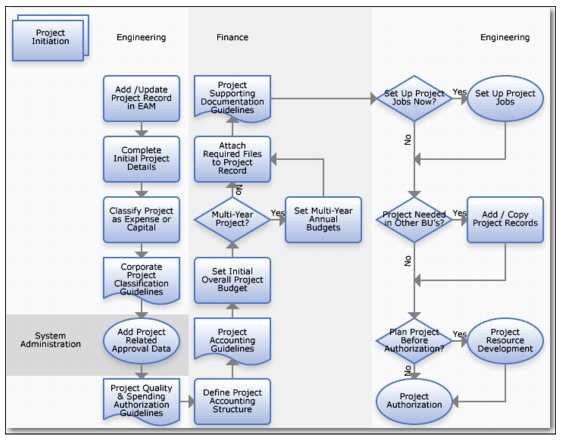
Project Setup Process Flow
Set Up Project Process Flow
1 Add or update a project record in EAM.
2 Complete initial project details.
3 Classify the project expense type (expense or capital).
4 Verify compliance with corporate project guidelines.
5 Add project-related approval data.
6 Review and follow quality and spending authorization guidelines.
7 Define the project accounting structure.
8 Review and follow project accounting guidelines.
9 Set the initial overall project budget.
10 Set annual budgets for a multi-year project.
11 Review and follow supporting documentation guidelines for the project.
12 Set up project jobs.
13 Add or copy records if other business units need the project.
14 Develop project resources to plan the project before authorization.
15 Obtain authorization for the project.