Report Setup
Use this module to substitute a custom print document for the standard. A custom print document can be the replacement for one of the print documents found in EAM.
Report Xref
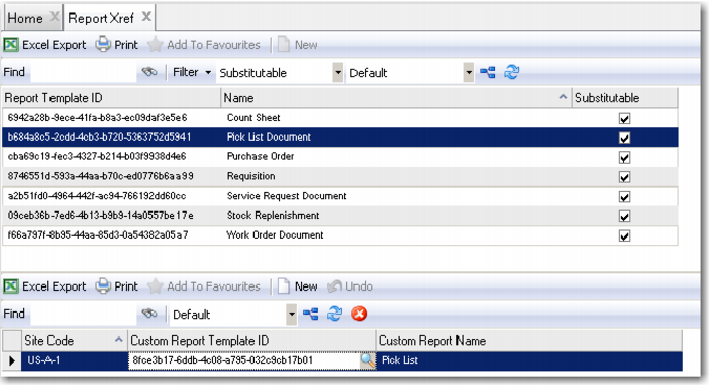
There are seven print documents found in EAM: Stock Replenishment, (Physical Inventory) Count Sheet, Requisition, Service Request Document, (Stores Requisition) Pick List, Purchase Order, and Work Order Document. When a custom print document is substituted for the standard, it prints when the Print Document action is selected or when that document is selected from Analysis.
Report Xref Browse
Access this browse from System Administration|Report Setup|Report Xref. Use it to organize and display records, to access supporting functions, and to edit or create new records.
Note: You cannot update any of the fields in the upper browse, which lists the print documents that can be customized. However, you can change the columns displayed in the upper and lower browses and save those settings. If you are going to substitute a custom print document, highlight the report name you want in the upper browse
Report Xref Right-Click Menu
The right-click menu contains administrative functions.
Columns
A list of columns available to the upper browse displays here. Select a column header to display it. Clear the column header to hide it.
1 From the upper browse, highlight the report name you want to substitute.
2 In the lower browse, click New to substitute a custom print document previously established in the Report Designer (System Administration|Report Designer) for the standard in a specific site.
3 If you know the site, enter it or access the Site Lookup to find it.
4 Move to the Custom Report Template ID and click the lookup to find the correct one. The Custom Report Template ID lookup displays all the custom reports and print documents added in the Report Designer. Find the correct print document and double-click it.
5 EAM fills in the Custom Report Name with the name of the selected template ID established in the Report Designer.
6 The same custom print document can be used in another site in place of the standard.
7 Close the user-defined fields browse by clicking the X on the top of the browse.
Report Xref Upper/Lower Browse