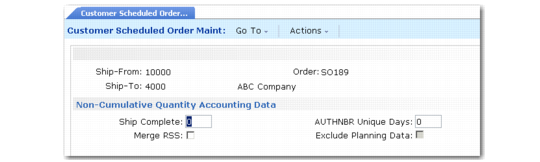
Non-Cumulative Quantity Accounting Data Frame
This frame displays when Ship to Cum/Req is set to Req.
Customer Scheduled Order Maintenance, Non-Cumulative Quantity Accounting Data Frame
Ship Complete
Ship Complete is used to specify what percentage of a requirement quantity must be shipped to be considered complete. If you consider a requirement satisfied when 100 percent of the requirement quantity has been shipped, set Ship Complete to 100.
To verify that a requirement with only one authorization number is shipped properly, set Ship Complete to 1. This prevents any other occurrence of an authorization number from being shipped. When the first occurrence is pegged, it satisfies the ship complete percentage, and sets open quantity to zero. If you attempt to peg the requirement quantity for a second occurrence, an error displays.
During the generation of a required ship schedule, this field determines which RSS requirements are open and should be carried to the new active schedule. If a percentage shipped is less than the Ship Complete percentage, the requirement is included in the new active RSS.
During shipment, this field determines which requirements are available for pegging in various shipper programs.
Example: Set Dynamic Unpeg to No and Ship Complete to 100. Create a shipper with an item, in a box, on a pallet, with a ship quantity of 500. With an RSS requirement of 500, when you peg 500 in the Consume Required Ship Schedule Requirements frame, the open quantity is reduced to zero. This shipment is now considered complete.
AUTHNBR Unique Days
If not zero, the system verifies that duplicate authorization numbers are not reused within the time period specified.
Merge RSS
This field determines whether open requirements from existing required ship schedules (RSS) are copied to newly generated schedules. A requirement is considered open if it has not been fully shipped.
Note: During the merge, the value of Ship Complete determines which requirements are open.
No: Required Ship Schedule Update (7.5.5) and Selective Required Ship Schedule Update (7.5.6) do not copy requirements from existing active schedules to new schedules.
Yes: Required Ship Schedule Update and Selective Required Ship Schedule Update copy open requirements from existing active schedules to new schedules. If Yes, enter yes or No in the Exclude Planning Data field to indicate whether to merge planning data.
Set to Yes if your trading partner does not retransmit requirements that have not yet been shipped.
Note: Open requirements that are already allocated are always copied regardless of this setting.
EDI Update RSS
When both this field and Merge RSS are Yes, the system updates the required ship schedule after importing a ship schedule in Document Import (35.1).
The default is No. You can update it only when Merge RSS is Yes.
You can update the RSS using Required Ship Schedule Update (7.5.5) or Selective Req Ship Sched Update (7.5.6). However, depending on how frequently you run the import process, it is possible to miss some requirements when you do the update manually. Updating the RSS at the same time the schedule is imported and merged avoids this problem.
Exclude Planning Data
You can update this field only when Merge RSS is Yes. When open requirements are being merged, this field determines how the system manages planning data.
No: Planning data from the active required ship schedule is merged into the newly generated schedule.
Yes: Planning data from the active required ship schedule is not merged into the newly generated schedule.