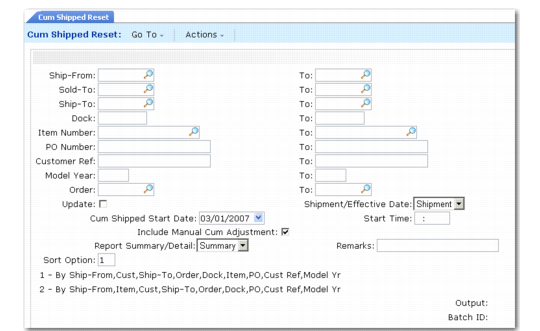
Resetting Cumulative Quantities
Use Cum Shipped Reset (7.5.18) to reset the cumulative totals for scheduled orders and to generate a summary or detail report showing the updated order. You can reset one or a range of scheduled orders based on the selection criteria. This action cannot be undone.
You can run the cumulative reset function without actually resetting a scheduled order’s cumulative totals. This gives you an opportunity to review the scheduled orders being reset before actually changing the database. Do this by setting Update to No. When Update is Yes, the cumulative totals are reset.
Include manual adjustments made in Cumulative Shipped Maintenance (7.5.16) by setting the Include Manual Cum Adjustments field to Yes. Setting this field to No ignores all manual adjustments when resetting the cumulative shipped quantity.
At the time you reset a scheduled order’s cumulative totals, you can also enter a new cum shipped start date and time. This new date and time replaces the scheduled order’s current cumulative start date and time. The time must be in 24-hour format.
When the cumulative totals are reset to zero for a date in the past, all shipments made between the specified time in the past and the current system date are totaled. This total is set as the new cumulative shipped quantity for the scheduled sales order lines.
Note: Only shipments for scheduled sales order lines are included.
Cum Shipped Reset (7.5.18)
The first half of the Cum Shipped Reset screen consists of selection criteria ranges such as ship-from, sold-to, ship-to, dock address, item number, PO number, customer ref, model year, and order. Use these values to identify the cumulative shipped quantities to reset.
Update
Enter Yes to reset the cumulative totals. Enter No to print the report without resetting cumulative totals.
Shipment/Effective Date
Enter the type of date specified in Cum Shipped Start Date.
Shipment: The value in Cum Shipped Start Date is the date when the shipment was initially entered into the system.
Effective: The value in Cum Shipped Start Date is the date when the shipment was effective for accounting purposes.
Cum Shipped Start Date
Enter the new date to start accumulating cumulative quantities for the scheduled orders.
Start Time
Enter the time when cumulative shipped reset is to occur on the specified date. The time must be entered in 24-hour format.
Include Manual Cum Adjustment
Enter Yes to include all manual adjustments in the Cum Shipped total. Enter No to ignore all manual adjustments made in Cumulative Shipped Maintenance (7.5.16).
Report Summary/Detail
Enter the format to use for this report.
Remarks
Enter any general comments.
Sort Option
Enter the sort option that determines the order the information prints on the report.