Retrobill Maintenance
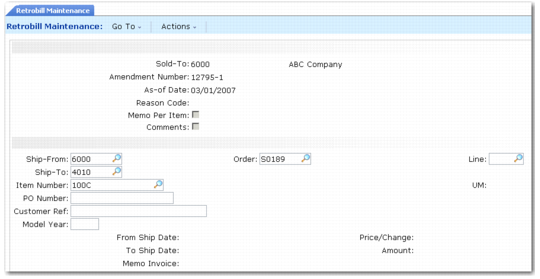
In the first frame, enter a sold-to code and amendment number. These form the unique retrobill ID used by the system. The amendment number authorizes the retrobill and is typically provided by the customer. The as‑of date is used when more than one retrobill is applied to the same scheduled order line items. It determines the sequence for applying the retrobills.
Memo Per Item determines how many debit/credit invoices are to be created.
• Set it to Yes if you want a separate debit/credit invoice created for each line item.
• Leave the field set to No (the default) if you want one debit/credit invoice created for all line items in a purchase order, or if no debit/credit invoice should be created.
Memo Per Item works in conjunction with Create Memos in the Retrobill Report (7.13.13.3). Both Memo Per Item and Create Memos must be set to Yes to print invoices.
The Reason Code and Comments fields are optional.
Click Next to move to the second frame.
Retrobill Maintenance (7.13.13.1)
The second frame consists of two sections. In the first section, identify the scheduled order and line item being changed. In the second, define the terms of the retrobill.
The ship-from, ship-to, item, PO number, scheduled order number, line item number, customer reference, and model year are used to select the scheduled order and line item being changed by the retrobill.
Click Next to advance to the lower section of the frame.
In this section, you define the terms of the retrobill by specifying:
From Ship Date/To Ship Date
These set the date range used for selecting invoices during retrobill processing. Invoices falling outside this date range are not included.
Price/Change
Indicates whether the Amount field contains a new price (Price) or a price change (Change).
Price: The value entered in the Amount field replaces the current price.
Change: The amount is applied to the current price. To reduce an existing price, enter a negative amount.
Amount
Specify the currency amount to be applied based on the Price/Change field.
Memo Invoice
Displays the debit/credit invoice number set by the Retrobill Report (7.13.13.3) when Create Memo is Yes. You can also use this field to manually enter a debit/credit invoice number.