Managing Duplicate Sequence Requirements
In some situations, the same sequence may be reported on separate schedule releases. For example, you send the last requirements of the day, but your customer creates and sends the new sequence schedule while those requirements are in transit. The new schedule will contain some of the same requirements again, since they have not arrived at the customer site.
Normally, the system automatically creates a cross-reference from the new duplicate sequence to the picked sequence when the sequence schedule is initially imported into the system. However, if the item number, customer reference, customer dock, or line feed on the new duplicate sequence does not match the picked/shipped sequence values, the cross-reference is not created.
Creating Cross-References
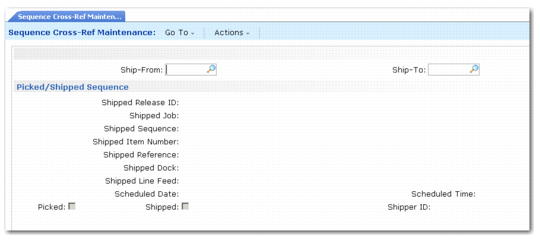
Use Sequence Cross-Ref Maintenance (7.5.4.13) to manually create cross-references from duplicate sequences on one schedule release to the picked/shipped sequence on another schedule release. You can also create cross-references to sequences marked as deleted, or sequences that have already been cross-referenced to previously picked/shipped sequences.
After indicating the ship-from and ship-to sites, use the selection criteria on the Picked/Shipped Sequence frame to select the sequence that was previously picked. Use Next/Previous to scroll through all the sequence schedule releases and lines that exist for the ship-to and ship-from site combination.
Sequence Cross-Ref Maintenance (7.5.4.13)
The Linked Sequence frame displays next. The field values on this frame refer to the information for the duplicate sequence on the new sequence schedule release. Enter the appropriate values as needed. The system creates a cross-reference link from the picked sequence to the duplicate sequence. The new cross-referenced sequence cannot be picked. The system considers this sequence to be a closed requirement.
Use Sequence Cross-Reference Report (7.5.4.14) to report the cross-reference records you create manually as well as any cross-reference records created automatically when sequences are imported through EDI eCommerce or the shipper gateway.