Creating Sequenced Pre-Shippers
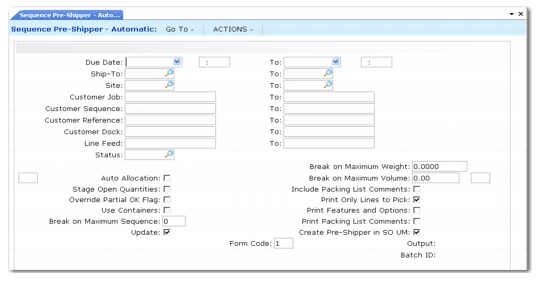
Use Sequence Pre-Shipper–Automatic (7.5.4.10) to create pre-shippers for one or a range of sequence schedules. The selection criteria for this program applies only to sequence schedules. To create pre-shippers for ranges of both sequenced and non-sequenced schedules, use Picklist/Pre-Shipper–Automatic (7.9.1).
Sequence Pre‑Shipper– Automatic (7.5.4.10)
Sequence Pre-Shipper–Automatic selects sequences from active schedules. The sequences must match the selection criteria, and cannot be marked as deleted, picked, or cross-referenced. It arranges the sequences by ship/delivery date and destination and creates the pre-shippers as needed. All processing occurs as in Picklist/Pre-Shipper–Automatic (7.9.1).
Sequenced pre-shippers are printed as two documents:
• The first document displays the total gross requirements. This is the same as the one produced by Picklist/Pre-Shipper–Automatic.
• The second document shows all the sequence information in order by sequence.
Status and the selection criteria ranges refer to sequence schedule information. Most of the fields on the bottom half of the screen are the same fields found in Picklist/Pre-Shipper–Automatic.
See User Guide: QAD Sales.
Break on Maximum Sequence
This is an optional control field used to specify the maximum number of sequences allowed on a shipper.
The default is 0 (zero). Leave this value to indicate that the shipper can contain an unlimited number of sequences.
When adding a sequence to a shipper, the system first checks to make sure that this number of sequences has not been reached on the shipper. When a shipper reaches this number of sequences, a new shipper is created. Any additional sequences are added to the new shipper.