Posting, Exporting, and Printing Invoices
When you post an invoice using Invoice Post and Print (7.13.4), the system checks whether any sequences are associated with that invoice. If the invoice references shipments of sequenced items, the sequence shipper records are updated with a reference to the invoice number being posted.
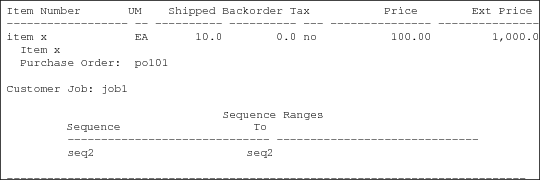
This reference is used to print a range of sequence numbers on the invoice whenever it is printed with Invoice Post and Print, or any other function that prints invoices. The inclusion of the range of associated sequence numbers on the printed invoice is dependent on the customer control record or Sequence Schedule Control settings. The range prints at the end of the invoice, once all invoice lines have been printed.
When you export an invoice that is associated with sequence schedule lines, that invoice can optionally include the sequence information associated with it. The inclusion of sequence information is dependent on the customer control record or Sequence Schedule Control settings. Use Invoice Export (35.4.3) to export invoices with EDI eCommerce.
Sequence Number Range Printed on an Invoice
The following programs also print a range of sequence numbers on the invoice based on the customer control record or Sequence Schedule Control settings.
• Invoice Print or Reprint (7.13.12)
• Pre-Shipper/Shipper Confirm (7.9.5)
• Shipper Unconfirm (7.9.21)