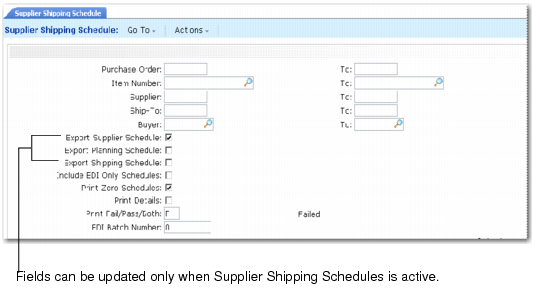
Exporting Supplier Schedules
Use Supplier Shipping Schedule (35.4.8) to export the schedule release to an ASCII text file that can be used for an EDI system transaction.
Only supplier schedule type 5 and type 6 can be exported when the Supplier Shipping Schedules module is active. Only schedule type 4 can be exported when this module is not active.
Schedules are exported only when EDI Schedules is Yes in the header of Supplier Scheduled Order Maintenance (5.5.1.13). Set up supplier‑specific EDI information in Trading Partner Parameter Maintenance (35.13.10) by specifying Yes for the appropriate logical parameter:
Send EDI Plan Schedules
Send EDI Ship Schedules
If either schedule export parameter is Yes in the supplier’s record, EDI Schedules defaults to Yes in Supplier Scheduled Order Maintenance.
See User Guide: QAD EDI eCommerce.
Supplier Shipping Schedule (35.4.8)
Export Supplier Schedule
This value determines whether standard supplier schedules are exported via EDI. When the Supplier Shipping Schedules module is activated, this field is always No and cannot be updated. When the Supplier Shipping Schedules module is disabled, the default is Yes.
Export Planning Schedule
Enter Yes to export supplier planning schedules that match the selection criteria. When the Supplier Shipping Schedules module is deactivated, the default value is No and cannot be updated. When the Supplier Shipping Schedules module is activated, the default is Yes.
Export Shipping Schedule
Enter Yes to export supplier shipping schedules that match the selection criteria. When the Supplier Shipping Schedules module is deactivated, the default value is No and cannot be updated. When the Supplier Shipping Schedules module is activated, the default is No.
Include EDI Only Schedules
Enter No to export both EDI and non-EDI schedules. Supplier Shipping Schedule disregards the setting for EDI Schedules in Supplier Scheduled Order Maintenance and includes both EDI and non-EDI supplier schedules for export.
Enter Yes to export only schedules that have EDI Schedules set to Yes in Supplier Scheduled Order Maintenance.
When this is No and the system cannot find valid associated settings in Trading Partner Parameter Maint (35.13.10), errors result. By setting the field to Yes, you can avoid having to review error messages associated with schedules that should not be exported.