Printing Supplier Schedules
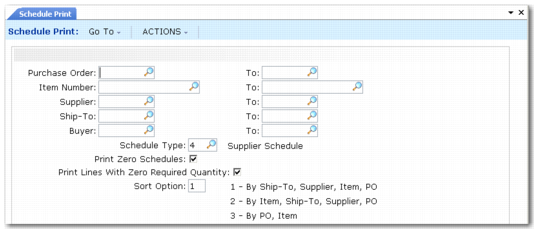
Use Schedule Print (5.5.3.8) to print a schedule release as a material release to the supplier. Use the Schedule Type field to print type 5 or type 6 schedules. When the Supplier Shipping Schedules module is inactive, selection is limited to type 4 schedules only.
Note: You specify whether the system uses calendar or working schedules to interpret firm days in the Calendar/Working Firm Days field in Schedule Update from MRP. The system uses the value of this field when printing schedule firm days. If you specify working schedules, the system treats holidays as nonworking days when the supplier schedule is calculated with working firm days.
Schedule Print (5.5.3.8)
You can print and review a schedule release any number of times before you actually transmit it. Indicate when the schedule has been sent to the supplier by responding Yes when prompted to update the Schedule Sent field. To transmit the release, you can mail or deliver it.
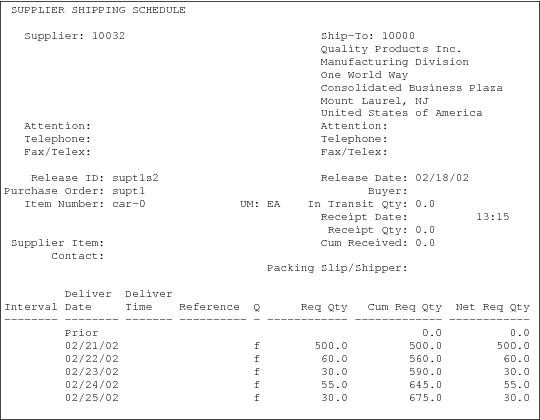
Schedule Print creates the printed supplier schedule. The header of this document includes supplier and ship-to information, the release ID, purchase order number, item number, receipt quantity, and cumulative receipts. The ship/delivery pattern displays, then the order detail. The detail shows any prior open quantities, including quantities in transit, and each scheduled requirement.
For each line on the printed schedule:
• Req Qty is the discrete or bucketed quantity for that schedule line.
• Cum Req Qty is the total cumulative requirement, including that line quantity, for the entire life of the order.
• Net Req Qty is the total open quantity including that line quantity.
Supplier Schedule Print Output