Comparing Shipping to Planning Schedules
Use Ship to Plan Schedule Compare (5.5.7.14) to compare active shipping schedules with their corresponding active planning schedules.
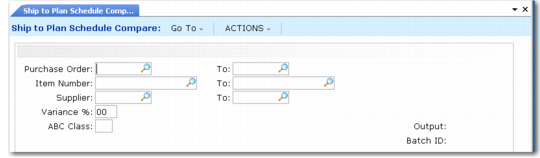
Ship to Plan Schedule Compare (5.5.7.14)
Variance %
Optionally specify a variance percentage (1 to 99 percent) to report only item quantities on schedule detail lines that differ by this percentage or more. When this value is 0 (zero), any quantity variance is reported, regardless of variance percentage.
Variance percentage indicates the extent to which one schedule detail line varies from another, expressed as a percentage value. For example, if you execute a comparison program with all fields left blank, but with Variance % set to 5, the resulting report only includes releases where the schedules differ by five percent or more.
ABC Class
Optionally specify an item ABC class to compare only schedule detail lines containing items that belong to that class. Assign ABC class codes to individual items using Item Master Maintenance (1.4.1).Valid values are A, B, or C.
You can combine this code with a variance percentage for reporting. For example, class A items might be reported at a two-percent variance while class C items are reported at a ten-percent variance.
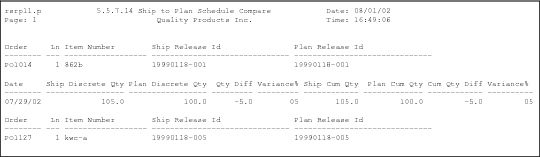
Ship to Plan Schedule Compare Output (5.5.7.14)