Setting Up EDI eCommerce
Before you can begin processing trade sales transactions with eCommerce, you must have the following data set up:
• EC subsystem definition
• Exchange file definition
• EC subsystem/exchange file cross-reference
• Application document definition
• Implementation definition
• Transformation definition
The following sections describe additional EDI eCommerce settings for trade sales processing.
See User Guide: QAD EDI eCommerce.
Determining Your ASN Process
There are two ASN processes that you can set up EDI eCommerce to manage:
• Trade sales suppliers send you an original ASN.
• Trade sales suppliers send you a copy of the ASN.
If the trade sales supplier sends you the original ASN, you send your own ASN to the customer. The system automatically creates your ASN from the SO shipper. If the trade sales supplier sends you a copy, you typically do not send your own ASN to the customer as this duplicates data the customer receives and can lead to confusion.
The system creates an SO Shipper automatically from the ASN data that the trade sales supplier sends to you, so there is no additional ASN setup required to create the SO shipper.
Setting Up Trading Partner Parameters
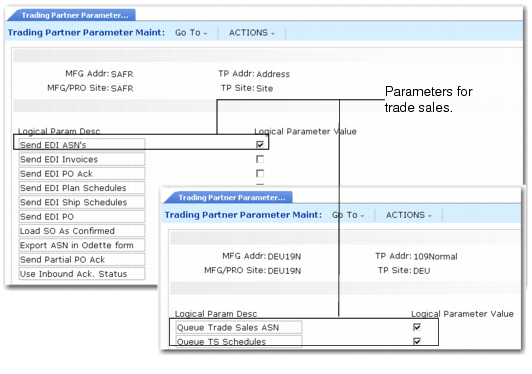
You set fields in Trading Partner Parameter Maint (35.13.10) that let EDI eCommerce process trade sales ASNs.
You must set fields for both the customer trading partner parameter record and the supplier trading partner parameter record. The following sections describe the fields.
Trading Partner Parameter Maint (35.13.10)
Send EDI ASNs
This parameter lets you send ASNs to the customer using EDI, regardless of the EDI eCommerce export method you use. Set this field for the customer trading partner parameter records.
No (the default): Do not send ASNs to the customer.
Yes: Send ASNs to the customer.
Queue Trade Sales ASN
This parameter determines if the system should queue an ASN for export to the customer based on the confirmed SO shipper data. Set this field for the supplier trading partner parameter records. You export queued ASNs using eCommerce Manager.
No: The system does not queue an ASN for export to the customer.
Yes: The system queues the shipper as an ASN for export to the customer after it confirms the SO shipper.
The system creates SO shippers when you import a supplier’s ASN. To review all SO shippers for a supplier before exporting them, set this field to No. Once you review the data, you can export the shippers using Shipment ASN Export (35.4.1).