Labor Reporting
When using Advanced Repetitive (or Repetitive), it is important that an operation be entered in the Op field in Product Structure Maintenance (13.5).
Op
The routing or process operation at which this component is used.
Determines whether this component is backflushed. If you enter the operation number here, this component is automatically issued (backflushed) when you report quantities for the parent in Advanced Repetitive or Repetitive labor and scrap reporting transactions. If Op is [blank], or does not match a defined operation, this component is not backflushed.
Use the reference field to accommodate the same component issued at multiple operations. For example if you have a common component that is issued at operations 10, 20, and 30, you could assign a reference code of 10, 20 and 30 to each component at each operation. For costing by operation it is important to know which components are issued at which operations.
Backflush Transaction
Labor and Burden Calculations
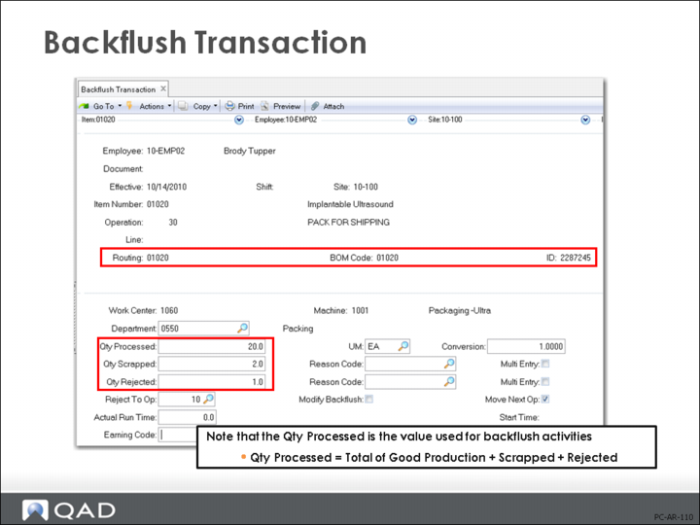
Backflush Transaction (18.22.13) is one of the most important Advanced Repetitive functions. From a cost perspective, it is used to report labor hours and operation completions, backflush materials associated with the operation from inventory based on the quantity completed (the quantity can be changed manually), and to put finished items into stock when completions are reported at the last operation).
This transaction also completes and reports previous non-milestone operations.
You can also report scrap and rejected quantities. Note that the quantity processed is the total units processed. In the example shown 20, units were processed of which 2 were scrapped an 1 rejected back to operation 10. At this time there are only 17 good units at operation 30 that will be closed to inventory.
The ID number shown is the ID of the cumulative order to which the costs will be booked.
If an alternate BOM and or routing are to be used, they must be specified on the Backflush Transaction (18.22.13) screen. This will generate a new cumulative order that is then used to determine manufacturing performance and variances. Differences between the rolled up cumulative order cost and the GL standard cost are reported as Method variance.
Repetitive Labor and Burden Calculations
In Advanced Repetitive, each type of labor—setup, run, rework, down time, and non-productive time—is reported using a different transaction. This is a bit different from Shop Floor Control (16.20.24) where there was only one transaction to record setup, run, rework, and down time, and another to record non-productive time. But from a GL and cost perspective, this difference is superficial. The effect is the same.
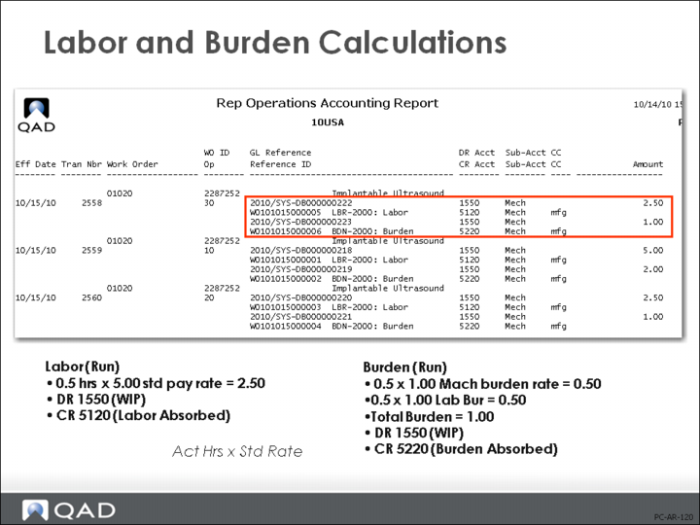
• Actual costs and automatically reported labor costs are entered in the WIP (debit) and the Labor and Burden Absorption accounts (credit) (see figure above). Auto Reported Labor should not generate any variances. If you report labor at an operation flagged for Auto Labor, the reported hours will be added to the automatic hours and will generate a variance.
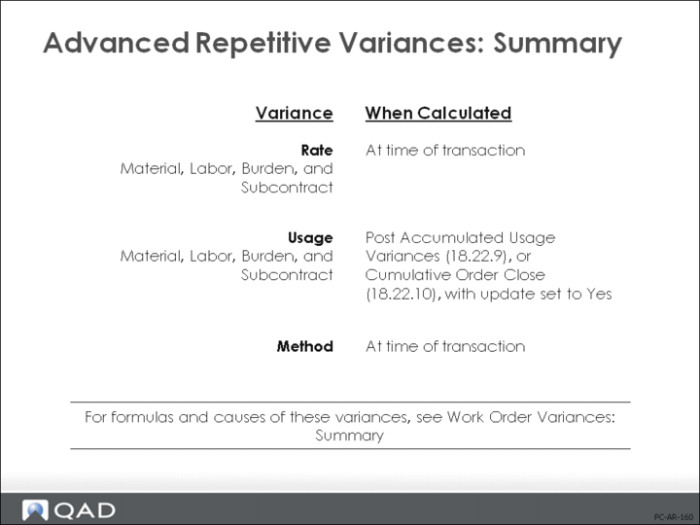
• Any differences between actual and standard costs generate variances for labor and burden rate, which appear immediately. Labor and burden usage variances are generated by Post Accumulated Usage Variances (18.22.9) or Cumulative Order Close (18.22.10)
Note: GL transactions created by Advanced Repetitive labor reporting have a GL type of WO. The description is BCKFLSH trans#, where trans# is the transaction number of the operation history, and can be viewed by using Operations Transaction Detail Inquiry (18.22.4.2).
The calculations for labor and burden are the same as for work orders and can be found in the appendix at the end.
Non-Productive Labor
Non-Productive Labor includes any time not spent in production (for example, preventative maintenance, meetings). These costs are not considered part of WIP and they don’t contribute to manufacturing variances. Down time and non-productive labor cost are reported directly to the Cost of Production account (debit) and to the Labor Absorption account (credit). An operation history record of type DOWN is generated.
Note: Operation transaction history provides the basis for many history reports within QAD Enterprise Applications, efficiency, utilization, and downtime for example.
Labor and Burden Rate Variance Calculations
All transactions consuming resources are immediately calculated and their rate variances are recorded.
• For component material, rate variance is calculated as the difference between the GL cost presently in effect and the GL cost captured in the cumulative order. Usually there is no component material rate variance. It occurs if the GL standard cost of the component material changes during the lifetime of the cumulative order.
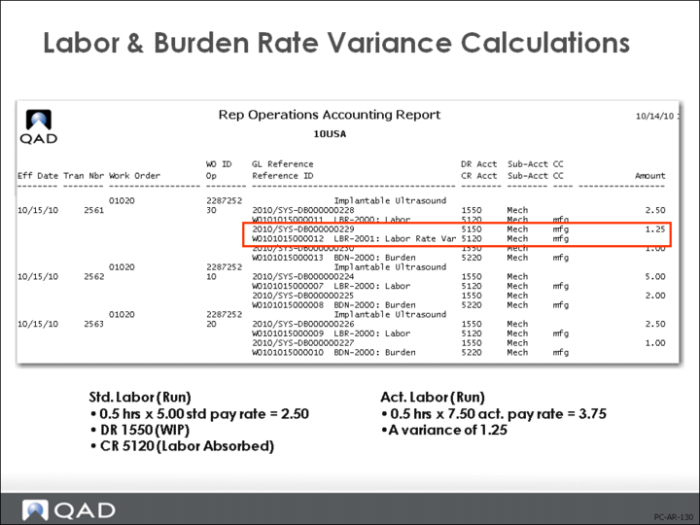
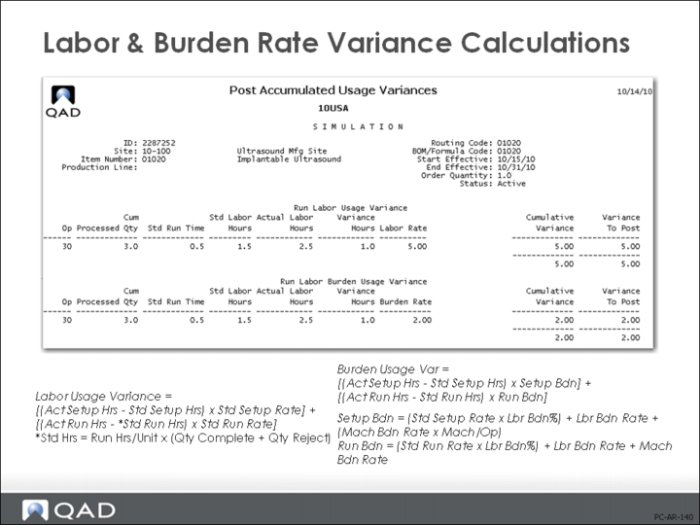
• Labor and burden rate variance is calculated in a similar way. When a cumulative order is created, standard labor and burden rates are captured from the routing and work center data in effect. When labor is reported at a cumulative order operation work center, rate variance is calculated as the difference between the actual employee pay rate and the captured labor rate standard. This assumes actual employee pay rates are maintained using, Actual Pay Rate Maintenance (14.13.21). In the example shown the employee pay rate is 7.50 not the 5.00 work center standard. This caused the labor rate variance.
• Subcontract rate variance is the difference between the purchase order price per unit and the subcontract cost per unit as captured in the cumulative order.
This is recorded in two stages by the Cost of Production account using the RCT-PO from Purchase Order Receipts (5.13.1) and an operation history record, type SUBCNT.
The calculations for these variances are the same as for work orders and can be found in
Variances and Components Reference.
Labor and Burden Usage Variance Calculations
Labor and burden usage variances are generated when there is a difference between the actual hours needed to complete an operation and the standard hours.
In the example shown here the standard at operation 30 is 0.5 hours, and the operation is flagged for automatic labor reporting. An additional 1.0 hours run time was reported during the backflush transaction. This generated the 5.00 labor usage variance (5.00 is the standard work center rate). It also generated the 2.00 burden usage variance as both the machine burden rate and labor burden rate are 1.00 per hour.
Usage variances are calculated and recorded upon Post Accumulated Usage Variances (18.22.9) or Cumulative Order Close (18.22.10)
The calculations for these variances are the same as for work orders and can be found in the appendix at the end.
Method Variance
Method variance is calculated and recorded upon the following transactions:
• Cumulative Order Close (18.22.10)
• Backflush Transaction (18.22.13)
• Labor Transaction (18.22.14)
• Setup Labor Transaction (18.22.15)
• Rework Transaction (18.22.17)
• Move Transaction (18.22.19)
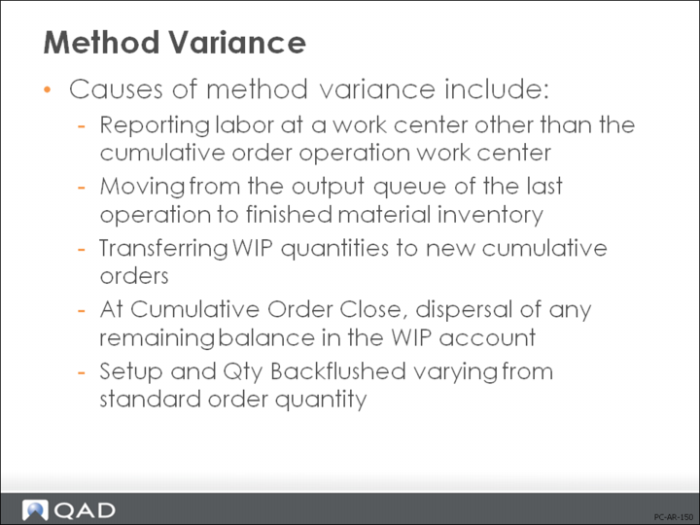
Causes of Method Variance
• When labor is reported in the transactions listed, method variance can be generated when reporting at a work center other than the cumulative order operation work center. Method variance is calculated as the difference between the standard labor and burden rates of the work center being reported and the standard labor and burden rates of the cumulative order operation center, extended by the number of hours reported. This prevents charging unexpected rate variances to work centers.
• Understand the relationship between your work centers and your production lines. Costs are calculated from data in the work center record and the route. Scheduled run times in repetitive scheduling are based on production line rates. You could set up one production line per work center or one work center with all similar production lines.
• In the Backflush transaction and Move transaction, method variance can be generated when moving from the output queue of the last operation to finished material inventory. Method variance is calculated as the difference between the final operation cost contained in the cumulative order and the current GL standard cost of the finished material, extended by the quantity being reported.
• In Cumulative Order Close, method variance can be generated when transferring WIP quantities to new cumulative orders. Method variance is calculated as the difference between the operation cost in the former cumulative order operation and the operation close of the future cumulative order operation, extended by the quantity transferred.
• Rounding of costs held in several decimal places could result in a non-zero balance in the WIP account. This is changed to a Method variance at Cumulative Order Close.