Non-Productive Labor Feedback - GL Effect
Use Non-Productive Labor Feedback (18.22.22) to record non-productive labor for an employee or down time for a work center. For an employee, it is time not directly related to setup or production; time spent in meetings, waiting for work, cleaning up, preventative maintenance. For a work center, it is idle time.
Note: Some operations have a defined teardown procedure as well as setup. This can be included as setup time at the last operation or as a separate final operation if you want the time reported.
Time can be reported for an employee, an employee at a specific work center, or for a work center. The financial effects are different for each. As shown in the graphic above.
In Advanced Repetitive, you can have subcontract purchase orders or supplier schedules in conjunction with the repetitive routing. The subcontract operations are similar to discrete capabilities, discussed in the courses on work orders and purchasing.
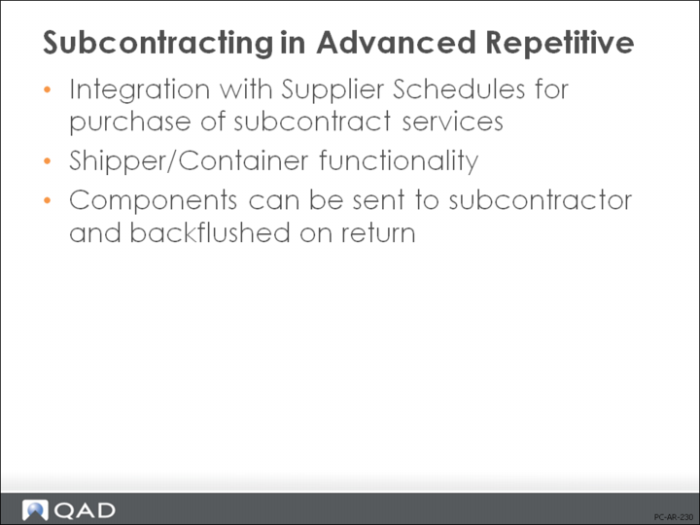
Subcontracting in Advanced Repetitive
All of the processing that occurs prior to the subcontract operation uses standard Advanced Repetitive functions. The last operation reported just prior to the subcontracting operation (milestone or non-milestone) must have Move Next Op set to No. This leaves the WIP in that operation’s output queue. Items are then ready to be processed through the subcontract operation.
The subcontracting process and associated GL effects in Advanced Repetitive are discussed on the following pages. For more in-depth training in Advanced Repetitive, please refer to the QAD Advanced Repetitive Training materials.
Subcontract Process in Advanced Repetitive
Routing Maintenance
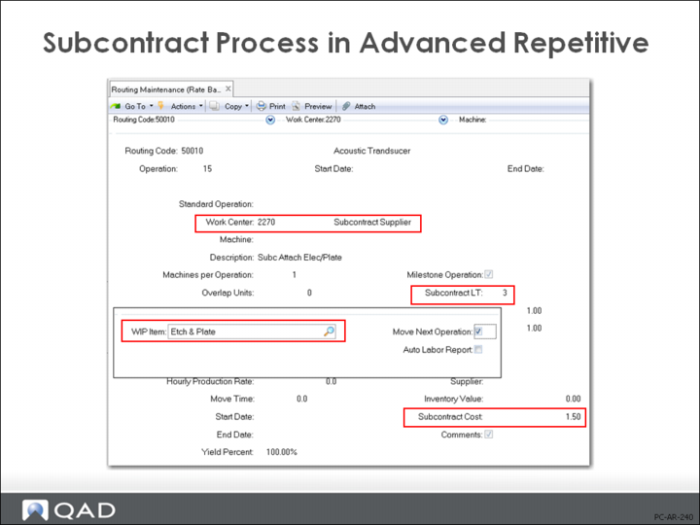
Routing Maintenance (14.13.1) is where the routings are set up for the parent (manufactured) items. When setting up routings for the advanced repetitive items, there are several fields that are important when implementing a subcontracting operation.
Subcontract Cost
The cost per item of this subcontract operation
Subcontract Lead Time
The lead time that should be included when scheduling the operation. This will also affect manufacturing lead time calculations
WIP Item
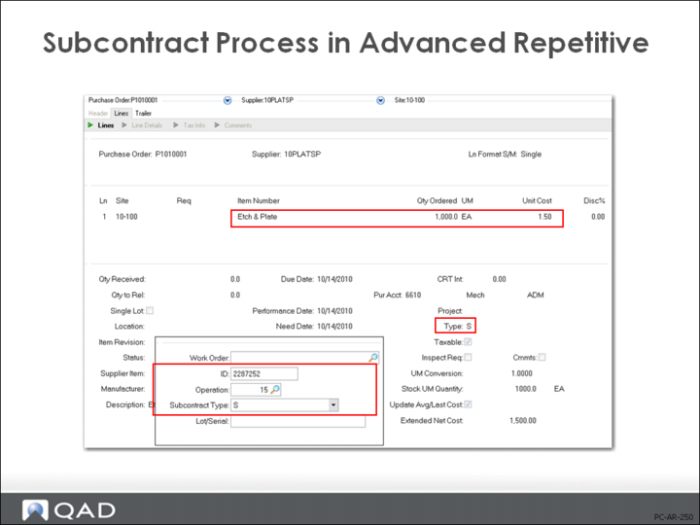
This is a “service” item that is set up in the Item Master. It is used primarily with discreet POs. It is for ease of entering a purchase order that will specifically call out the service requested instead of the parent item number that is being sent. (The item that is set up in the Item Master (1.4.1) is a Purchased Type. No need to cost it; the Routing Cost Roll-Up will cost everything correctly. This part is never planned for or transacted through Inventory by the system. For example, a part can be set up called Paint, which indicates purchasing a service of Paint from a supplier.)
PO and Line
If using Supplier Schedules and not discrete Purchase Orders, the Supplier Scheduled PO number and the line can be entered here. This will give an automatic link to the correct Supplier Schedule. This functionality does not require the use of a WIP Item as there is a direct link between the route and the supplier schedule line item.
Move Next Op
For the subcontract operation, this can be set at either Yes or No. Setting it to Yes will allow the PO Receipt or the Shipper Confirm to move the WIP to the input queue of the next operation. Setting it to No will keep the WIP in the output queue of the subcontract operation after PO Receipt/Confirm Shipper.
Note: The Move Next Op field at the milestone operation prior to the subcontracting operation must be set to No. The subcontract shipper will transfer WIP from the output queue of the previous milestone (reported) operation before the subcontract operation into the input queue of the subcontract operation.
Auto Labor Report
For subcontracting, no labor is usually associated with this. Setting this field is optional.