Cumulative Order Close
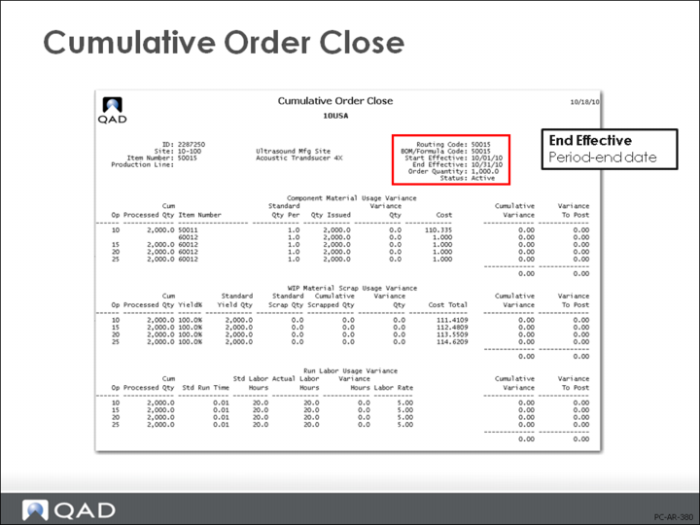
Cumulative Orders must be closed for accounting purposes in order to clear out WIP. Normally the Cumulative Order Close (18.22.10) is run as part of your period-end procedures. It creates the same GL transactions as the Work Order Accounting Close (16.21).
Closing the Cumulative Order
The one difference is that Cumulative Order Close will close all cumulative work orders regardless of whether they have been “completed” or not. This completes any unreported operations, but it closes them at zero cost. If all components have been issued at the first operation, or if you have not completed all production in each operation, you could incur significant variances.
Cumulative Order Close (18.22.10) also creates GL entries for usage and method variances accumulated since the previous Post Accumulated Usage Variances report.
• Cumulative Order Close has update and no update options
• Orders with blank End Effective dates are not selected by Cumulative Order Close
• You can transfer WIP balances to another cumulative order or write off balances to Method Change Variance
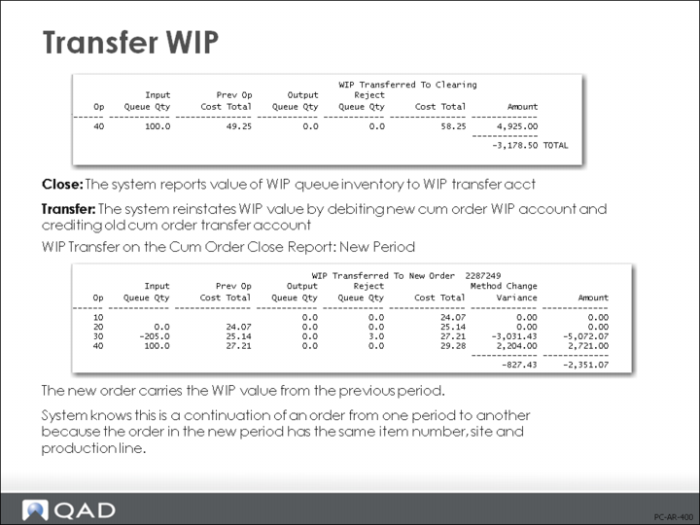
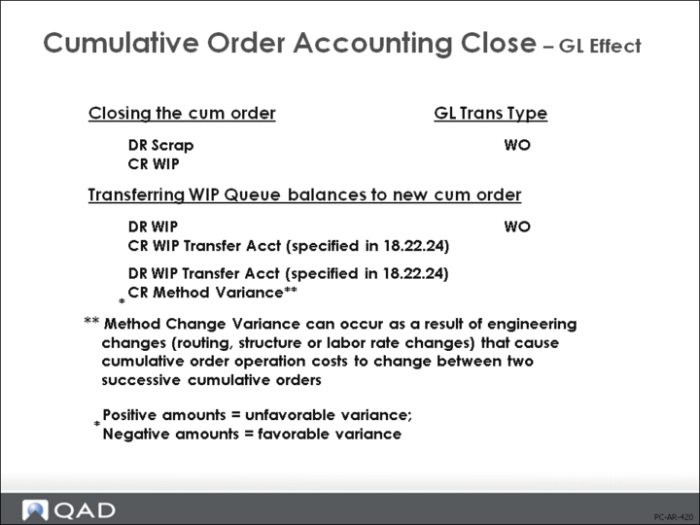
If Transfer WIP is set to Yes, then any amount on the old cumulative order is transferred to the new cumulative order through the Transfer Clearing account. Any difference between the old cumulative order WIP and the new cumulative order WIP will create a method change variance.
If Transfer WIP is set to No, then any amount on the old cumulative order is cleared through the method change variance account
Note: Cumulative orders will be closed if their End Effective date matches the End Effective date on the request screen, whether they have been completed or not. If you report completions at intermediate (that is, non-receiving) milestone operations, this should not cause variances if you set Transfer WIP to yes.
Processing Sequence
The processing sequence for each order selected by Cumulative Order Close is:
• Execute Post Accumulated Usage Variances
• Set cumulative order status to [C]losed
• Create CLOSE operation history record
• Transfer WIP, if necessary
• If WIP transferred, create TRANSFER operation history
• Post any remaining balance in WIP to Method variance
WIP Transfer
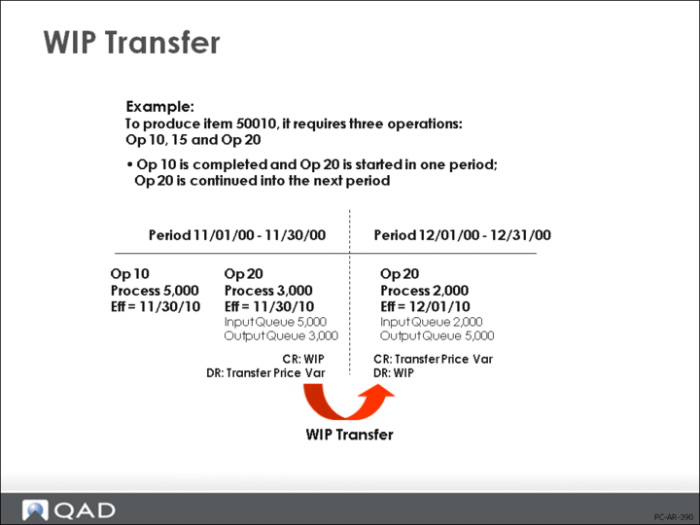
If Transfer WIP is Yes in Cumulative Order Close (18.22.10), the system transfers WIP balances to the next appropriate cumulative order—an order with the same item number, site, and production line.
• The system adds the WIP queue quantities from the order being closed to the WIP Input Queue balance quantities of the receiving order. Depending on quantities completed at each operation, the transfer could be to the same operation in the new order or to the next operation.
• The system reinstates the WIP value by debiting the new cumulative order WIP account and crediting the old cumulative order WIP Transfer account specified in Advanced Repetitive Control (18.22.24)
• If the cost of WIP queue inventory at this operation is different than the cost of the receiving operation, the system calculates and records the difference to Method Change Variance
WIP Transfer Inhibitors
Some factors prevent a WIP transfer from taking place, necessitating manual adjustments:
• A cumulative order already exists in the next period, but is closed
• An operation with the same number as the transferring operation does not exist on next period’s cumulative order
• An operation number match between both cumulative orders is found, but the transferring operation is not the first operation whereas the operation on the new order is the first operation
WIP Transfer on the Cum Order Close Report
WIP Transfer on the WIP Valuation Report
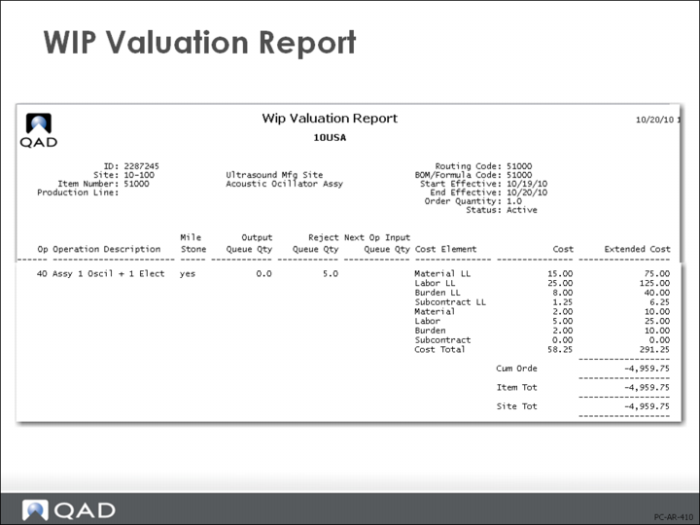
One of the more important reports in the Advanced Repetitive module is the WIP Valuation Report (18.22.4.13). This is used to report the current value of WIP, detailed by item, site, and production line. It shows the status of all open production orders, WIP quantity, rejects, and the value of WIP.
Cumulative Order Close: GL Effect
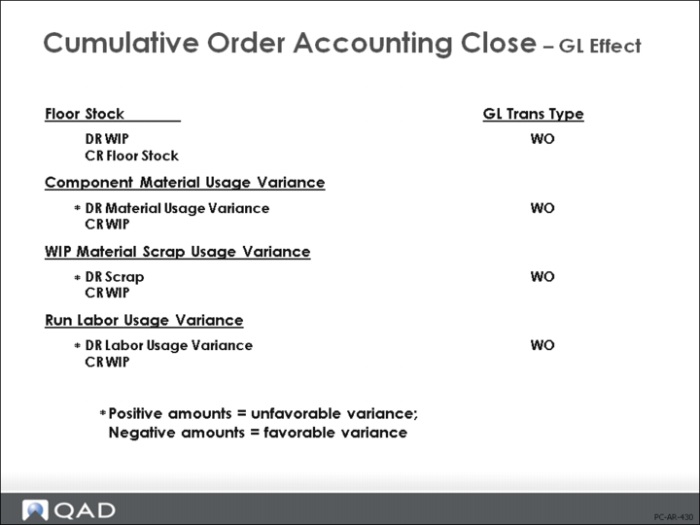
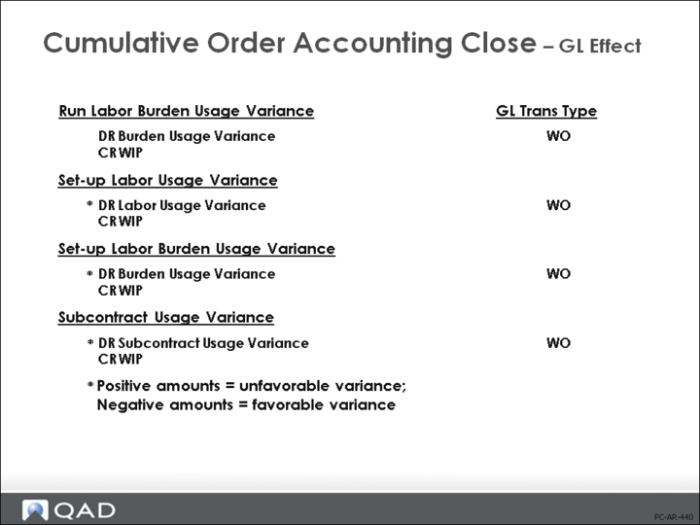
The GL effects of Cumulative Order Close are shown above and on the following pages.
The GL effects for the variances (shown above and on the following page) are the same as those produced by Post Accumulated Usage Variances (18.22.9)