Creating Budgets
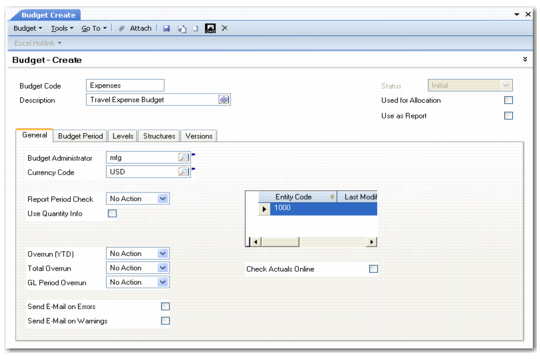
Use Budget Create (25.5.1.1) to create budget periods, levels, and structures. In addition, use the fields in the General tab to specify if the Budget daemon must check actuals against budgeted values, and what type of action to take if a budget amount is overrun.
Budget Create
Field Descriptions
Budget Code
Specify a code (maximum 20 characters) to identify the budget.
Description
Enter a brief description (maximum 40 characters) of the budget. You can optionally enter descriptions in more than one language. See User Guide: Introduction to QAD Enterprise Applications for more information on the Translation Option.
Status
This field displays the budget status. Budgets can have one of the following statuses:
Initial: The preliminary status of a budget. The status field is read-only and set to Initial until you define budget periods and levels.
Valid: Indicates that the budget can be modified and is ready for use. The status changes automatically from Initial to Valid when you define the budget periods and budget levels. You cannot change a budget status from Valid to Initial.
Operational: Indicates that the budget setup is complete, and that actuals are retrieved by the Budget daemon.
You must manually change the budget status to Operational to allow the actuals to be retrieved. You can change a budget status from Valid to Operational, and from Operational to Closed.
Note: The system generates Budget daemon requests for operational budgets only.
Closed: Indicates that the budget life span is complete. You can reopen the budget by changing its status to Operational.
Used for Allocation
Select the field if the budget structure is used for allocations.
Only accounts, sub-accounts, projects, cost centers, and SAFs can be used in allocation structures.
See
Setting Up Allocations and
Running Allocations for more information on allocations.
Use as Report
Select the field if the budget structure is used to define a report hierarchy for the Balance Sheet and Income Statement structured reports.
When you select Use as Report, the system validates and categorizes the report structure data differently than general budget data. In addition, selecting the Use as Report field makes the report structure available in the selection criteria of the Financial Statement ProForma, Balance Sheet, and Income Statement reports.