Supplier Payment Selection Confirm
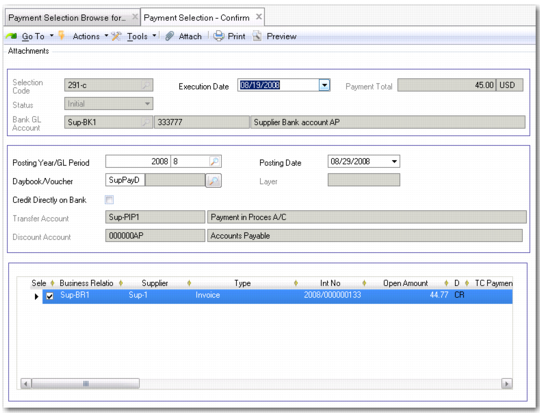
The Supplier Payment Selection Confirm (28.9.4.5) activity provides a read-only overview of the payment selection. Add the posting information—year, GL period, daybook, and posting date—to confirm the selection. Confirming the selection has the effect of changing the selection status from Initial to Confirmed, and creates all of the sub-ledger and GL postings for the payments.
Note: The system displays an error when you have not defined For Collection and Paid statuses for this bank account. You must define the necessary statuses.
You can generate multiple postings for several suppliers in the same payment selection.
The Transfer account and the Discount account are linked to the bank account and cannot be changed.
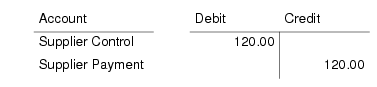
Confirming the payment selection generates a posting that credits the Supplier Control account and debits the supplier payment account defined for the payment status and bank account used. For example, the payment of two invoices for the same supplier that do not have discounted due dates produces the following postings:
These postings apply to both invoices. Postings are grouped by supplier.
Field Descriptions
Selection Code
This field displays the payment selection code.
Execution Date
This field displays the selection execute date. The default is today’s date.
Note: The posting is created on the execution date you specify and not the date on which you create the Supplier Payment Selection Confirm record (system date) if these dates are different.
Payment Total
This field displays the total amount of the payment in the payment currency.
Status
This field displays the current status of the payment.
Bank GL Account
This field displays the bank account code, account number, and payment format being used for this selection.
Posting Year/GL Period/Posting Date
Select a posting year, GL period, and posting date for the selection. The current year, GL period, and posting date are displayed by default.
Daybook/Voucher/Layer
Select a daybook for this selection. The Layer field displays the accounting layer for this daybook.
Credit Directly on Bank
Use this field to control the status assigned to the confirmed payment selection and the corresponding GL postings.
Select: The Paid status is applied, crediting the bank account and debiting the sub-ledger and Supplier Control account.
Clear: The For Collection status is applied, crediting the account associated with the For Collection payment status, and debiting the sub-ledger and Supplier Control account.
This field is selected by default when you have defined a Paid status for the payment but not a For Collection status.
Transfer Account/Discount Account
These fields display the transfer and discount accounts defined for this payment status. The discount account is used in postings for early payment discounts. These accounts default from the supplier.
Click Confirm to generate the payment selection postings and change the payment selection status to Confirmed.