Repetitive Production
Repetitive Production Overview
Advanced Repetitive Scheduling enables companies using a dedicated process for a group or family of items to manage labor, material, and costs by defining what should happen and then reporting what actually did happen.
Repetitive manufacturing is executed with schedules rather than work orders. Schedules require fewer steps and less paperwork to execute.
The QAD Enterprise Application Advanced Repetitive module enables you to:
• Build to a repetitive schedule.
• Run a production line without finite schedules.
• Run a production line with repetitive schedules forward scheduled to capacity limits.
• Report production and let MRP adjust inventory plans.
Repetitive Production
Repetitive Defined
Repetitive manufacturing is the production of individual items, using the same process for all items. In this kind of manufacturing the process has been brought under a high degree of control. There is little variation, and therefore, little need for paperwork for each item produced. Production is managed instead by creating a schedule of production, and then measuring actual production against what the schedule requires.
Manage by Variance
If you are managing a repetitive operation, you need to keep track of the amount of:
• Labor put into the items
• Material used
Because you understand your processes, you know how much labor and material ought to be put in, and you know how fast the items should be created. So you manage by comparing the amount of each item actually put in with the amount that ought to be put in.
Create Schedules, Report Actuals
To collect the required information, the manager or master scheduler must create reasonable production schedules for each item. Then each person working accurately reports what was actually completed and what was lost in wasted time or in work on items that were broken or not used (scrap). Periodically, the schedules and the reports of actuals must be summed up and compared.
Note: If you are using a single operation routing, you can use a kanban signal instead of creating a schedule.
Less Reporting
Relative to other manufacturing environments, repetitive manufacturing is remarkable for its absence of reporting. Each operation and each issue of material does not need to be tracked individually.
QAD Enterprise Application in Repetitive Environments
Supports Most Repetitive Environments
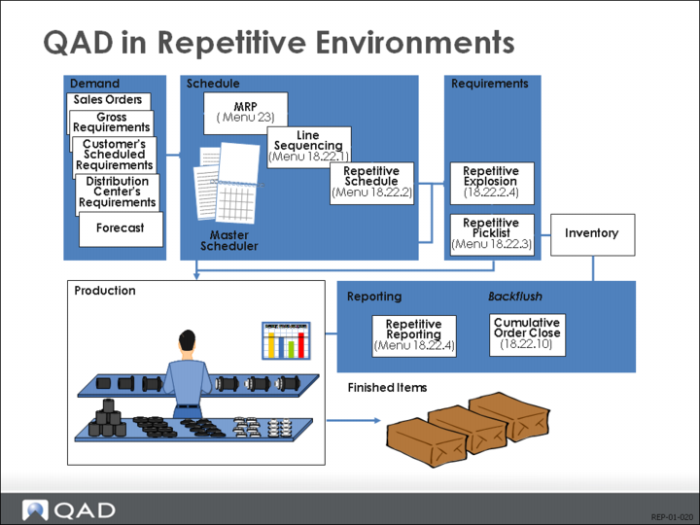
The QAD Advanced Repetitive module supports the reporting and management requirements of most repetitive environments.
Scheduling/Reporting
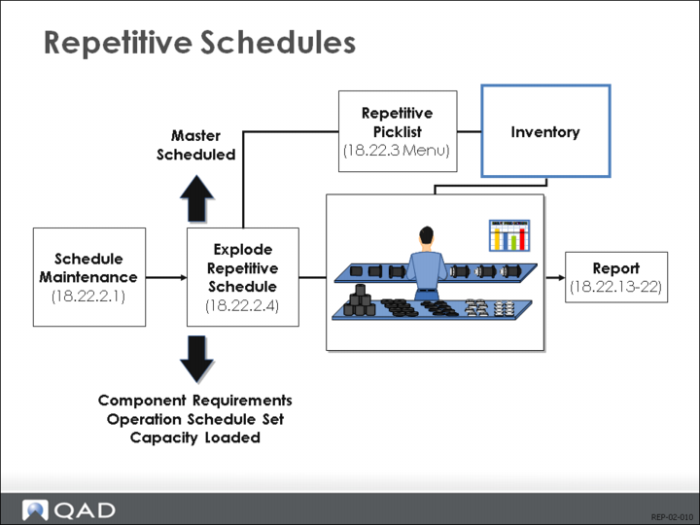
In a repetitive environment, you normally need two things from a computer system: the ability to create schedules and the ability to report on what happened. The schedules set requirements at each operation, and you can determine at which operation you want to report production counts. Labor reporting is optional.
Manual or Line Sequencing
In QAD Enterprise Applications, you can do the scheduling manually, or use the line sequencing functionality. Line sequencing enables you to import QAD planned orders into a simulated schedule, and then modify the schedule based on the actual capacity of a production line.
Explosion, Picklist
Once you establish a schedule, you must explode it. Exploding a schedule determines what will be done at each operation and when. It also determines what material will be required at each operation. In environments where inventory is stored on the line, the repetitive picklist enables you to determine when to replenish the line’s work centers.
Activity Reporting
Nine Transaction Types
As work is performed, labor and movement of WIP units are reported. Repetitive functions enable you to report these activities using various types of transactions, including downtime, scrap, rework, move, and rejects. There are nine transaction types and several purchase order functions for subcontract activities.
Updating
The repetitive schedule is updated when units move to stock. Operation schedules are updated at completion of the operation. As the transactions are entered, a cumulative order is updated for costing or measuring variances.