Sales Order Shipments
• Records that you have fulfilled all or part of your customer order
• Can process SO shipments only against open sales orders
• Shipping items sets the Quantity to Invoice equal to the Quantity Shipped
Create an invoice for each shipment
Or set Ready to Invoice = No to hold up invoicing until the order is completely shipped
• Multiple shipments can be processed against one order
• Once all line items on an order are shipped and invoiced, the system closes the SO
• Shipments relieve inventory and charge Costs of Goods Sold (COGS) accounts
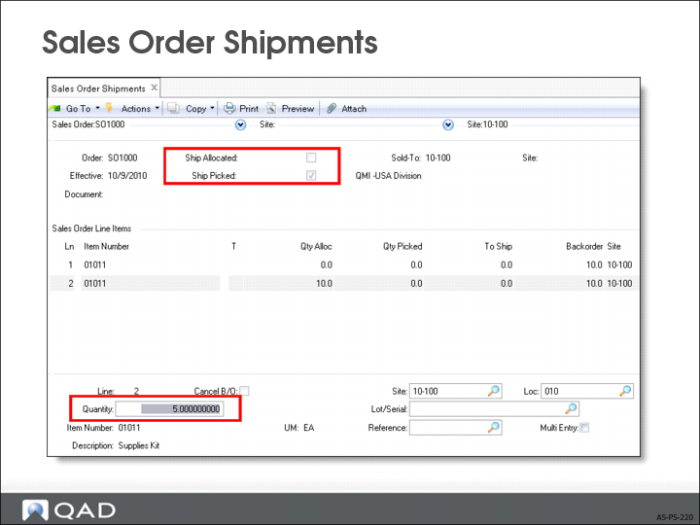
Sales Order Shipments
• Specify the SO number, which lists the line items and the quantity open (ordered but not yet shipped)
• For each line item enter the quantity and the Site, Location, Lot/Serial, and Ref
When Multi-entry is Yes, another screen displays for a list of sites, locations, lot/serial, lot reference numbers, and quantities
• Can change the add-on charge amounts, the carrier, bill of lading (BOL), and invoicing
• To hold up invoicing until the remainder of the order ships, set Ready to Invoice = No
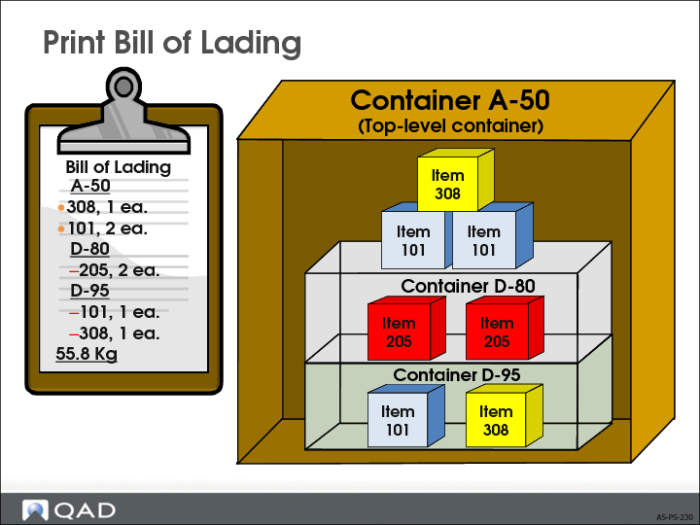
Print Bill of Lading
• Bill of lading identifies the contents of all containers, including embedded items
• Shows a final summary of the package weight