Sales Quote Control
Sales Quote Control enables an optional rule that items can only be used if they have a valid price list.
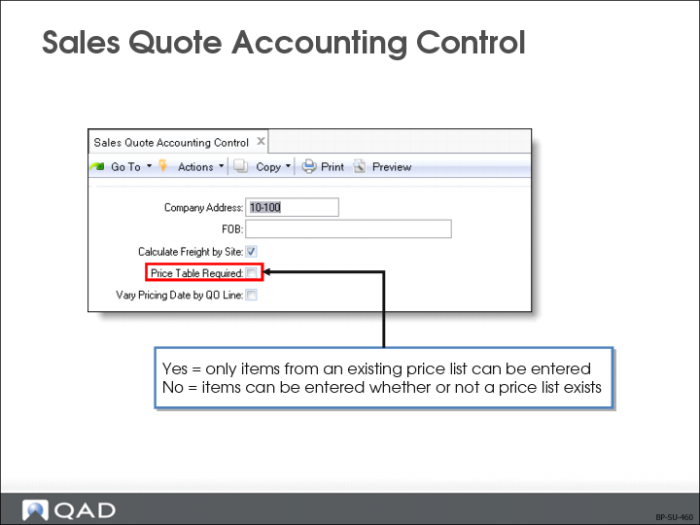
Sales Quote Accounting Control
Note: These fields are in Sales Quote Control (7.12.24) in QAD Standard Edition. In QAD Enterprise Edition, financial control settings are updated separately from operational settings in Sales Quote Accounting Control (36.9.9).
Price Table Required
When Price Table Required is Yes, only items from an existing price list can be entered, and only if the price list, item, unit of measure, and currency match. If a price list is required, then it must match the item number.
When Price Table Required is No, items can be entered whether or not a price list exists. Prices can be overridden unless the field is password-protected
Requiring price tables controls which items can be ordered or purchased and customer/supplier units of measure.
Vary Pricing Date by QO Line
Pricing date determines the effective date to use in searching for applicable prices for the line item. This field determines whether or not the pricing date can be modified for each line item on a sales quote
During line item entry in Sales Quote Maintenance (7.12.1), a pop-up window displays with fields: Pricing Date, Credit Terms Int, Reprice, Manual
If this field is Yes, the Pricing Date and Credit Terms Int fields can be modified for each line. If No, the pricing date and credit terms interest specified in the quote header are used.
The default price effective date for a sales quote header is determined by the setting of QO Default Pricing Date in Pricing Control (1.10.1.24). This can be the quote date, due date, required date, or promise date.