Volume Discounts
Volume Discount Maintenance
Volume discounts apply to all quotes and sales orders, product lines, line items (inventory or memo, debits or credits), and all customers with the same Customer Type.
Year-to-date totals are taken from the sales analysis history records.
A customer never receives a discount smaller than the one entered in the customer file, unless it is manually overridden.
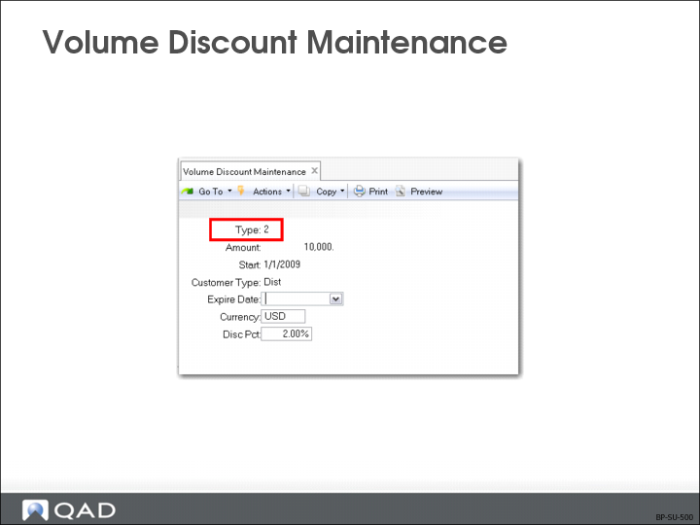
Type
You can give a sales volume discount, either by individual order or year-to-date sales, that overrides the default discount for all orders for a particular customer. Single digit code, must be 1 (order volume) or 2 (year-to-date sales volume).
Currency
The currency in which the volume discount amount is expressed. Normally this is your company base currency. Order or year-to-date totals are converted to this currency using the current exchange rate prior to determining volume discount percentages
Disc Percent
The discount percent to use on orders or customers at this volume level; used to set different discounts at different sales volumes.
Example: You offer a 10% discount on sales volumes up to $99,999 and 15% on sales of $100,000 or more.
Note: Once established, volume discounts apply to all customers belonging to the same Customer Type. If Customer Type is left blank here, then every customer whose Type field is blank is eligible for this discount as long as other criteria for the volume discount is met.
Volume discounts are calculated whenever a sales quote, order, or invoice is entered. Once all sales order lines are entered the system calculates the amount on which to base the volume discount. When discounts are based on order volume this base amount is simply the total of all the line items on the order (including memos and credits).
When discounts are based on year-to-date sales volume this base amount is the year-to-date sales amount plus this sale. Other open orders are not included.
The base amount is used to access the appropriate volume discount percentage. This percentage is only used if it is greater than the normal customer discount percentage.
Volume discounts are recalculated each time an order is modified. In the above example, you would enter the volume discounts as:
Amount: 0 Discount: 10%
Amount: 100,000 Discount: 15%
An unlimited number of volume discount levels can be established.
Note: In Sales Order Maintenance (7.1.1), the system displays trailer information totaling line items and calculating taxes, optional order discounts, and freight charges.
Volume Discount Browse
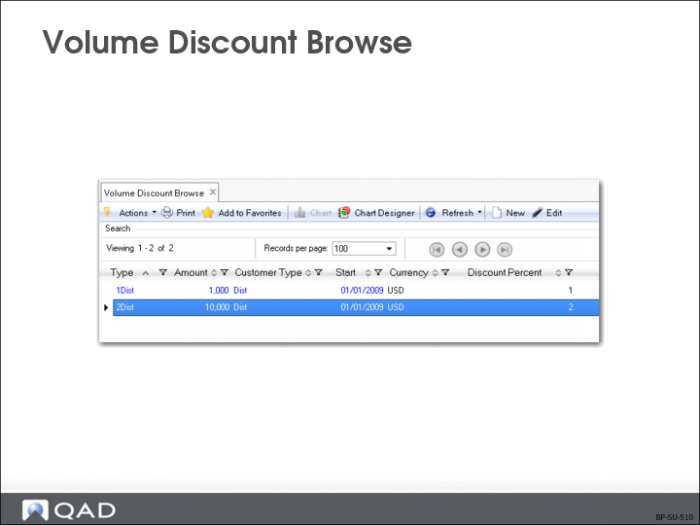
You can sort this browse by Customer Type, an optional code for classifying customers.
Exercise: Set Up Price Lists
Now that we have set up analysis codes for both QFresh items and wholesaler customers, we can proceed to create price lists to define the QMI pricing policies in the system.
1 Create a price list for the QFresh promotion pricing policy using Price List Maintenance (1.10.1.1).
Field | Data |
Price List | QFresh |
Item/Analysis Code | QFresh |
Expire Date | [The last day of the next month] |
Description | QFresh promo |
Amount Type | Discount% |
Quantity Type | Quantity |
Comb Type | Combinable |
Break Cat | QFresh |
Min Qty | 0 |
Discount% | 10 |
2 Create a price list for the wholesaler customers’ discount policy using Price List Maintenance (1.10.1.1).
Field | Data |
Price List | WHSL |
Customer/Analysis Code | WHSL |
Description | 15% discount for WHSL |
Amount Type | Discount% |
Quantity Type | Quantity |
Comb Type | Combinable |
Minimum Order | 100 |
Min Qty | 100 |
Discount% | 15 |
3 Create a price list for the promotional credit terms policy using Price List Maintenance (1.10.1.1). Leave both item and customer analysis code fields blank to apply it to all customers and items.
Field | Data |
Price List | CT |
Expire Date | [The last day of the next month] |
Description | 30-60-90 over 1000 USD |
Amount Type | Credit Terms |
Quantity Type | Amount |
Comb Type | Combinable |
Min Amt | 1000 |
Credit Terms | 30-60-90 |
4 View the price lists you have just set up using Price List Inquiry (1.10.1.2).