Cost Management Topics
Cost Management
With the Cost Management module, you can create additional cost elements, which provide additional reporting detail; and multiple cost sets, which enable you to keep cost history and create future costs without impacting current cost updates. These are aids to live costing and are covered in this chapter.
Cost Management also provides the ability to simulate cost changes and to modify elements of cost for “what-if” scenarios, and to develop cost plans. These topics are also covered in this chapter.
Linked Site Costing allows you to create a cost set and then link it to multiple sites.
Create Multiple Cost Sets
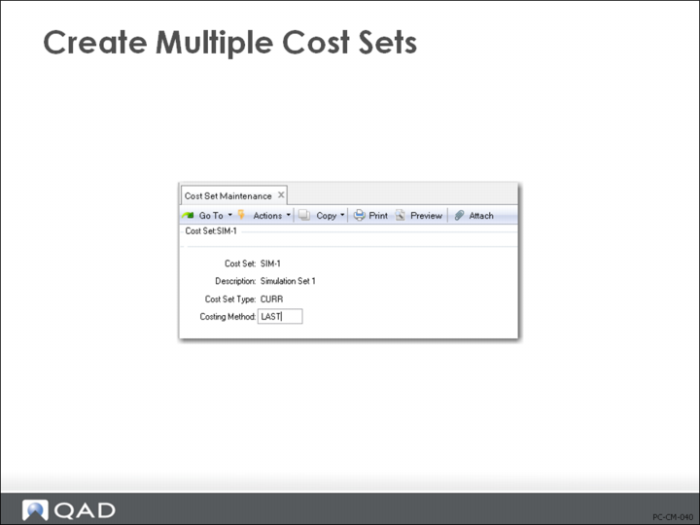
For any item, multiple sets of costs can be maintained, each identified by a cost set code, in Cost Set Maintenance (30.1). Data associated with this cost set code controls how these costs are updated and used.
Each cost set code is assigned a cost set type of GL, Current, or Simulated, and a costing method of Standard, Average, Last, or None. These two fields together determine how costs from this cost set are updated and used.
Note: Only one GL and one current cost set per site are permitted. The default GL and current cost sets cannot be maintained although the costing method can be changed in Inventory Accounting Control (36.9.2)
Types of Cost Sets
Historical
Useful for tracking costs from prior periods. If standards are changed during a fiscal year, you can track original standards set at the beginning. Or you can use historical cost sets to track standards from year to year.
Simulated
Useful for planning future costs or performing “what-if” analyses, such as developing costs based on different estimates of volume.
Site Specific
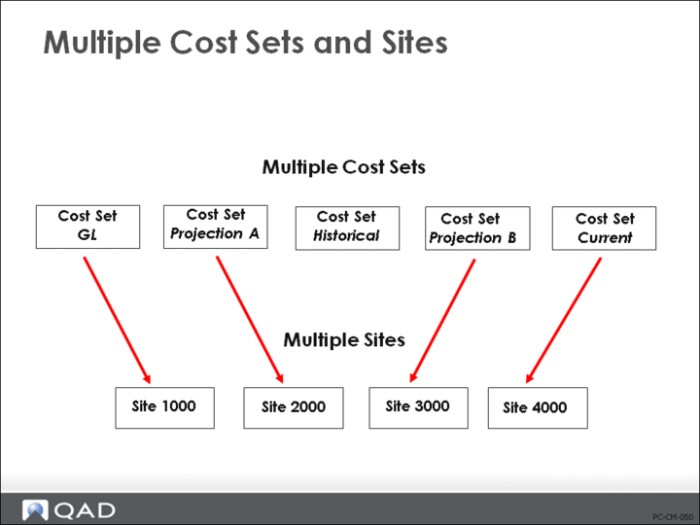
Different cost sets can be assigned to each site. Note that in a single-database environment, you can have only one current cost method, as this is set through the Inventory Accounting Control (36.9.2).
GL Cost Set
Defines costing method that will be used for inventory valuation.
Current Cost Set
Defines the current cost of an item, either last, average, or none.
Once you have defined the cost sets, you can assign them to each site using Cost Set to Site Assignment (30.9).