Multi-Site Cost Considerations
Within QAD Enterprise Applications, each site must be assigned a GL and a Current cost set. We saw earlier that these default to the cost sets Standard and Current. All sites are initially assigned these cost sets, but this can be easily changed. The Cost Set To Site Assignment 30.9, is used to assign a different GL and/or Current cost set to a particular site. When GL costs are changed, inventory is automatically revalued to the new cost.
• Any cost set of type GL can be assigned to a site as its GL cost set. This cost set can use a costing method of Standard or Average.
• Any cost set of type CURR can be assigned to a site as its Current cost set. This cost set can use costing method Average, Last, or None.
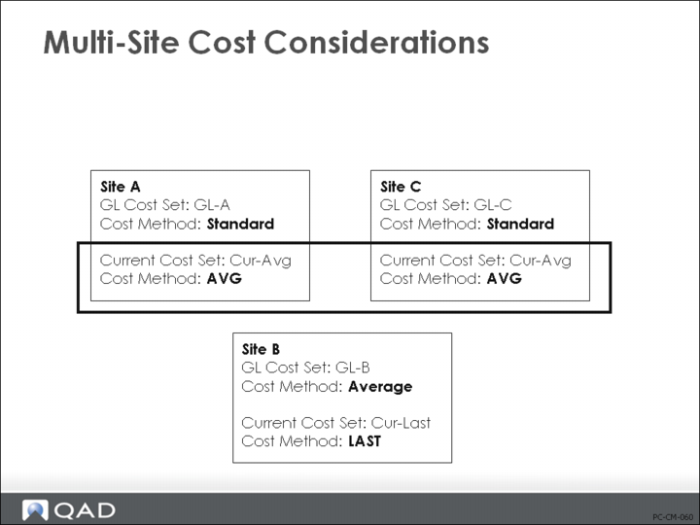
In the example shown on the previous page, each of the three sites (A, B, and C) are set up differently. In particular, notice the following.
1 It is possible for more than one site to use the same cost set; they don’t have to be different. For example, sites A and C share the same Current cost set.
2 Each site can use a different Current costing method. For example, sites A and C use Average costing and site B uses Last.
3 Each site can use a different GL cost set and costing method. If you have multiple sites making the same products, it is unlikely that they will have the same cost structure. To support this, each site can choose its own cost method. For example, sites A and C use Standard costing, while site B uses Average.
Linked Site Costing
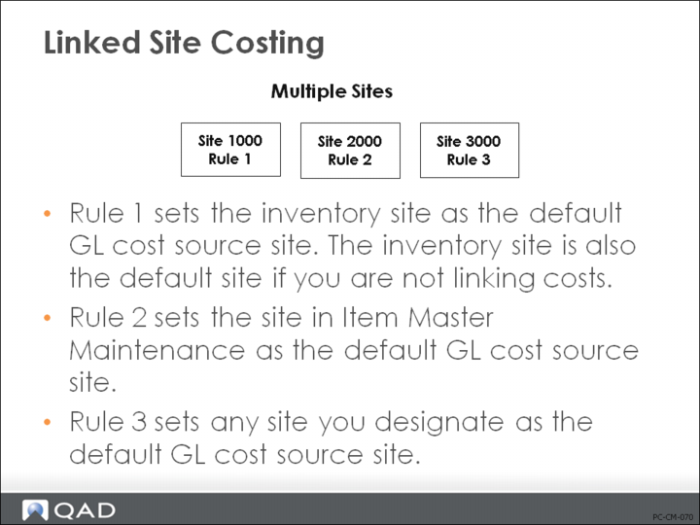
Linked-site costing lets you specify one set of GL cost site records to serve as an item's GL cost set at another inventory site. The system sets the default value for GL Cost Source Site according to three site-linking rules, that can be assigned by item type, product line, purchase/manufacture code, or none.
• Linking rule 1 sets the inventory site as the default GL cost source site. The inventory site is also the default site if you are not linking costs.
• Linking rule 2 sets the site in Item Master Maintenance as the default GL cost source site.
• Linking rule 3 sets any site you designate as the default GL cost source site.
This costing method significantly reduces redundant data in a database, simplifies costing procedures, and decreases the chance for unexpected cost discrepancies across sites. In addition, you need only one shared GL cost set record for each inventory record instead of duplicate records for each site. Linked-site costing is useful for companies that manufacture the same product in different ways at multiple sites, or that purchase the same product from different sources.
Note: You cannot use linked-site costing for a site if you use the average cost method for GL transactions, since average cost calculation does not consider inventory at multiple sites.
Use these browses to view the site information:
• Item Cost Set Browse (30.6) shows by item what cost sets are assigned.
• Site by Cost Set Browse (30.10) shows by cost set which sites are assigned.
• Cost Set by Site Browse (30.11) shows by site which cost sets are assigned.
• Linked Site Item Browse (30.18.3) shows items assigned by site and the GL Source Site.