Control Setting
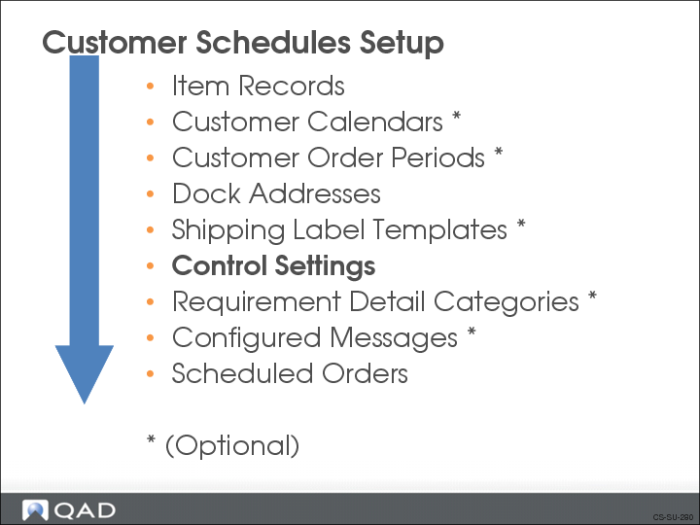
Before you begin processing customer schedules, you need to set up certain default information for the system to use during processing. You use the control program to set up default information for:
• Pre-shipper sequence numbers
• Shipper sequence numbers
• Master billing of lading sequence ID
• Document formats
• Invoice processing
• Shipping labels
Also, it is in the control programs that you indicate if inventory movement codes are required and if maintenance of SO trailer amounts are allowed.
Note: In QAD Enterprise Edition, financial control settings are updated separately from operational settings. This supports detailed segregation of duties assigned with role-based security. So for customer schedules, you update operational setting in Customer Schedules Control and financial settings in Cust Sched/Shipper Acct Control.
Customer Schedules Control
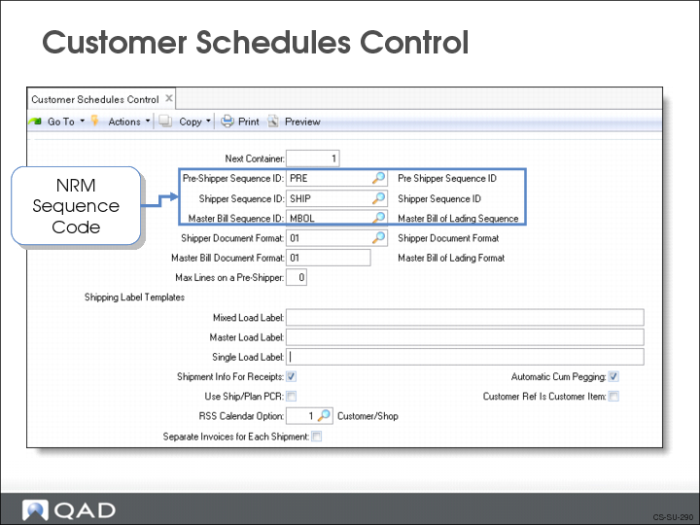
Use Customer Schedules Control (7.3.24) to set up default customer schedule information.
Next Container
Container IDs are assigned to individual containers when preparing a shipment. Each ID is unique, giving each pallet, box, or returnable package a specific identifier. This information is often required by customer’s on the ASN.
Pre-Shipper Sequence ID and Shipper Sequence ID
Number Range Management (NRM) sequence codes the system uses to generate sequence numbers for all pre-shippers (or shippers) that do not use inventory movement codes or have no available shipping group.
Master Bill Sequence ID
NRM sequence code the system uses to generate sequence numbers for all master bills of lading with no available shipping group. Before you specify the sequence numbers for pre-shippers, shippers, and bills of lading, you must define them using the NRM feature
Shipper Document Format
Document format code applicable to pre-shippers/shippers. Default for all pre-shippers/shippers that do not use inventory movement codes
Master Bill Document Format
Valid document format code applicable to master bills of lading. Default for all master bills of lading that do not use inventory movement codes or having an available shipping group
Max Lines on a Pre-Shipper
Determines the maximum number of lines printed on a pre-shipper.
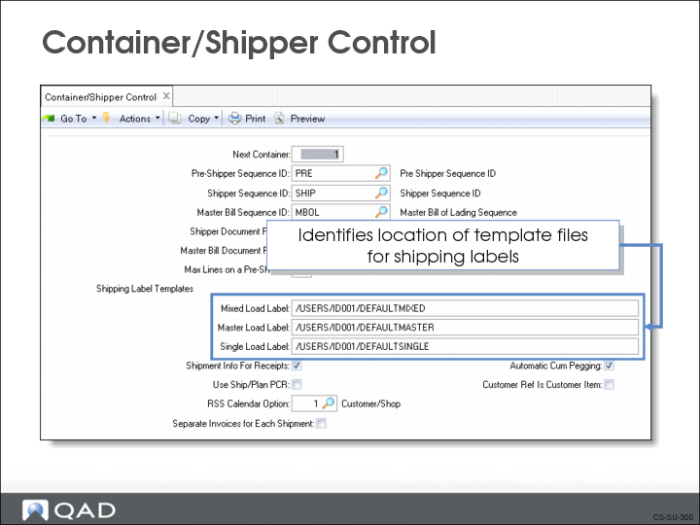
Mixed Load Label, Master Load Label, Single Load Label
You use these fields to enter the name of the template files to be used for shipping labels
Use Ship/Plan PCR
Determines if prior cumulative required quantities are considered by Required Ship Schedule Update (7.5.5) or Selective Required Ship Schedule Update (7.5.6).
• If Yes, the beginning of the planning schedule is replaced by the shipping schedule and the remaining planning schedule quantities are adjusted by prior cumulative quantities
• If No, the beginning of the planning schedule is replaced by the shipping schedule and no prior cumulative quantities are considered
Note: This field only affects customer scheduled orders with netting logic set to 3.
Use Cust Sched/Shipper Acct Control (36.9.7) to define accounting-related settings.
Auto Invoice Post
Determines if the invoice created at the time the shipper is confirmed is automatically posted and whether or not to update the Ship Via and FOB Point on the original scheduled order to match the shipper’s.
• If Yes, invoice is automatically posted. The Ship Via and FOB Point remain unchanged
• If No, invoice is not posted. The Ship Via and FOB Point can change when confirming the shipper
Note: Becomes the default setting in Pre-Shipper/Shipper Confirm (7.9.5). Also defaults in Customer Scheduled Order Maintenance (7.3.13).
Consolidate Invoices
Determines if a single invoice is generated for a specified range of orders, or if one invoice is generated for each order.
• If Yes, all referenced orders are consolidated into a single invoice
• If No, one invoice per order is generated
Note: Becomes the default setting in Pre-Shipper/Shipper Confirm (7.9.5) and can be changed as needed.
Print Invoice
Determines if invoice is printed at the time the shipper is confirmed.
• If Yes, invoice is printed at confirmation. Set to Yes if you need a paper record of the invoice
• If No, invoice is not printed at confirmation
Note: Becomes the default setting in Pre-Shipper/Shipper Confirm (7.9.5).
Require Inventory Movement Codes
Determines if inventory movement codes are required for newly created pre-shippers/shippers.
• If Yes, inventory movement codes will be required
• If No, inventory movement codes are not required. No is the Default. Set to No if you are not using advanced shipping features
Sum history - Items, Sum history - Containers
Determines if the Pre-Shipper/Shipper Confirm generates a separate transaction history record for each item or container detail record on a shipper or summarizes transaction history by item or container.
• If Yes, system generates a transaction history record for each unique combination of the following shipper detail data:
• Sales order number
• Line number
• Item or container number
• Ship-from site and location
• Lot or serial number
• Reference number
• If No, system generates a separate transaction history record for each detail record on the shipper
Maintain Trailer Amounts
Determines if you can maintain sales order trailer amounts during shipper maintenance and confirmation.
• If Yes, you can maintain trailer amounts
• If No, you can specify trailer amounts
Note: Applies only when the shipper document format is used as an invoice.
Shipment Info For Receipts
Determine if the system prompts you for shipment information during material receipt entry.
• If Yes, when entering receipts, you can specify shipment number, ship date, and inventory movement codes
• If No, system does not prompt you for entry
Container/Shipper Control
Any changes you make to Container/Shipper Control (7.9.24) are automatically made to Customer Schedules Control (7.3.24). These two screens are the same program called from two different menu locations.
Exercise: Set Up Cust Sched/Shipper Acct Control
Use Cust Sched/Shipper Acct Control (36.9.7) to define operational accounting settings so that:
• The system will automatically post the invoice.
• You can print the invoice.