Non-instrusive Customization: Architecture
Introduction to QAD EE Architecture
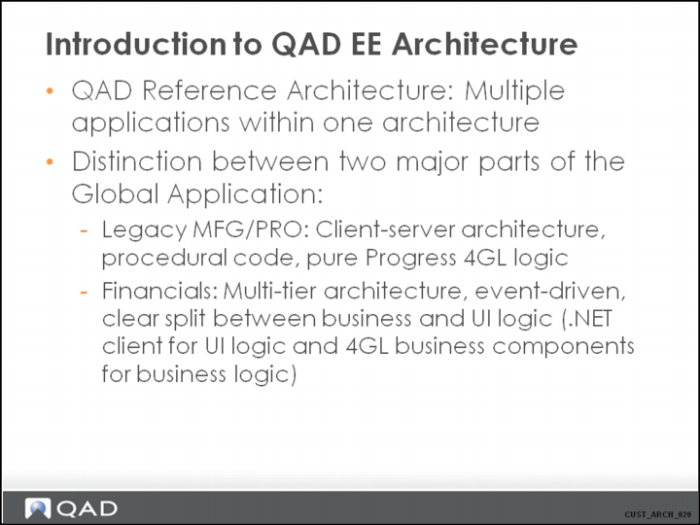
Customization is different for standard MFG/PRO and Financials. This is, of course, caused by the different internal architecture of the two modules.
The design goals of Financials are based on the need for a component model for the application. This model features code reuse, encapsulation, and clear interfaces.
Introduction to QAD EE Architecture 2
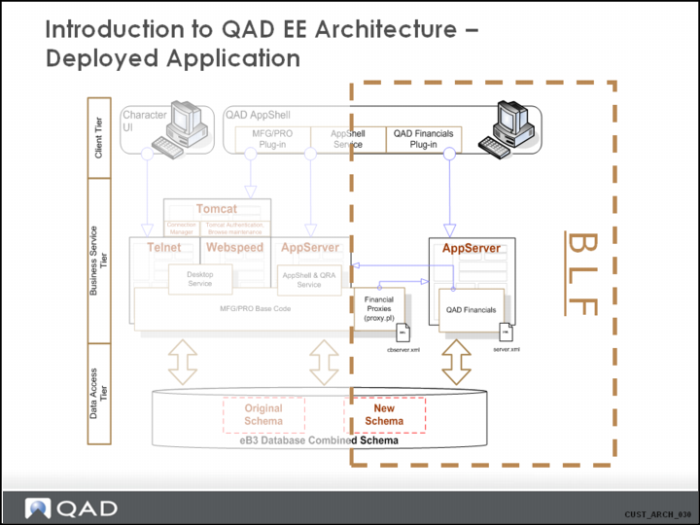
This slide first gives a global, high-level overview of the architecture for the QAD EE application.
The general rule of the architecture is a clear separation between UI / BL / Data access for the future.
Most important in the scope of this training is the right-hand side, with a further explanation about the BLF implementation of the architecture.
Internal integration of the different pieces in the application is based on the proxy mechanisms.
Proxy mechanisms rely on the deployment of pieces of code on the consumer side. These pieces just represent the business logic and are basically gateways, or wrappers, for the real business logic running on another server. Proxy code typically exposes the API interface of a component, but hides the logic for connecting to the backend AppServer.
Introduction to QAD EE Architecture 3
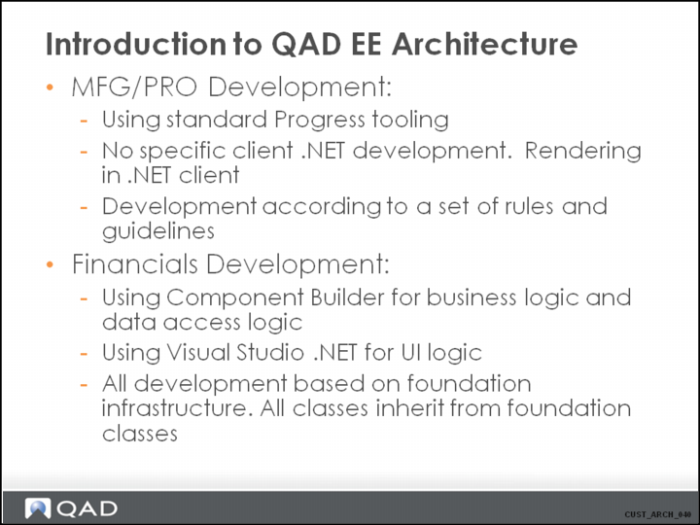
MFG/PRO code is written in the traditional style. This means there is basically one layer containing a mixture of business logic, UI logic and database access logic. This is the typical approach for classical, procedural-written client-server code. The .NET UI is rendered and does not contain real application code on the .NET client side.
Due to this, MFG/PRO Customization is mostly intrusive and done in the main .p program for the function (except for non-intrusive Customization done via ICT).
Financials are written for a component model, which is more event-driven. Business logic is developed in Progress and UI code is developed in C#.NET. No behavioral code for the UI is written in Progress. The metadata about information for objects is retrieved from the business logic and is not duplicated on the UI side.
There is a fundamental difference in data handling between the two models. Because MFG/PRO is a client-server application using direct database access, data shown on the screen is retrieved directly from the database. Updates are immediate, with large physical transactions and locking of records within the transaction. For Financials, data manipulation is always on a dataset, which contains a copy of the data in the database. The object datasets consist of temp tables. Updating an object in Modify mode does not imply an active physical transaction. It uses an optimistic lock approach when updating data in the database.
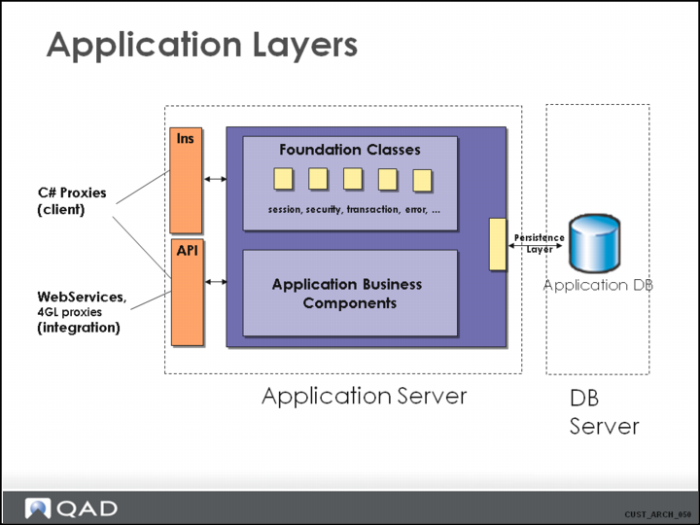
Application Layers
This slide shows the final result when the Enterprise Financials application is deployed.
We should explain how components/functions are delivered as part of the foundation and how functions are delivered as part of the application.
We should briefly mention the mechanism of the INS and API interfaces. It is important, however, to also note that methods called through the INS require state in the form of an existing session instance and/or an existing transaction instance, so updates can be part of a larger transaction, and methods called through the API do not require state, and are always stand-alone transactions.
This is described in more detail later in the presentation.
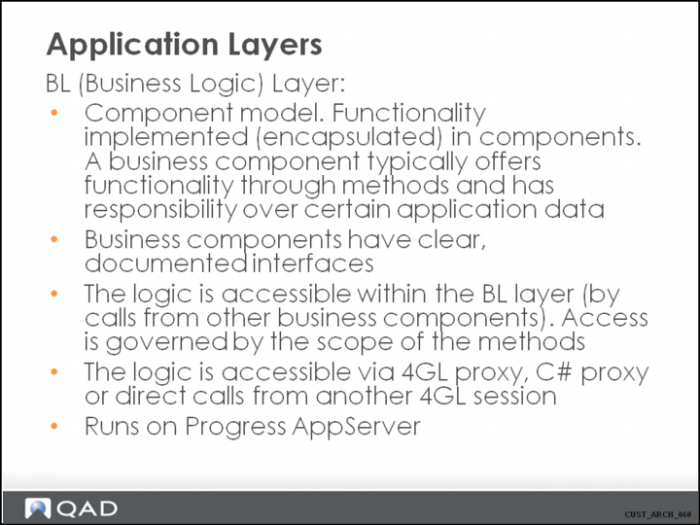
Application Layers 2
The real physical structure of the code for a business component is explained later in the presentation.
The term “Progress AppServer” means that the business logic is developed in Progress 4GL (ABL).
Scope of Methods
It is important to understand the term “proxy”, which is central to the rest of this session.
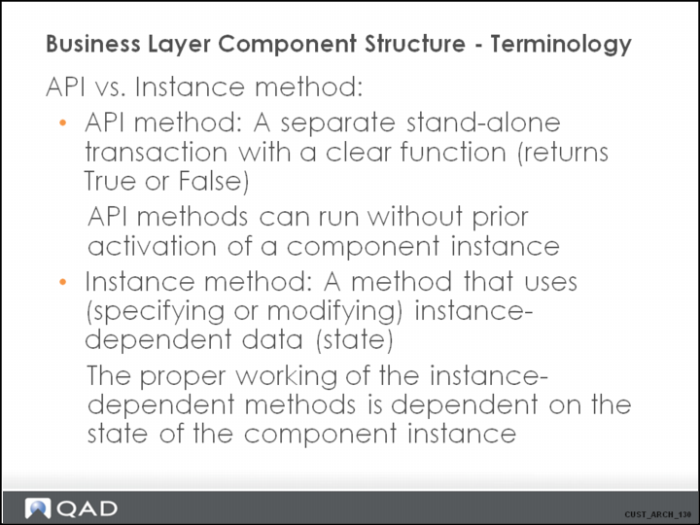
The scope itself can be private/protected/public. This is the same as in any other OO language. When the method is public, it means a method is available to other components within the business layer. A public method can also be marked as “API”, which means that the method is exposed to external consumers, and the proxy is generated and available for it. A public method can also be marked as “Remoting’”, which means that C# proxy code is generated and available to call the method from within the C# client code.
A method or query can only be called after a component has been instantiated. See the Pattern section of this training.
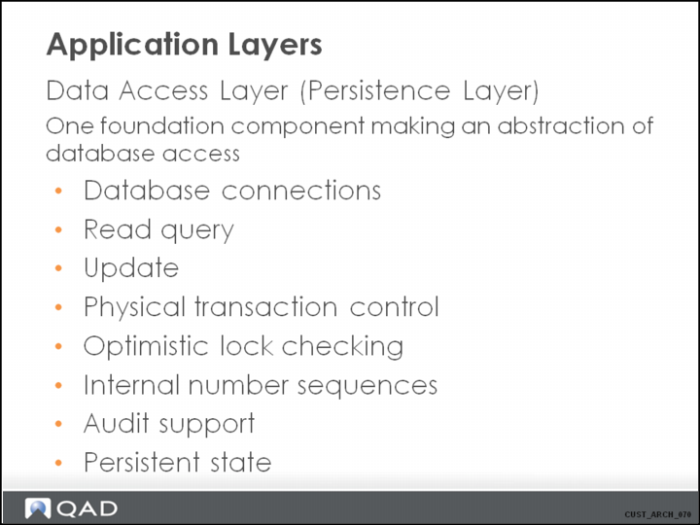
Application Layers 3
Database connections are performed at runtime. Databases do not need to be connected at the startup of the AppServer sessions.
The following sections explain logical transactions and optimistic locking:
• For a typical classical transaction as used in MFG/PRO: As soon as a function is started, and data displays on the screen, a physical transaction is active. The records and data to be changed in the function are read with a find/for each with exclusive-lock (or share-lock). The updates are done directly in the database during the function. A transaction rollback is foreseen using the BI (before image) of the database. There is an implicit or explicit commit of the transaction, controlled by the code blocks in the program.
• For a logical transaction as used in Financials: When a function is started, a logical transaction is started. The logical transaction is basically a component instance that controls other instances in which updates are prepared for writing to the database. The records and data to be changed during the function are read with a query no-lock from the database, and data is stored in temp tables datasets. No locking takes place. After the updates are made by the function, the changed dataset is validated, and finally the logical transaction is asked to commit the changes to the database. It is only at this moment the real physical transaction takes place. At this point, an optimistic lock check takes place and the data is updated in the database.
Persistent state is explained later in this presentation.
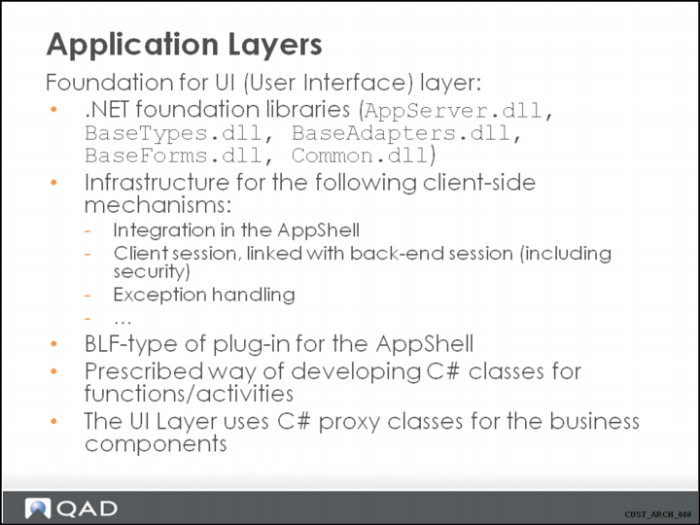
Application Layers 4
Business Layer Component Structure
Inheritance Structure
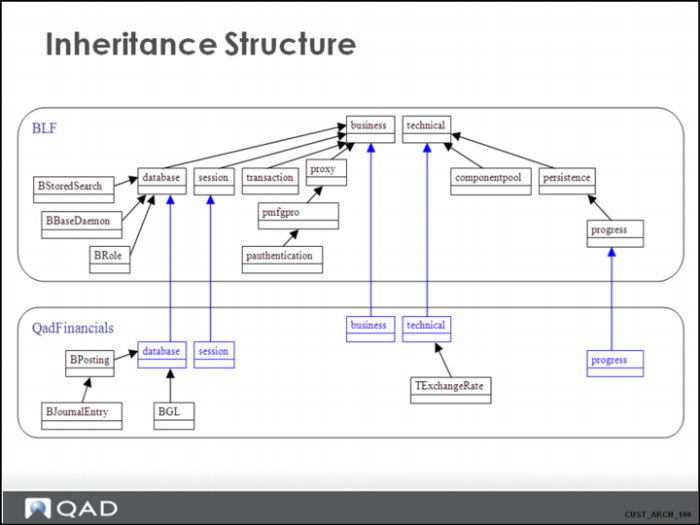
The application is built of components, which are maintained in different projects:
• FoundationClasses: This project contains TBD. These are the infrastructure foundation components.
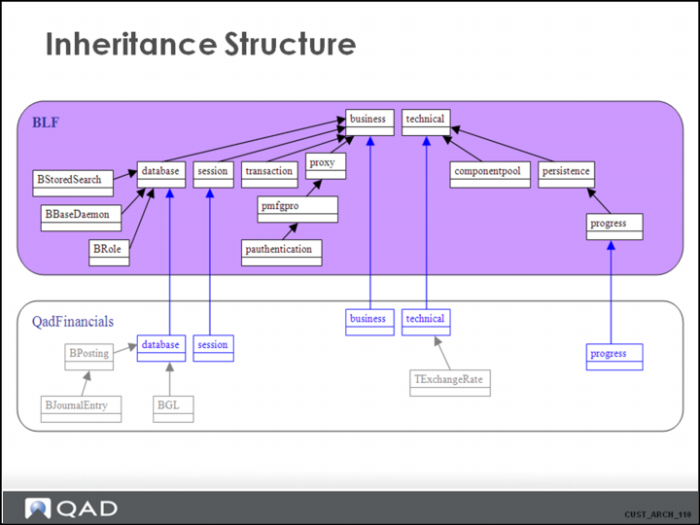
• BLF: This project contains the application foundation components. These are components that are used to implement generic application functionalities, such as stored searches, or role-based security. This project also contains the technical infrastructure components. These are abstract components with generic logic supporting all mechanisms and patterns in the application, and non-abstract technical components with a very specific function in the infrastructure.
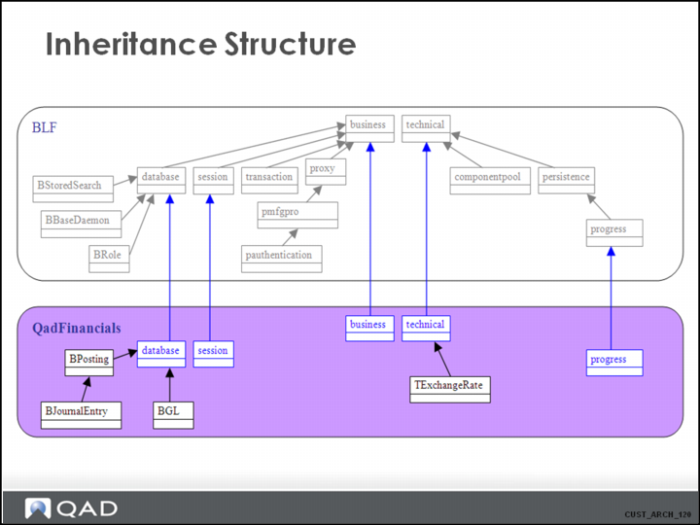
• QadFinancials: This project contains all application level components. The business logic for all application functions is implemented in this project.
Inheritance Structure 2
BLF:
• “Business” and “Technical” are the ancestor/super components for most of the other components in the system. These are abstract components containing generic logic, but are not suitable for instantiation.
• “Database” is the ancestor component for all components in the application that are linked to tables in the application database, encapsulating data access to these tables.
• “ComponentPool” is a component that handles the memory management for component instantiations at runtime. It is responsible for starting the underlying .r code for components in memory, caching it, and cleaning it up. This is an important component for Customization, because it starts the Customizationcontroller component to guarantee available Customizations are detected and activated.
• “Session” is a component that contains logic to store/restore all session-dependent properties. For each client session, a session instance is started on the BL. The session component is responsible for authenticating the client and for retrieving the settings specific for the entity/domain for which the client session is logged in.
• “Transaction” is the component that contains all logic necessary for the implementation of the “logical transactions” in the system. Examples: AddInstance(), CommitTransaction(), AbortTransaction() methods.
• “Persistence layer” is the component that contains the logic required to ensure the abstraction of data access in the system. Typical methods for this component are ConnectDb(), ReadData(), WriteData(), ReadQuery(), SaveInstance() and LoadInstance(). The last two methods are used for saving and restoring the state of an existing component instance.
• Generic implementation of the daemons. For example, the XML daemon “‘BXmlDaemon” inherited from “BBaseDaemon”).
• Security implementation. Roles, role permissions (“Brole”), role membership (“BUserRole”).
• Typical implementation of the PMFG/PRO proxy. This component is used to call the MFG/PRO APIs.An example is the PAuthentication. The session component uses this component to call the authentication service.
• The components “BStoredSearch” and “BControlProperty” contain the code used for resp. Browse stored searches and UI design mode (UI Customization).
Inheritance Structure 3
QadFinancials:
• This project contains the application-specific components.
• “Session”component is what we call a “Leaf” class. This is a class that is inherited from a component with the same name from another project (a project on which the current project is dependent). Leaf classes are used to enable generic programming, with the possibility of overriding or extending methods and functionality on a lower level. Session is a typical example of a leaf class, because on each project level, more information is important for a client session. Other examples of leaf classes are “Business”, “Database”, and “Technical”.
• The HTML documentation set is a good starting point for learning about business components in the application.
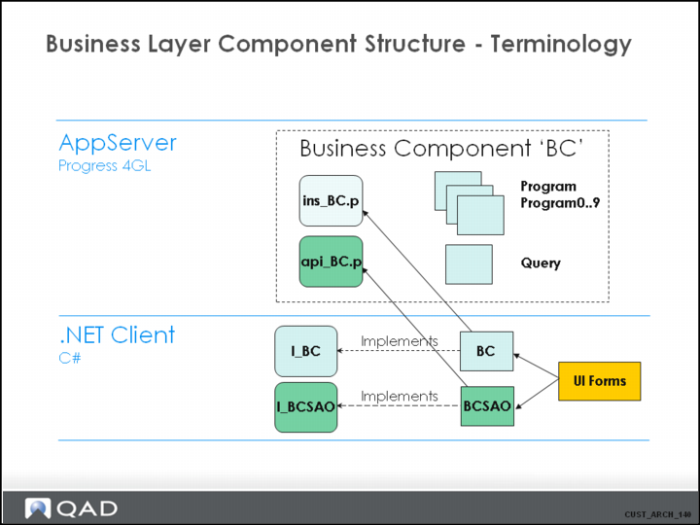
Business Layer Component Structure - Terminology
Business Layer Component Structure - Terminology 2
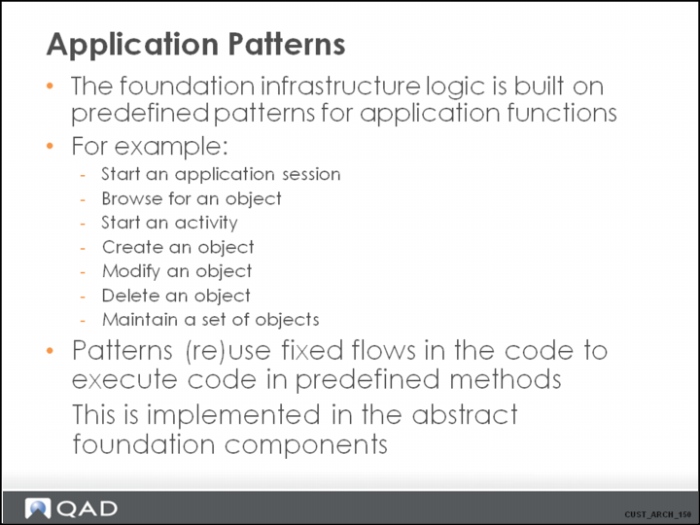
Application Patterns Overview
Application Patterns Client
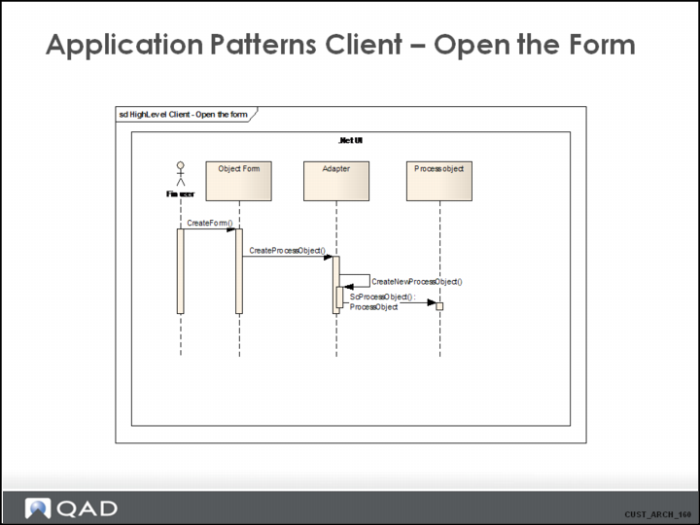
This diagram shows the flow that is executed when a form is opened on the UI. It does not have any direct interaction with the business layer.
Note:
Usually, the CreateProcessObject() method is run, and the name of a business activity (format '<BusinessComponent>.<Activity>', such as 'BGl.Modify') is supplied as a parameter. This automatically starts the necessary logic on the back-end business logic layer (as shown in the next section).
Application Patterns Client 2
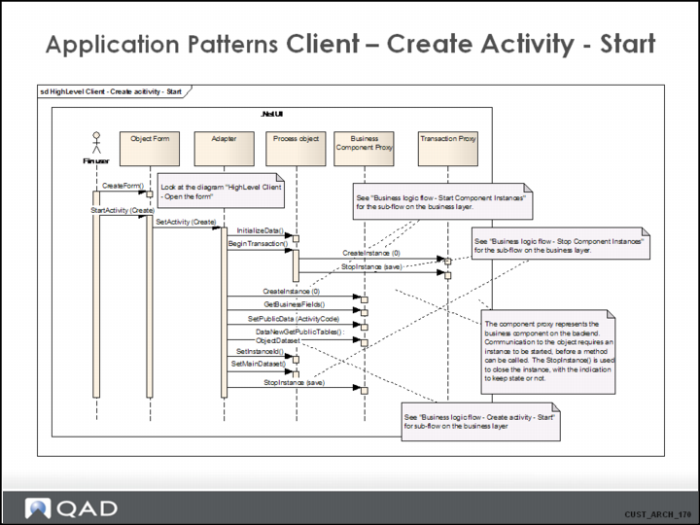
This diagram shows the flow that is executed when a Create activity is started. It assumes the form is already instantiated. It stops when the form is displayed on the screen and is ready to receive input from the end user.
Notes:
• When a method on the business layer is called, it is called through the business component’s proxy on the client side. In case of a normal method, a createinstance() and a stopinstance() should be placed around the call. This is because the normal methods need a component instance (and state) to execute.
• The CreateInstance() method technically creates the object instance on which the method can be called. When 0 is passed as the instance ID, the backend creates a new instance, with a new unique instance ID and return this. When an existing instance ID is passed (non-zero), the state for that instance is restored.
• The call to GetBusinessFields() is conditional. Since this information can be cached, the flow may skip this call if the information is still up-to-date on the client side.
Application Patterns Client 3
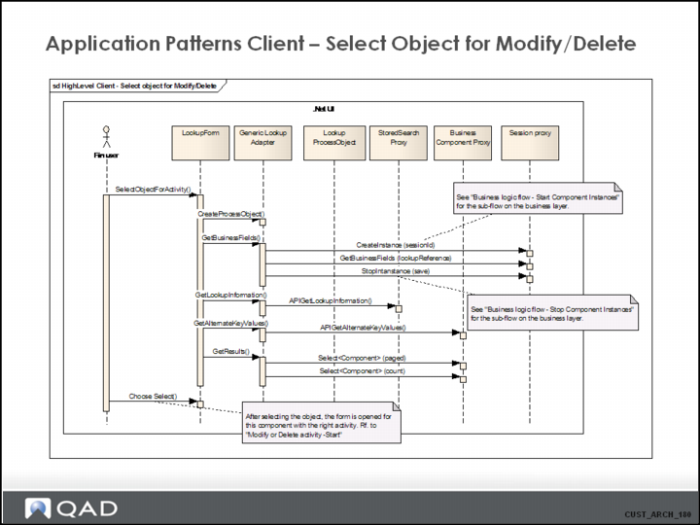
This diagram shows the flow that is executed when the user selects an activity for which an object must be first selected. It starts the browse form or lookup form, retrieves all metadata (such as filter fields or result fields information), and runs the query to retrieve the list of objects.
This is a common flow for all activities that require an object be selected before the object form for the activity is started (for example “Modify” or “Delete”).
Application Patterns Client 4
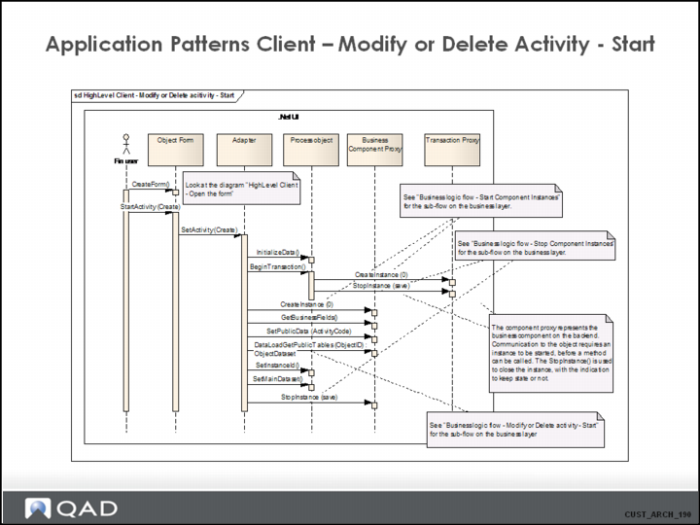
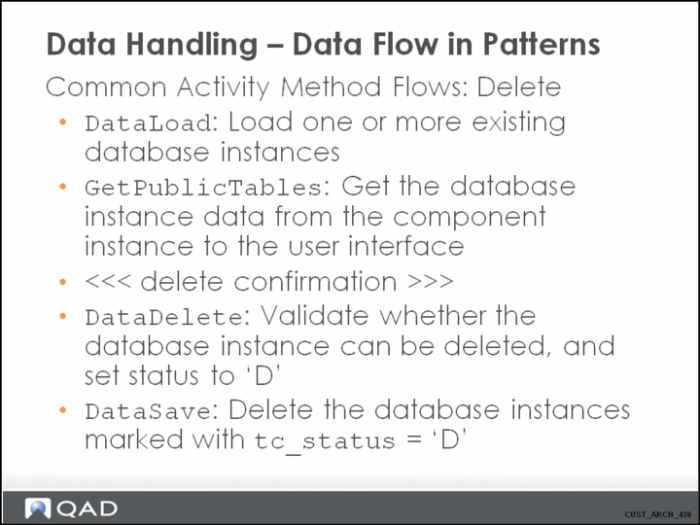
This diagram shows the flow that is executed when modifying or deleting an object. The main difference with the Create flow is the call to DataLoadGetPublicTables instead of DataNewGetPublicTables.
Application Patterns Client 5
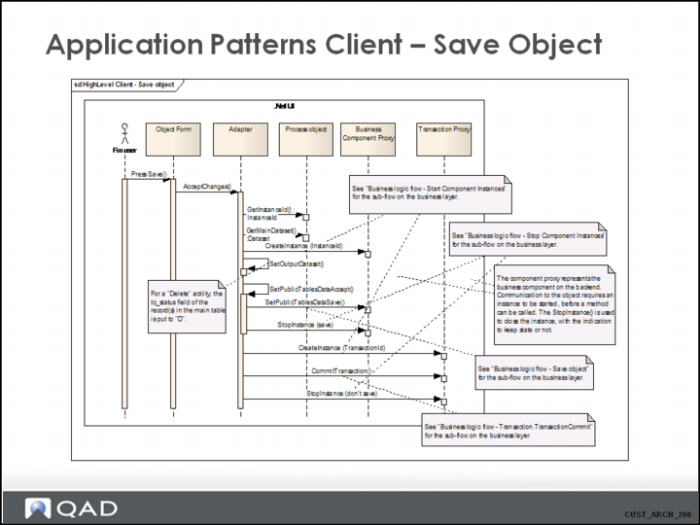
This diagram shows the flow that is executed when the user clicks Save and submits the form.
Note:
• SetOutputDataset: Handles the completion of the tc_status. It also ensures that ONLY changed/new/deleted records are sent to the server.
• SetOutputDataset: When data is submitted for the “Delete” activity, the tc_status for the main table records is set to “D”.
Application Patterns Business Logic Flow
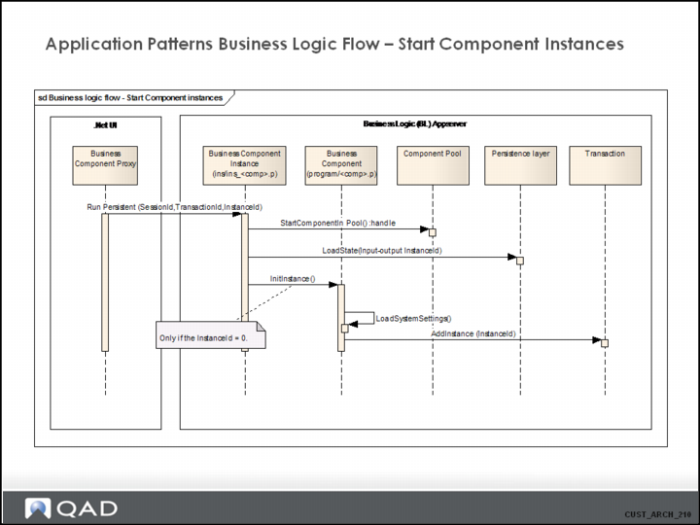
This diagram shows the flow that is executed when a business component instance is started. You can start a component instance in two ways:
1 With an existing instance ID, in which case the state of that instance is loaded, or
2 With a non-existing instance ID (=0), in which case the system creates a new instance.
The instance is started by running the instance persistently on the AppServer. This locks the AppServer agent, and ensures that data and context remain available to the client session as long as the procedure is persistent in memory.
A component instance is started by running the ins__ procedure persistently on the AppServer. SessionId, TransactionId and InstanceId are passed as parameters.
• SessionId is required. It is the component instance ID of the session started previously, which contains the information about the current session.
• InstanceId: Ff it is 0, it is assumed that a real new instance / state must be created. If it is <>0, the system restores the instance data associated with that instance ID.
• TransactionId should be completed if a new instance must be associated with an existing logical transaction (as identified by TransactionId).
The role of the ComponentPool component should be clear in this pattern. Technically, the creation of a component instance ensures the right .r code is loaded in memory to enable execution of methods. The logic for starting a component instance is contained in ComponentPool. When the system starts a component instance, ComponentPool first checks its internal cache of component instances (the set of related .r code persistent in memory), and returns a reference, if found, to the instance. If a reference is not found in the cache, it loads the required .r code in memory and returns a reference to it.
For Customizations (see later), it is important to understand that the ComponentPool uses the CustomizationController component to establish if there is customized code for the component.
Application Patterns Business Logic Flow 2
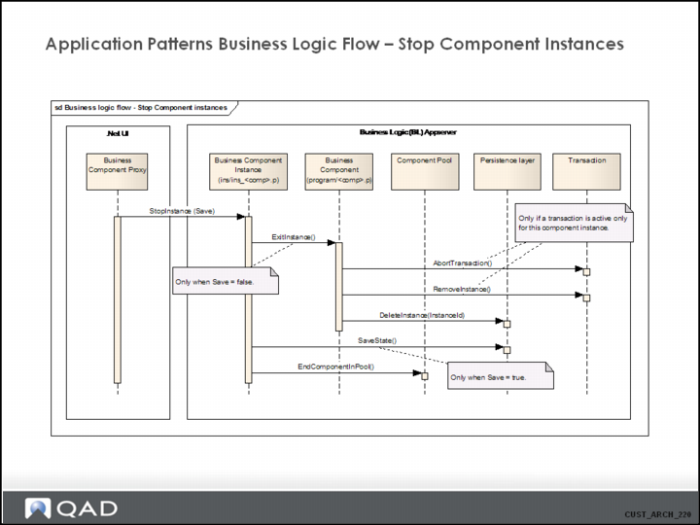
This diagram shows the flow that is executed when a business component instance is stopped. Stopping the instance from the UI means that the instance is no longer needed, and the lock on the stateless connection can be released. This is primarily done by stopping the persistent procedure.
Stopping an instance can be done in two ways (specified by the “Save” input parameter).
The first way is to stop an instance with the intention of removing everything from the server. Not only is the program code released, but all related state information is also deleted.
The second way is to stop the instance, but to keep the state information so that the instance with that state can be “revived” at a later stage.
The ComponentPool removes the .r code associated with the component instance from memory, but only if the number of cached components exceeds the component cache limit as defined in the server.xml configuration file for the back-end Financials AppServer (<swaplimit>). Otherwise, the .r code stays persistent in memory and can be reused in a subsequent request for a component instance.
Application Patterns Business Logic Flow 3
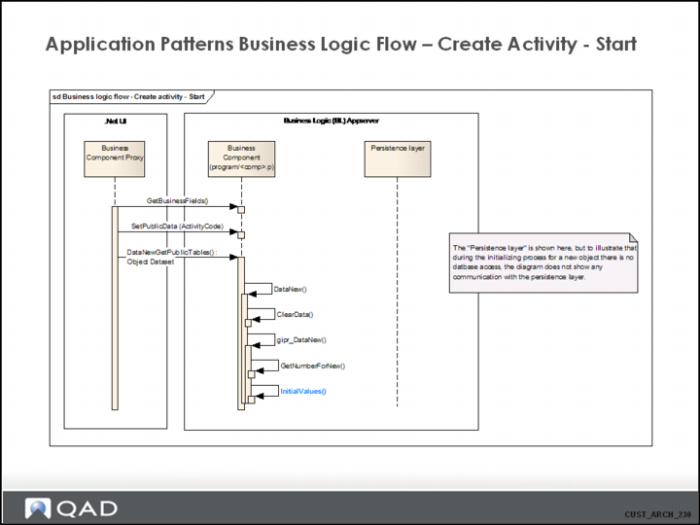
This diagram shows the program flow that is executed on the business logic layer when an object is created.
These UI calls are performed when the form is opened in Create mode.
InitialValues is typically a method that can be customized on the backend to specify initial values or to do initial calculations and defaulting.
Application Patterns Business Logic Flow 4
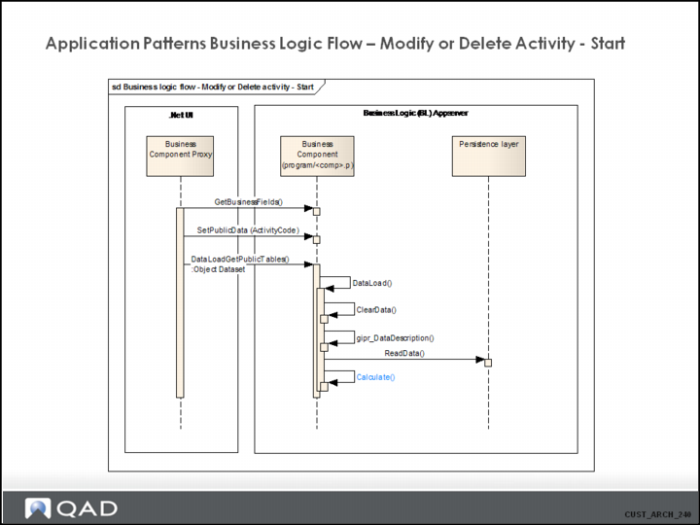
This diagram shows the program flow that is executed on the business logic layer when an object is loaded for modification.
These UI calls are performed when the form is opened in Modify or Delete mode.
This flow basically handles the completion of the object dataset with data that can be modified / deleted in a later phase. The object dataset is returned to the UI, where it can be viewed.
The Calculate() method is typically used to fill in the calculated fields in the object dataset.
Note:
The GetBusinessFields() method is only executed when the local client cache for that data is not up-to-date.
Application Patterns Business Logic Flow 5
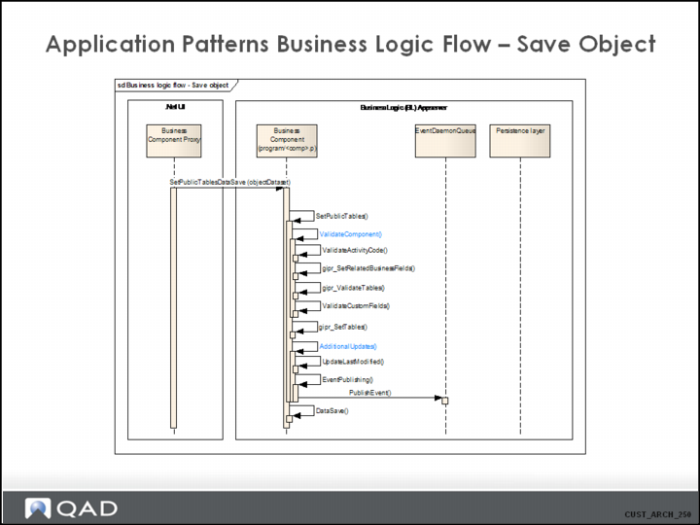
This diagram shows the program flow that is executed on the business logic layer when an object is sent from the client to the backend to be saved.
The objectDataset which is passed in as parameter to the SetPublicTablesDataSave(), only contains the changed rows. The internal flow merges the changes into the official object dataset on the backend during the validation process.
This diagram does not show the communication with the persistence layer in detail (this is shown in another diagram). The DataSave() method only writes data to the database when the component instance is not associated with a logical transaction. When the instance is associated with a logical transaction, the write to the database is performed in the “CommitTransaction” of the logical transaction itself, in a later step.
gipr_validateTables is a generated procedure, and contains all validations based on the data model information (for example, mandatory fields and mandatory relations).
gipr_SetTables is a generated procedure and handles the updating of the internal object dataset that contains data that is ready to be written to the database.
Typical Customizations can be of:
• ValidateComponent: This method contains the logic to validate the data in the object dataset with the changed data.
• AdditionalUpdates: This method contains logic to perform updates on other components besides the current one, based on the data that is ready to be written to the database.
Application Patterns Business Logic Flow 6
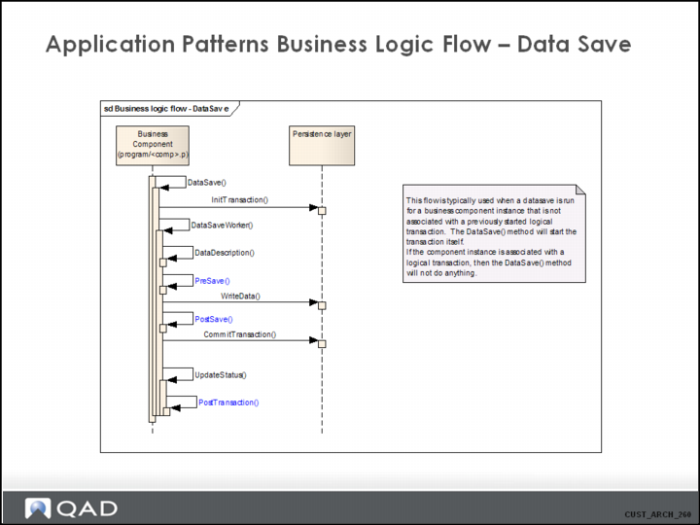
This diagram shows the detail program flow for the execution of the DataSave() method. This flow is only followed when the component instance for which the DataLoad is executed was not previously linked to a logical transaction. In the latter case, the DataSave() does nothing, and the logical transaction itself is responsible for writing changed data to the database.
It is assumed that the data in the object dataset is succesfully validated.
Typical candidates for Customization are the PreSave, PostSave, and PostTransaction methods.
Application Patterns Business Logic Flow 7
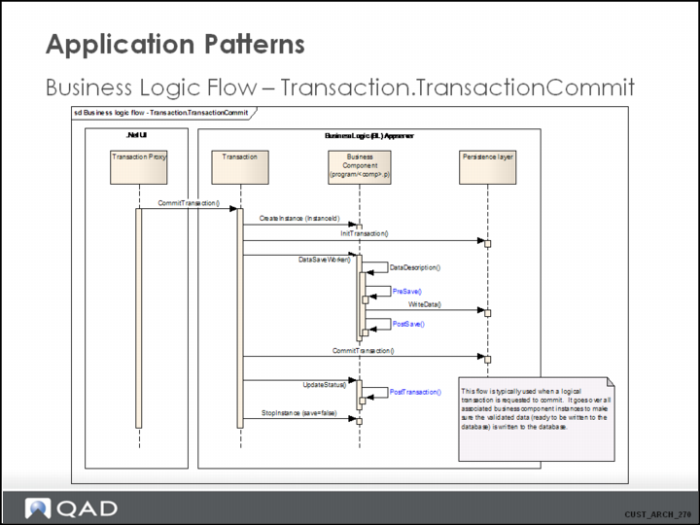
This diagram shows the detail program flow for the execution of the Transaction.CommitTransaction() method.
This is typically executed when a logical transaction, containing multiple associated component instances, needs to be committed.
The logic loops through all associated component instances and writes the changed data to the database in sub-transactions. The Transaction component instance itself controls the life span of the physical transaction.
Typical candidates for Customization are the PreSave, PostSave, and PostTransaction methods.
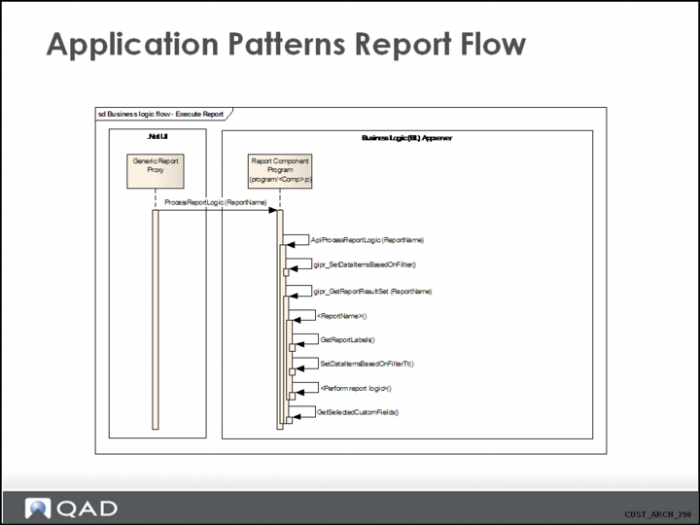
Application Patterns Report Flow
Application Patterns Report Flow 2
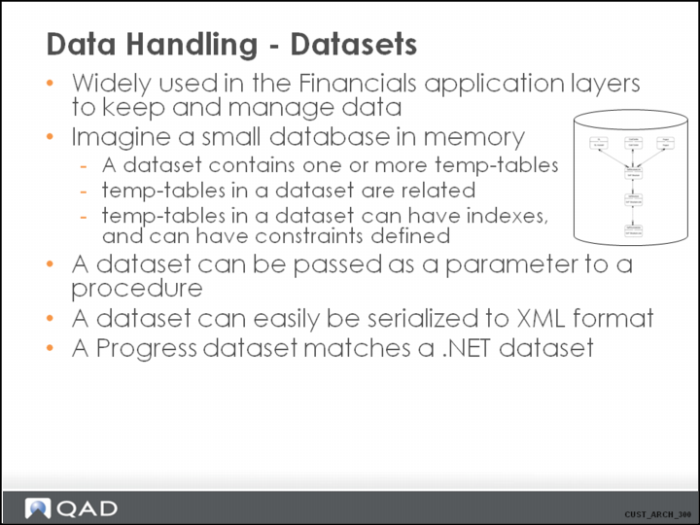
Data Handling - Datasets
Data Handling - Datasets 2
A dataset exists of temp-tables.
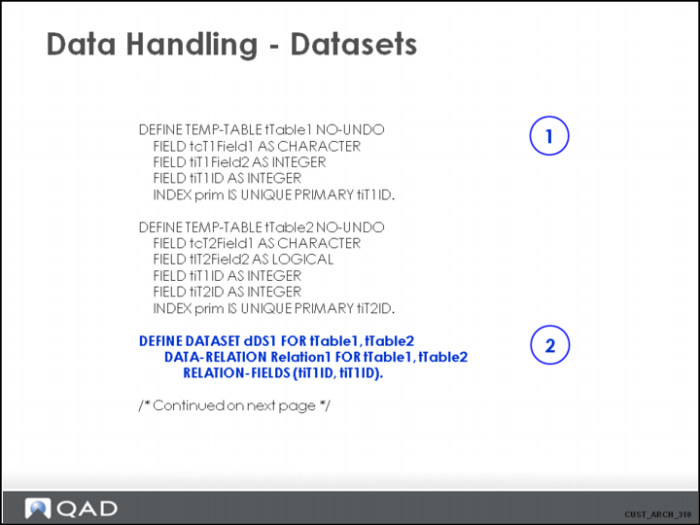
One way to define the dataset is shown in this example. It uses statically defined temp-tables, and defines a statical dataset (also named a “named” or “typed” dataset). Another way could be to build the dataset dynamically using the “create dataset” statement.
1. Define the different temp-tables.
2. Define the dataset (with name dDS1) which holds the temp-tables tTable1 and tTable2. A data relation is defined between tTable1 and tTable2 within the dataset, linking the 2 tables using the tiT1ID field.
Data Handling - Datasets 3
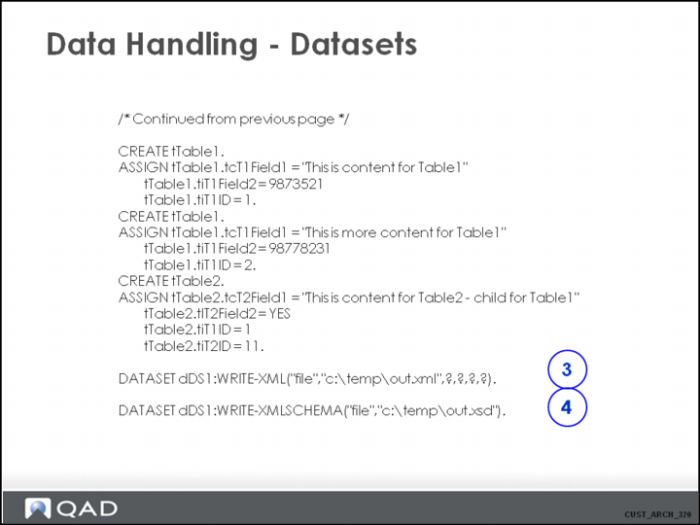
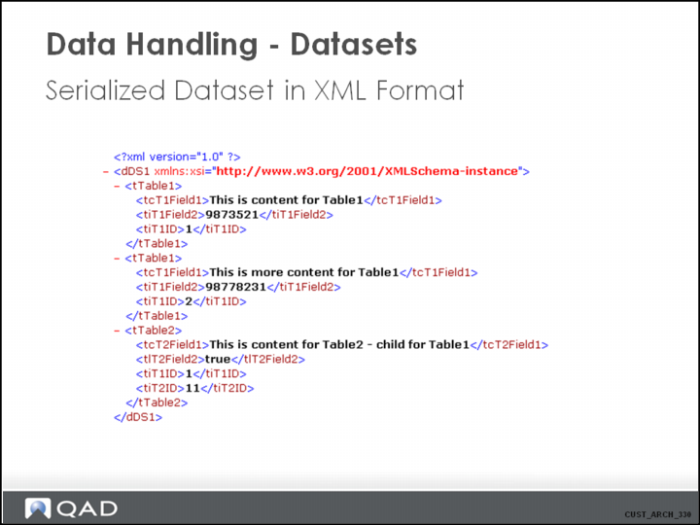
3. Use the “write-xml” method on the dataset object to serialize the dataset to XML format. This can be extremely useful when you want to dump the data and be able to reload the same data for processing in another system.
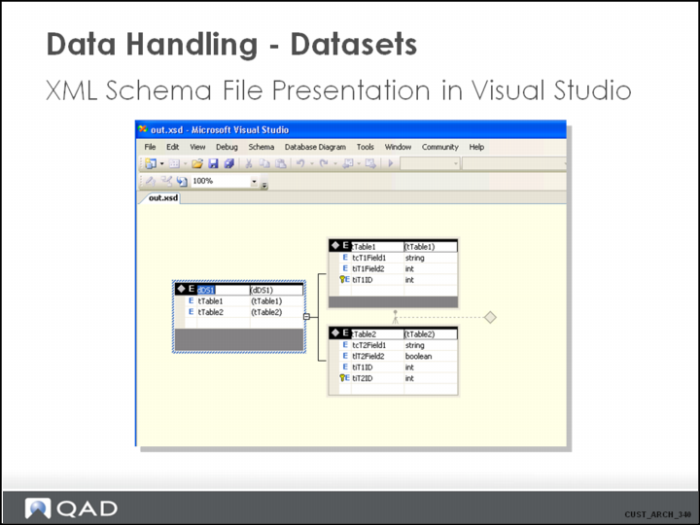
4. Use the “write-xmlschema” method on the dataset object to generate the XML description file. This is useful to be able to validate an XML file before trying to load it into a system.
Data Handling - Datasets 4
• The root element in the XML file is the dataset.
• Every record is a sub-element of the dataset element, with the name of the table as name of the element (an alternative hierarchical representation exists based on the datarelations; in this case it would mean that the <tTable2> element would be a sub-element of <tTable1> (where <tiID1> = 1) )
Data Handling - Datasets 5
Note the relationship between tTable1 and tTable2.
Data Handling - Datasets 6
A business component is typically responsible for the data belonging to a certain object. For example, the business component BPosting is responsible for a Financials posting. This might exist of header information and some lines.
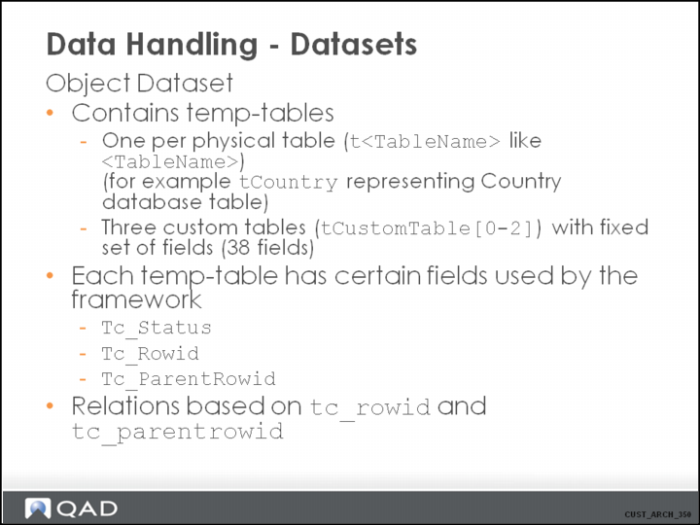
Typically, the object dataset contains a temp-table per physical table in the database. This temp-table contains a filed for each physical field in the database, but might also be extended with calculated fields. These typically can be recognized by their naming. The calculated fields are named “t<datatype><Name>”.
<datatype> can be one of the following:
• “i” (integer)
• “d” (decimal)
• “t” (time)
• “c” (character)
• “l” (logical)
• “m” (memptr)
• “b” (blob)
• “h” (handle)
• “g” (int64)
• “p” (longchar)
• “a” (raw)
• “r” (rowid)
The temp-tables in the object dataset are called “class tables”. There is always one (and only one) main class table, which is the parent table for the object data.
For Customization purposes, each object dataset contains also three custom tables that can be freely used by Customization developers to extend the data in the object datasets. They contain a fixed set of fields that are recognized by the framework and can be filled in by the Customization developer.
Each temp-table in the object dataset has three fields used by the framework for multiple reasons. Avoid manipulating these field, because doing so can yield unwanted/unpredictable behavior.
• tc_rowid: A unique value in the object dataset. For new records, this is typically filled in with a negative number. For records loaded for change, this is filled in with the rowid from the database.
• tc_status: an indication on what the system is doing with the data in this record. “N” means the record is being created, “C” means the record is being updated, “D” means the record is being deleted. “” means the record is unchanged in the transaction.
• tc_parentrowid: This value is only filled in for records in a child table. It contains the value of the parent records tc_rowid.
Data Handling - Datasets 7
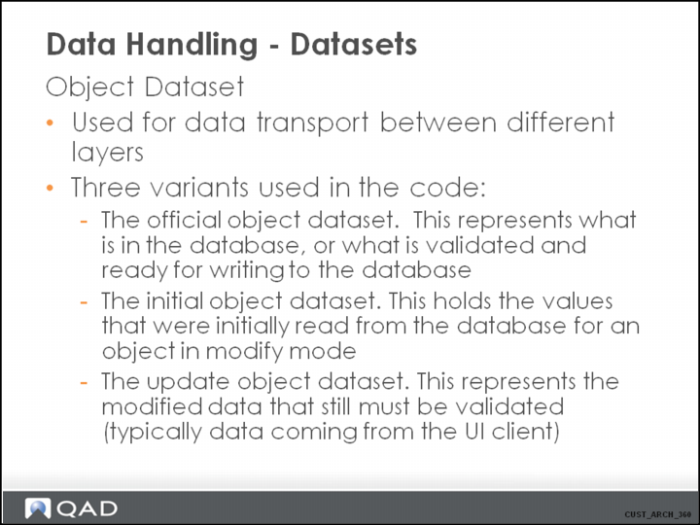
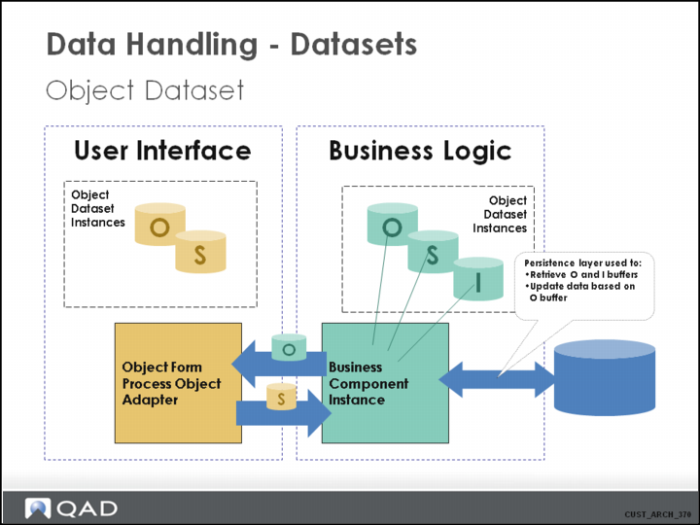
The object dataset is used to pass data between the layers. The business logic layer never directly uses database tables. The data is always retrieved via the persistence layer, and stored in the object dataset. The data the client UI layer is working with is received from the BL bakcend in the form of the object dataset.
The three variants are the following:
• <BusinessComponent>O: The official object dataset. Temp-tables defined for the object dataset are t_o<tableName>, for which in the source code t<TableName> are buffers. For example, the buffer tCountry represents t_oCountry.
• <BusinessComponent>I: The initial object dataset. Temp-tables defined for the object dataset are t_i<tableName>. The data in this dataset is used for optimistic lock checking during the update.
• <BusinessComponent>S: The update object dataset. Temp-tables defined for the object dataset are t_s<tableName. The data in this dataset is typically coming from the client and should be validated in the flow.
In the business code, mostly the programmer is working directly on the official object dataset. What this means is that if he/she accesses the temp-table t<tablename>, the data from the official object dataset is used. There is one moment the programmer needs to be aware other data needs to be worked on. This is during the validation of object data. At that moment, the t_s<tablename> should be referenced.
Data Handling - Datasets 8
The business layer uses the object dataset instances to:
• Store data that has been read from the database (in the I and O instances)
• Prepare data to write to the database (in the O instance)
• Store data that has been received from a client, but is not yet validated. (in the S instance)
The UI layer uses the object dataset instances to:
• Receive the data from the BL (O instance)
• Send the data to the BL (S instance)
Data Handling - Data Flow In Common Patterns
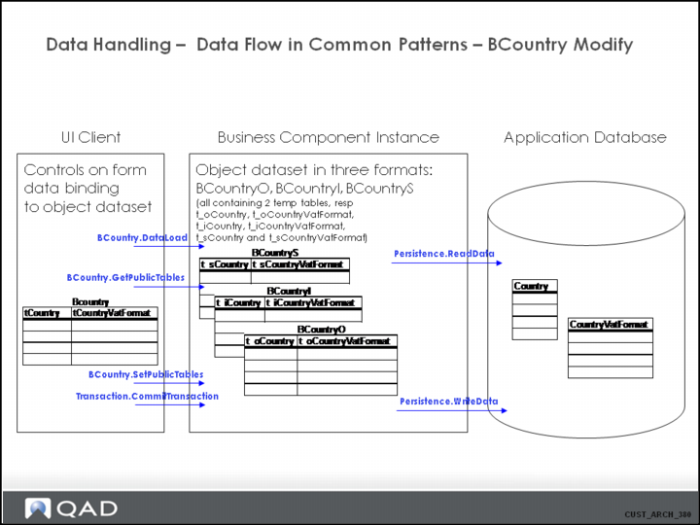
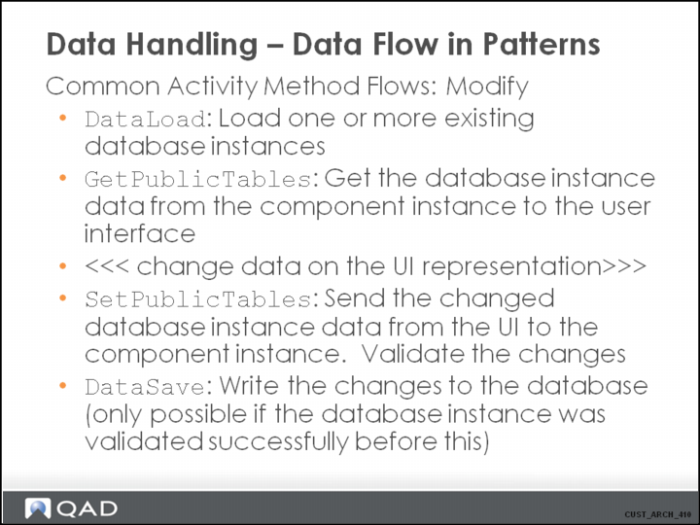
• BCountry is a business component that inherits from the “Database” component. This ensures that the component encapsulates all data access to the tables it is associated with. BCountry is responsible for tables Country and CountryVatFormat, for which a 1-N primary relation is defined in the datamodel.
• A BCountry component instance has three defined datasets (BCountryS, BCountryI, BCountryO). These datasets are used to store the records that are updated and passed around in the system.
• BCountryI : Contains records that were originally read from the database when data is loaded which it is intended to change.
• BCountryO : Contains records that are to be written to the database with the next DataSave / CommitTransaction.
• BCountryS : Contains data (record(s) in tCountry and tCountryVatFormat) that is presented by a client to be updated. This is unvalidated data.
• When data is loaded in the BCountry component instance through “DataLoad”, the instance contains a “database instance”.
• A call to DataLoad triggers a call to Persistence.ReadData, which reads data from the database to the BCountryO and BCountryI datasets.
• A call to GetPublicTables transfers the object dataset to the client. The client displays the information because controls are bound to the dataset.
• A call to SetPublicTables transfers the changes in the object dataset from the client to the BCountry component instance, and data is validated.
• A call to Transaction.CommitTransaction (or BCountry.DataSave) triggers a call to Persistence.WriteData, which stores the changes in the application database.
Data Handling - Data Flow in Patterns
Data Handling - Data Handling in Object Datasets - New Object
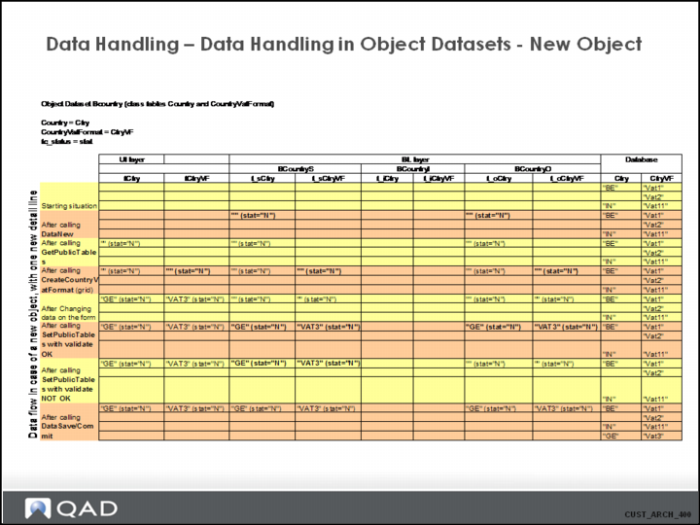
Notes:
• The BCountryI dataset is not used in this case, because no optimistic locking needs to take place for a newly-created record.
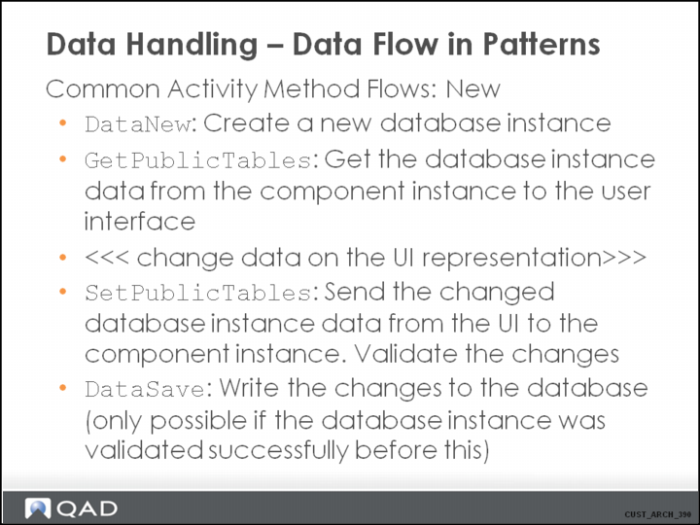
• DataNew() makes sure a new record in the t_sCountry and t_oCountry is created. Tc_status is always “N”, and tc_rowid is a negative number, starting with “-1” for the first created record. DataNew() only creates records for the main class table, not for the child tables. So in this example, DataNew() does not create a record in t_sCountryVatFormat or in t_oCountryVatFormat.
• For each of the child tables (in this case on tCountryVatFormat), a separate method “Create<tableName>” exists, which is used to create and initialize a new record in that table and transfer it immediately to the client. Underlying this, a call to the method AddDetailLine() is done, supplying the name of the child table as parameter.
• Transaction.CommitTransaction or BCountry.DataSave (depending on whether the component instance has been attached to a logical transaction or not), the data is written to the database, ONLY if the flag indicating a succesful validation is switched on.
• Within the dataset, relations between the tables are based on tc_parentrowid = tc_rowid condition. In this example: tCountryVatFormat.tc_parentrowid = tCountry.tc_rowid.
Data Handling - Data Flow in Patterns
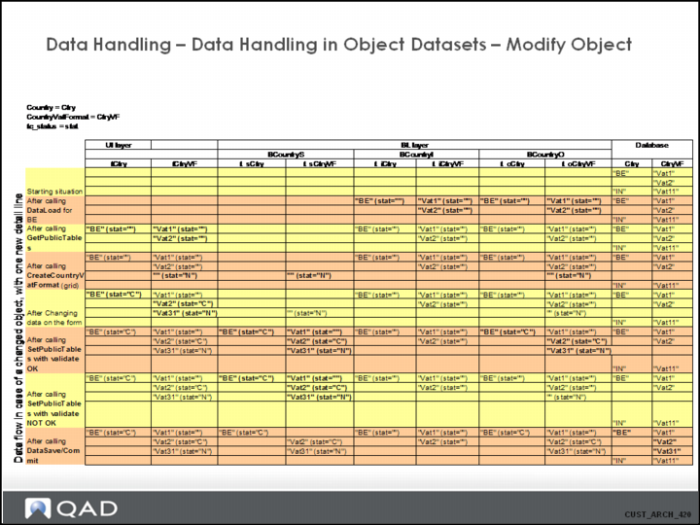
Data Handling - Data Handling in Object Datasets - Modify Object
Note:
Besides the normal logical validations of data, the system also checks optimistic locking. If the DataSave() fails on optimistic locking, the system updates the records in the t_i and t_o temp tables with the latest (correct) values from the database, and updates the t_s records. The user is also notified about this update.
Data Handling - Data Flow in Patterns
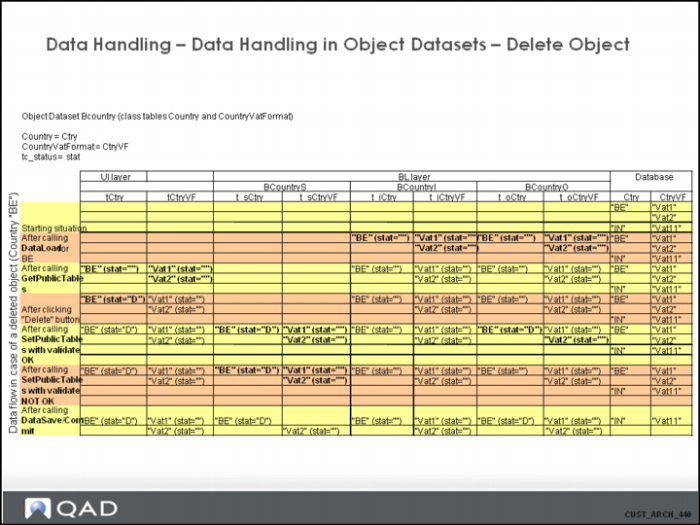
Data Handling - Data Handling in Object Datasets - Delete Objects
Error Handling
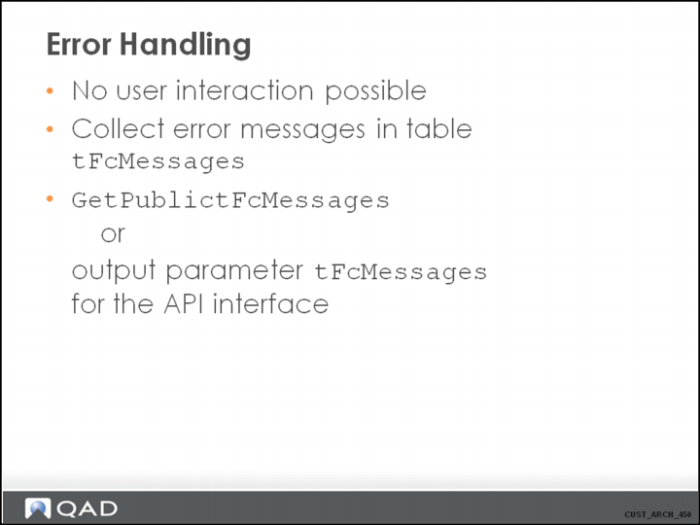
The business logic will write messages to a temp-table, not by creating records directly in the table, but by calling method SetMessage.
This table is then returned to the client.
Error Handling 2
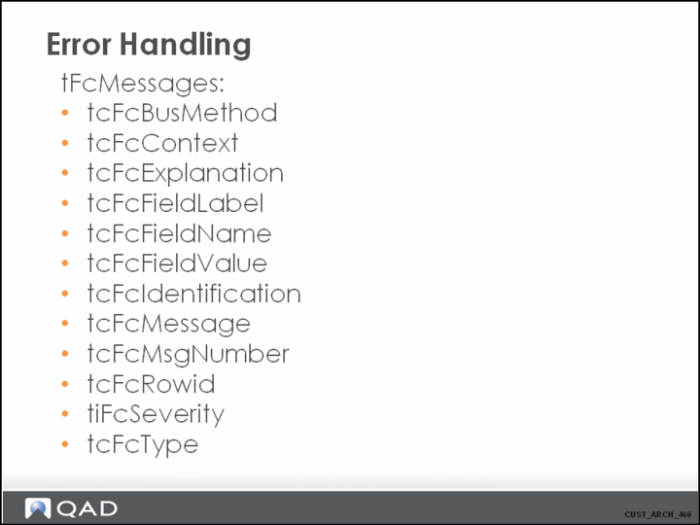
tcFcMessage
The actual (error) message
tcFcType
Type of message
E (standard correctable error; for example an error caused by incorrect user input)
D (non-correctable error; for example a restricted delete error)
S (system error; for example a configuration file not found error)
W (warning)
I (information)
tiFcSeverity
1 (highest severity)
to
5 (lowest severity)
tcFcMsgNumber
Unique key to identify the error message and look it up in the application source code
tcFcBusMethod
Name of the business method that raised the error
tcFcFieldLabel
tcFcFieldName
tcFcFieldValue
tcFcRowid
If the error is a validation error on data in the object dataset, these columns indicate what record and what column on that record contains an incorrect value.
tcFcContext
tcFcExplanation
tcFcIdentification
Error Handling 3
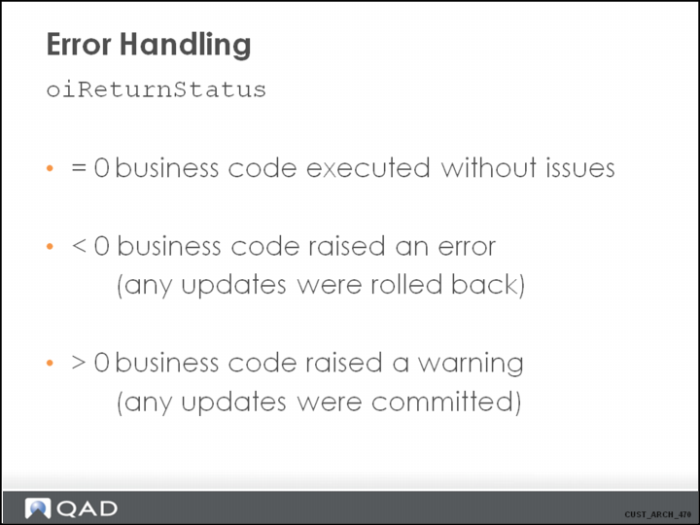
(Almost) every business method has an output parameter oiReturnStatus to indicate if the method executed correctly.
Known return statuses:
+1 Warning
-1 Validation error
-2 Optimistic lock error
-3 Standard run-time error
-4 No results found
-5 Fatal error
-98 Progress runtime (error not raised by the application but by the progress runtime)