EDI eCommerce Architecture Concepts
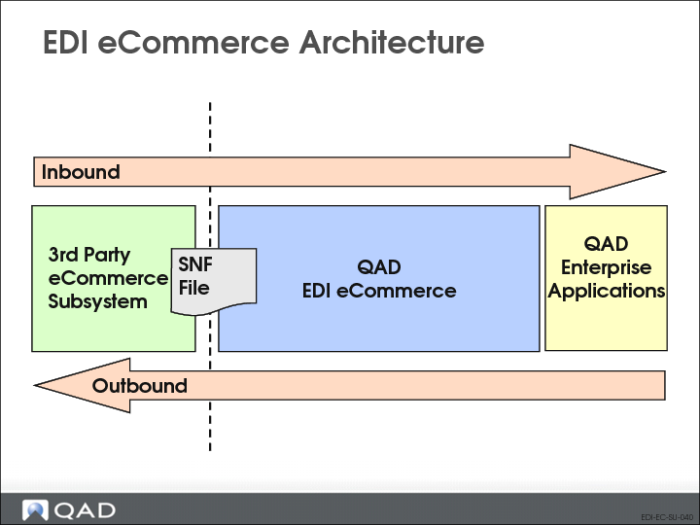
The EDI eCommerce Module converts EDI messages into QAD Enterprise Applications records, or vice versa. This conversion can be simple or very complex:
• It can be as simple as copying data from one field to another
• It can be as complex as mapping multiple input records and fields to a different set of records and fields
However, whether simple or complex, EDI eCommerce accomplishes the conversion in 3 steps. Thus, EDI eCommerce handles all conversions within the same simple architecture.
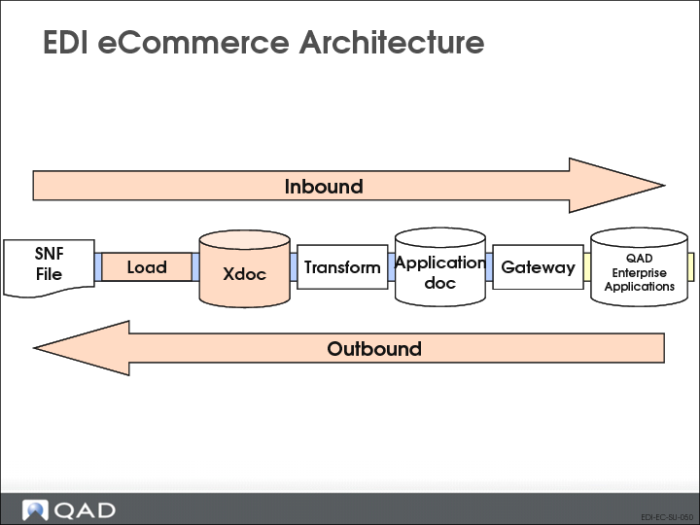
Inbound Process
In the Inbound process, the 3 steps are:
1 Load from a flat file.
2 Convert the data from EDI-centric to QAD Enterprise Applications-centric format.
3 Write to the QAD Enterprise Applications database.
Outbound Process
In the Outbound process, the steps are reversed:
1 Read from the QAD Enterprise Applications database.
2 Convert the data from QAD Enterprise Applications-centric to the required EDI-centric formats.
3 Unload the data to a flat file.
Read/Write Flat Files
• The EDI record input or output step is called “Load/Unload”
Data Conversion
• The conversion step is called “Transformation Processing”
Database Access
• QAD Enterprise Applications database access is called “Gateway Processing”
Inbound Process in Detail
Let's look at the Inbound process.
Load
Load prepares for Transformation by loading the EDI-centric records into a table called the “Exchange Repository”.
This load, from a flat file to the Repository, processes the file control records and saves control data (such as trading partner ID and destination site code) for use in the Transformation process.
No conversion occurs in Load processing, but all control information is captured so that it is readily available wherever needed in the Transformation.
Load processing thus prepares for Transformation simplifying the actual Transformation logic.
Transformation
The heart of EDI eCommerce processing is Transformation. All the data and record structure conversions occur in the Transformation step. Processing control records and storage of non-QAD Enterprise Applications data for later use occur outside of Transformation. The focus of Transformation is the actual format conversions of the individual data fields and record structures.
Gateway Processing
Gateway Processing writes the “transformed” data to the QAD Enterprise Applications database. Transformed data is stored in a table called the “Application Repository” by the Transformation process.
Gateway Processing reads the data from the Application Repository and creates records in the QAD Enterprise Applications database. Again, no conversion occurs in Gateway Processing.