EC Subsystem Definition Maintenance: Control Fields
Control Record Fields
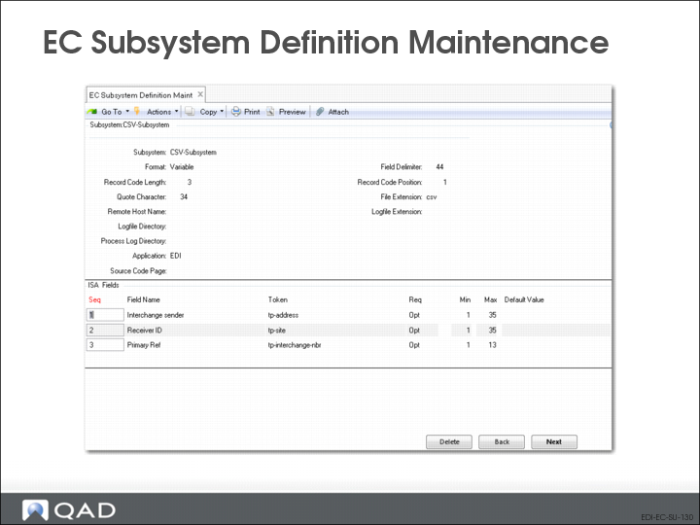
Use the last frame to define the fields included in a control record.
Note: This frame displays only when Fields is Yes in the previous frame.
Seq
Enter the numerical sequence in which this field occurs in the record.
Field Name
Enter a descriptive name for this field.
Token
If applicable, enter the token that applies to this record.
Req
Specify whether this field is mandatory (Man) or optional (Opt) for the receiving system—your system for inbound documents or the EC subsystem for outbound documents.
Min
Enter the minimum length of this field. The system validates that data included in the field is greater than or equal to the minimum required number of characters.
Max
Enter the maximum length of this field.
• If the field lengths are variable and separated by the specified delimiter, the system validates that the field length is between the Min and Max values.
• If the field lengths are fixed, the system uses this value as the actual length to calculate where each field starts and ends.
Default Value
Optionally enter a default value for the system to place in this field if no other value is specified. For example, this field could be used on an outbound transaction when the receiving EC subsystem requires a value in a field that generally is blank.
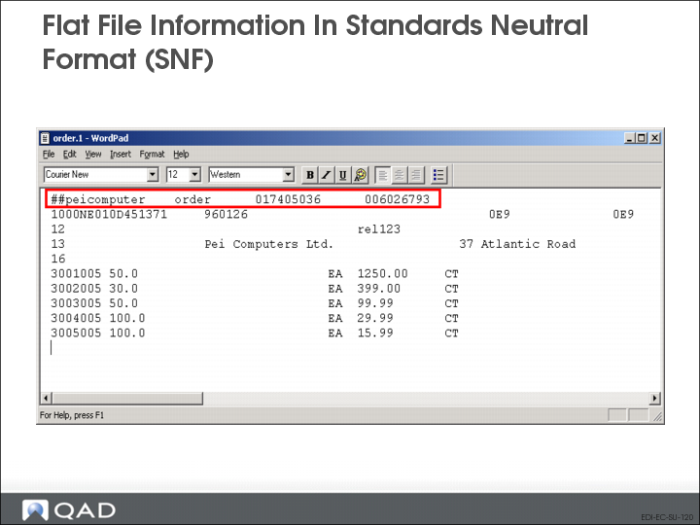
Example of Flat File in Standards Neutral Format (SNF)
830 Inbound Document
This example shows a flat file that will result in a customer planning schedule when it is imported into QAD Enterprise Applications.
Defining eCommerce Sequence Number Ranges
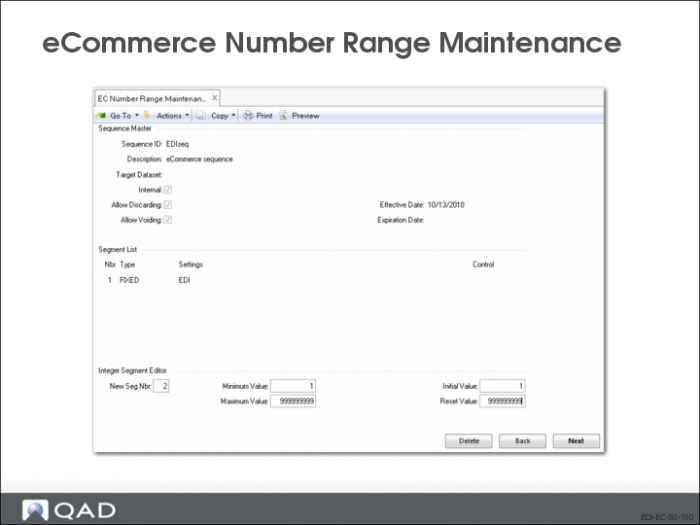
eCommerce Number Range Maintenance (35.21.1)
EDI eCommerce uses its own user-defined sequence definitions to assign numbers to repository documents. The functionality is identical to the standard Number Range Management features (36.2.21 menu) used elsewhere in the system. However, sequences defined here are specific to the eCommerce processing domain.
Define one or more sequences in EC Number Range Maintenance (35.21.1). Then, use eCommerce Control to associate default sequences with system processing actions.
You can change the defaults for trading partners or trading partner documents using Trading Partner Maintenance (35.13.7). When assigning a new sequence number, the system looks for a sequence definition in the following order:
1 Trading partner document record
2 Trading partner record
3 Application control record
4 Control record
The system maintains a history of numbers generated that can be displayed using EC Sequence Number History Report. When this history is no longer needed online, remove it using EC Sequence Delete/Archive.