Using Exchange Definition Maintenance
An exchange file defines the documents communicated between QAD Enterprise Applications and the EC subsystem. It includes data record structures that match the definition of the SNF communicated with the EC subsystem.
Use this program to modify an exchange file definition you have created yourself, or one based on a copy of a QAD-developed template definition.
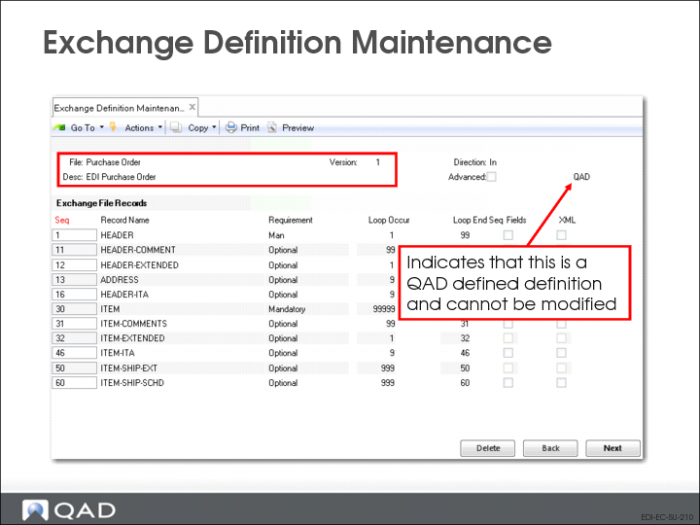
Note: The system does not allow you to modify a QAD-developed definition. Use Exchange Definition Copy (35.21.15.1) to copy a definition before modifying it.
Exchange Definition Maintenance (35.15.6): Initial Frame
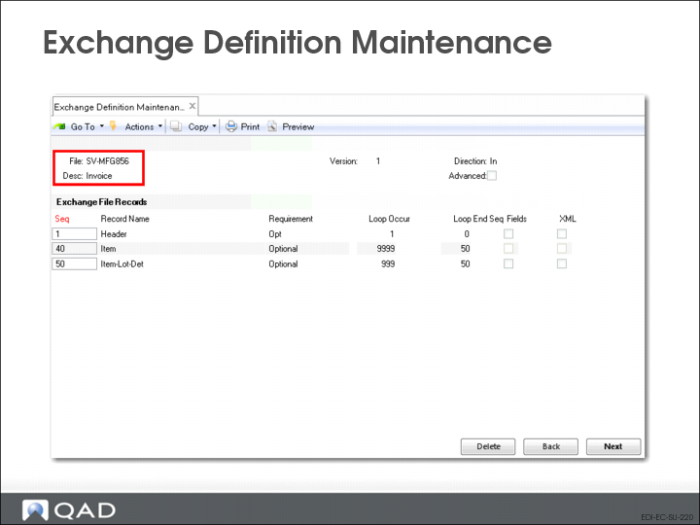
Use Exchange Definition Maintenance to define layout and content of exchange file documents. You must create a different exchange file definition for each type of document.
File
Enter a name for the exchange file definition.
Version
Enter a version number.
• Use the same name for more than one definition, then use a different version number to differentiate among multiple definitions with the same name
• Use Direction to distinguish between multiple definitions with the same name and version
Direction
Enter the direction of the file transfer that will use this exchange file definition
• Specify the direction relative to QAD Enterprise Applications
• Documents imported into QAD Enterprise Applications are inbound
• Documents exported from QAD Enterprise Applications are outbound
Desc
Optionally enter a text description of this exchange file definition (for reference only).
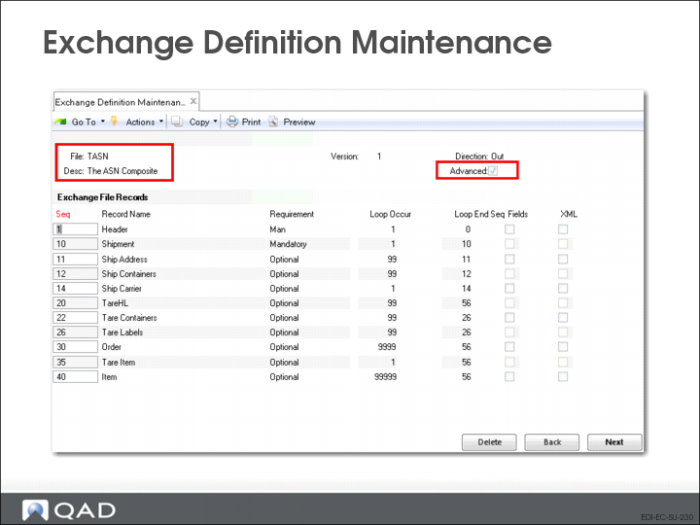
Advanced
Select this option only if you are setting up an XML document. When it is No, the system immediately advances to the Exchange File Records frame.
Exchange Definition Maintenance: Top-Level XML Setup
Note: You need to complete these fields only when you are setting up an XML document.
Document Type
Enter the document-level XML identifier for the document to be created using this definition. The resulting XML document includes this identifier in the first line.
Document Entity
Enter the URL containing the namespace definition that controls the XML structure associated with documents created using this definition; for example, http://www.w3.org/2000/xmlns/.
An XML namespace is a collection of names, identified by a specific uniform reference locator (URL), which are used in XML documents as element types and attribute names.
System Literal
Specify whether the document type definition (DTD) used to validate the content of exported XML files is on a public server or within a system domain. Valid values are:
PUBLIC: The value specified in System Location is outside the local system domain.
SYSTEM: The specified system location is within the local system domain.
System Location
Enter the path to the location where the document type definition (DTD) used to validate the content of XML files is stored.
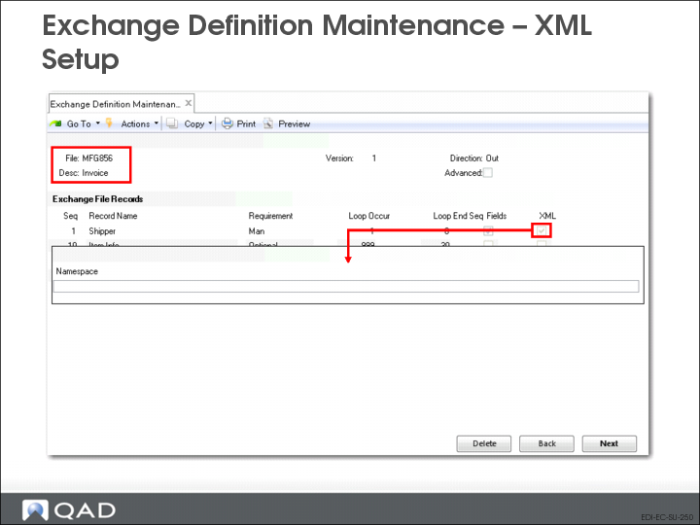
In the following frame, for outbound exchange definitions only, select a record and set the XML field to Yes to specify a namespace associated with the record.
Note: The XML field is disabled for inbound definitions.
Exchange Definition Maintenance: Exchange File Records Frame
Seq
The sequence number of this record. Choose Insert to add a new record. The system automatically assigns the next number, but you can change this to any number. You should set up a logical numerical hierarchy for record sequence numbers.
Important: In all cases, the first record in a document added to the repository must be sequence number 1. Other records can be numbered as you choose. The following examples show valid and invalid record sequences.
Valid | Invalid |
1, 2, 3, 4, 5 | 2, 3, 4, 5 |
1, 10, 20, 22, 30 | 10, 20, 22, 30 |
After you have used an exchange definition in a transformation definition, you cannot change record sequences in the exchange definition without deleting and reentering the entire transformation definition.
Record Name
Enter a name for this record. Each record name must be unique in an exchange file definition.
This record name is used as a variable during the transformation process, without the sequence number.
Requirement
Enter Mandatory to indicate that this record is required during the load or unload process or Optional to indicate that it is not. When the system cannot find a mandatory record to load or unload, it generates an error message and does not process the associated document.
Loop Occurs
Enter the number of times the processing logic should loop through the records during transformation.
Loop Ends Seq
Enter a defined record sequence number to indicate where the loop ends. For example, enter a Loop Ends Seq value of 2 on sequence number 2 to indicate that the entire loop sequence takes place on a single record. Or, enter an end sequence of 4 on sequence number 3 to indicate a loop that starts at 3 and ends at 4.
To specify a loop structure that includes all records, enter zero or a number higher than the last record sequence defined.
Fields
Enter Yes to display an additional frame that lets you enter or edit the fields contained in this record.
Exchange Definition Maintenance: Record-Level XML Setup
In XML, a namespace is a unique identifier for a collection of element type and attribute names. This lets you use identical type and attribute names for multiple purposes based on the namespace identifier. The value entered here will be prefixed to the field name followed by a colon.
The final XML setup fields display when you select a field in the Exchange File Field Record frame and set Adv to Yes.
Exchange Definition Maintenance: Exchange File Field Record Frame
Note: This frame displays only if Fields = Yes in the previous frame for the selected record.
Seq
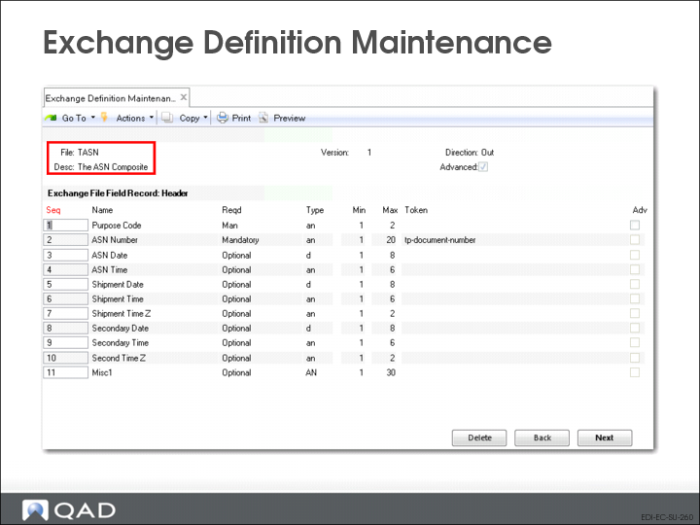
The sequence number of this field in the record.
Press Insert to add a new field. The system automatically assigns the next available number. You can modify the number as needed or navigate to the blank fields at the bottom of the frame and assign numbers.
It is recommended that you number the fields sequentially, beginning with 1. When you do this, a total of 99 fields are available for each record. Although the system accepts non-sequential numbers, their use is not recommended.
Name
Enter the name of the field. The name must be unique in the record.
Reqd
Enter Mandatory to indicate that this field is required during the load process or Optional to indicate that it is not. When the system cannot find mandatory fields to load, it generates an error message and does not process the associated record.
Type
Enter a code representing the type of data stored in this field. Valid entries are:
• AN: Alphanumeric
• D: Date
• I: Integer
• L: Logical
• R: Real number
Min
Enter the minimum number of characters to be included in this field. The system validates that required or optional data is greater than or equal to the minimum required value for the field.
Max
Enter the maximum number of characters to be included in this field.
• If the field lengths are variable and separated by the delimiter specified in EC Subsystem Definition Maintenance, the system validates that the field length is between the Min and Max values.
• If the field lengths are fixed, the system uses this value to calculate where each field starts and ends.
Token
If applicable, enter the name of the token associated with this field.
Adv
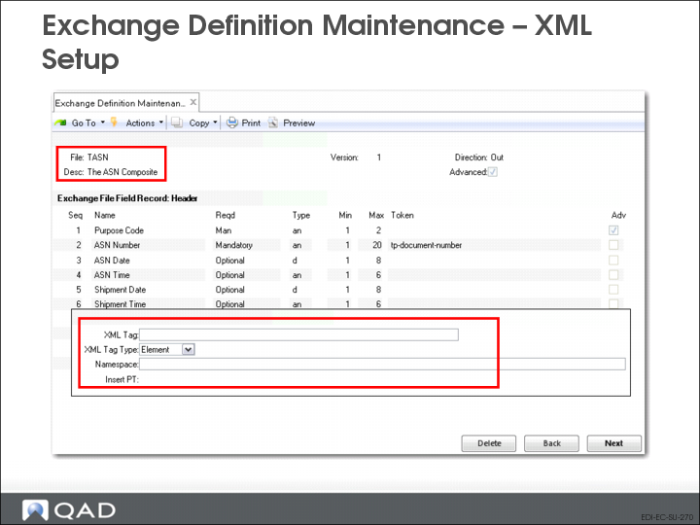
Set this field to Yes to display an additional frame that lets you complete XML setup at the field level.
Exchange Definition Maintenance: Field-Level XML Setup
XML Tag
Optionally enter an alternate XML tag name associated with this field. If you do not enter a value, the system uses the field name as the tag.
XML Tag Type
Indicate the type of the specified XML tag. Valid values are Attribute and Element. The default is Element.
Namespace
Optionally enter the XML namespace associated with this field.
In XML, a namespace is a unique identifier for a collection of element type and attribute names. This lets you use identical type and attribute names for multiple purposes based on the namespace identifier. The value entered here will be prefixed to the field name followed by a colon.