Using EC Subsystem/Exchange Maintenance
EC Subsystem/Exchange Maint (35.13.3)
Use EC Subsystem/Exchange Maintenance to correlate:
• Structure of the data records in the standards neutral format (SNF) file received from the EC subsystem
• Exchange file definition
This lets the system place data properly in the data repository before beginning transformation processing.
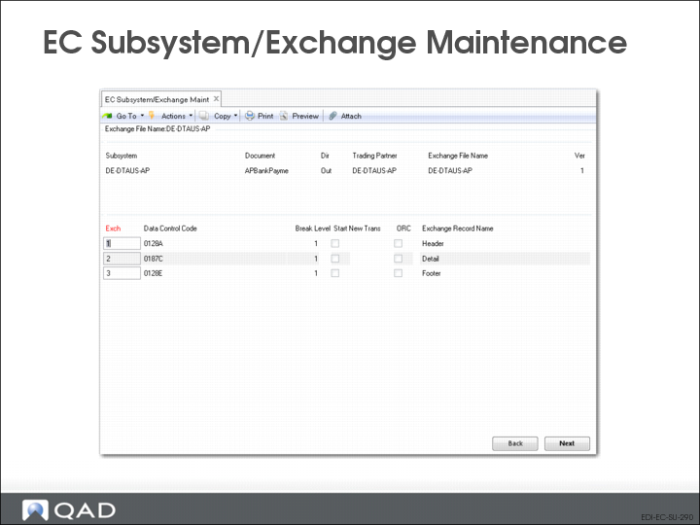
This program consists of two frames. In the first, you define a unique combination of EC subsystem, document type, and exchange file name:
Subsystem
Enter the name of an EC subsystem defined in EC Subsystem Definition Maint.
Document
Enter the type of document to be exchanged between your system and this EC subsystem. For example, 810 could be used to identify an ANSI X12 standard 810 document, which is used to export an invoice. This is ordinarily the value represented by the tp‑doc-id token.
Direction
Enter the direction for this document type—inbound or outbound. Documents imported into your system are inbound, while those exported to an EC subsystem are outbound.
Trading Partner
Enter an identifier for the trading partner to which this exchange/subsystem cross-reference applies. Leave blank if it applies to all trading partners.
By setting up trading partner-specific cross-reference records, you can apply different SNF definitions for different trading partners.
Exchange File Name
Enter the name of the exchange file to be associated with this document type. If you have set up multiple exchange files with the same file name in Exchange Definition Maintenance, scroll through the unique name, version, and direction combinations and select the appropriate one.
Ver
Enter the version of the exchange file to be associated with this document type. Multiple exchange files can have the same name. Be sure to use the correct version for the specific exchange file.
Use the next frame to establish a link between the document type and the record sequences, data control codes, and data record names in the exchange file.
Exchange Sequence
Enter a number to represent the sequence in which this record appears in the exchange file document.
Data Control Code
Enter the code or XML tag the EC subsystem uses to identify this type of data record in this document type.
Break Level
Enter the break level associated with this record.
Break level lets you define documents in which the same record name can be used more than once. For example, you can use Comment in both the header and in the detail. When the system processes data during transformation and encounters a duplicate record name, it looks for the record with a higher Break value than the previous instance.
Omit Record Code
Enter Yes to prevent the system from writing the record code to the output file. This field applies to exported files only.
Start New Trans
Enter Yes if you want the data in this record to be treated as a separate transaction line. This lets you process multiple transactions separately even when they are not separated by control data records.
Exchange Record Name
The system displays the name of the record from the exchange file definition.
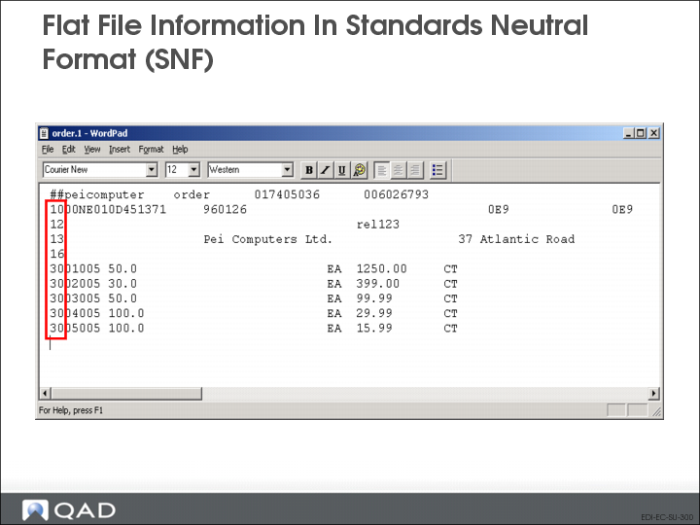
Flat File Information in Standards Neutral Format (SNF)