Setting Up Transformation Definitions
The system uses a transformation map in combination with an exchange file definition and an implementation file definition to exchange data between QAD Enterprise Applications and an external EC subsystem. The resulting output meets the specific data structure and format requirements of both systems.
Note: To use a QAD-developed transformation definition as the basis for a new definition, use Transformation Definition Copy (35.13.1) to copy a definition before modifying it.
Use Transformation Definition Maintenance (35.15.17) to define a transformation map.
Transformation Definition Maintenance (35.21.17)
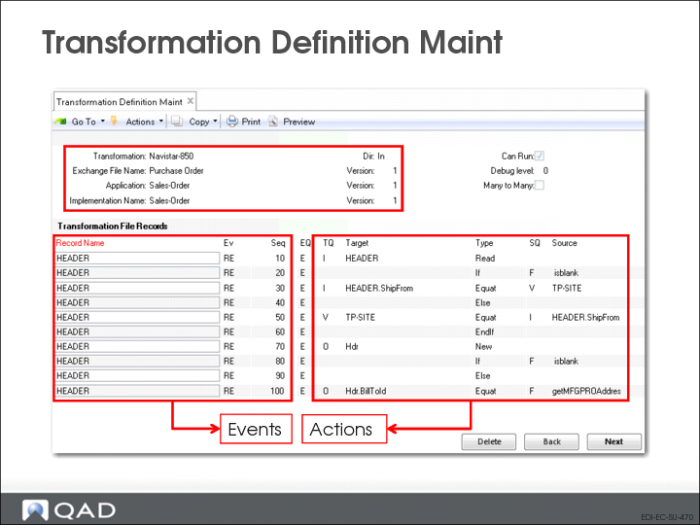
This program consists of four frames. Use the first frame to name the transformation map.
• Identify the existing combination of exchange file definition, application document definition, and specific implementation that uses this transformation map
• Set up two fields for testing the transformation map. Can Run and Debug Level provide options that can be especially valuable when you are testing a new implementation for a new trading partner or document
Transformation
Enter a name for this transformation definition.
Direction
Specify the direction—inbound or outbound—of the documents to be transformed using this definition. Documents imported into QAD Enterprise Applications are inbound, while those exported from QAD Enterprise Applications are outbound.
Two transformation definitions can have the same name and be distinguished only by direction.
Exchange File and Version
Enter the name and version of the exchange file definition used in this transformation.
QAD Enterprise Applications and Version
Enter the name and version of the application document definition used in this transformation. This can be a QAD-supplied definition or one you created.
Implementation and Version
Enter the implementation definition and version used in this transformation.
Can Run
Set to Yes to make this transformation map completely operational.
During testing, you can set this field to No. The system then runs the entire transformation process, but backs the data out of the application document repository instead of storing it. You can identify transformation mapping problems and correct them before changing the field to Yes, letting the data be saved in the application document repository.
Debug Level
Specify a value between 0 and 9 to indicate the level of detail reported in the activity file created when this transformation is run. Lower levels provide less detail. For example, you can set this to 9 during testing to get a complete record of what happens during transformation processing.
Leaving this field set to a high value can produce very large files and can lead to disk space problems.
The system names these activity files using the convention MMDDYYYY.DBG, where MMDDYYYY is the date the transformation map is used. A new file is created when the first session is run each day. A record of each transformation operation that occurs during that day is appended to this file.
Many to Many
Set to Yes to combine multiple input documents and treat them as one document. This lets the system back out multiple files or create a single output from several inputs.
If No, the system always maps one input document to one or many output documents, depending on how many times the transformation definition indicates a new header should be written.
Before displaying the second frame, the system creates variables from the exchange file and the implementation associated with this transformation definition. Only these and user-defined variables can be used during transformation, along with the following automatically assigned variables:
• tp-id
• tp-document-id
• tp-message-nbr
• tp-func-grp-nbr
• tp-interchange-nbr
• tp-document-nbr
• tp-doc-dir
• tp-site
• tp-address
• MFGPRO-site
• MFGPRO-address
The trading partner variables correspond to tokens. The system uses MFGPRO-site and MFGPRO-address to determine the customer address and the QAD Enterprise Applications site code automatically, based on the cross-reference defined in Trading Partner Maintenance (35.13.7). You can also assign these values as an event that takes place during transformation.
EDI eCommerce Engine