Maintaining Repository Data
If a problem occurs during import because the system cannot create a QAD Enterprise Applications business document based on the imported data, you can modify inbound data directly in the repository and then reprocess it.
• Individual programs are available to maintain exchange and application repository records and to reprocess corrected documents.
• For QAD .NET UI users, a single workbench-style program lets you view documents based on cross-references, update both repositories directly, and reprocess corrected repository documents.
Repository Maintenance Programs
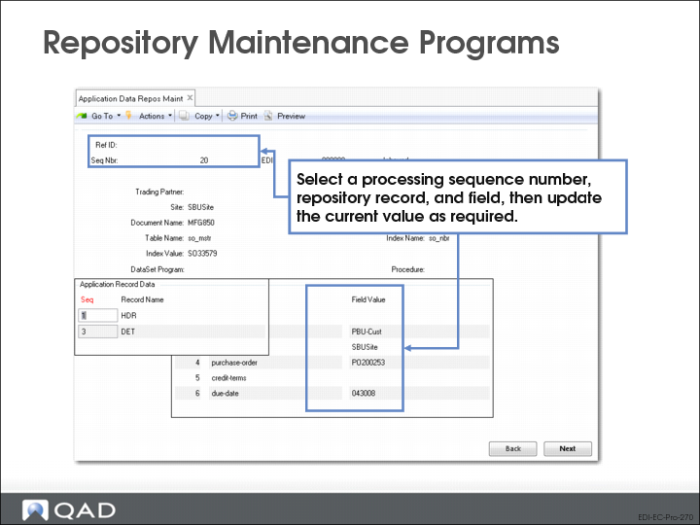
Use Exchange Data Repository Maint (35.9.3) or Application Repository Maintenance (36.9.10) to modify or add data in the associated portion of the data repository. For example, you might use this program to add a value to a missing mandatory field that is preventing the transformation process from completing. (The illustration shows the application data program; both programs operate the same way.)
Important: Use caution when modifying repository data. For example, changing data in a repository record that includes invoice data exported from QAD Enterprise Applications does not update the invoice itself. This can lead to database synchronization problems.
The reprocessing programs include three frames. When you select a repository document to maintain in the first frame, the system displays trading partner data and reference information about the document. Use the second and third frames to select the specific record and field that contains the data you want to maintain.
Note: A .NET UI menu collection—discussed in a later topic—lets you select a document through a browse and view or update associated records in both repositories, as well as reprocess them after correcting problems, through a single UI. Its repository maintenance functionality is similar to this program.
Document Reprocessing Programs
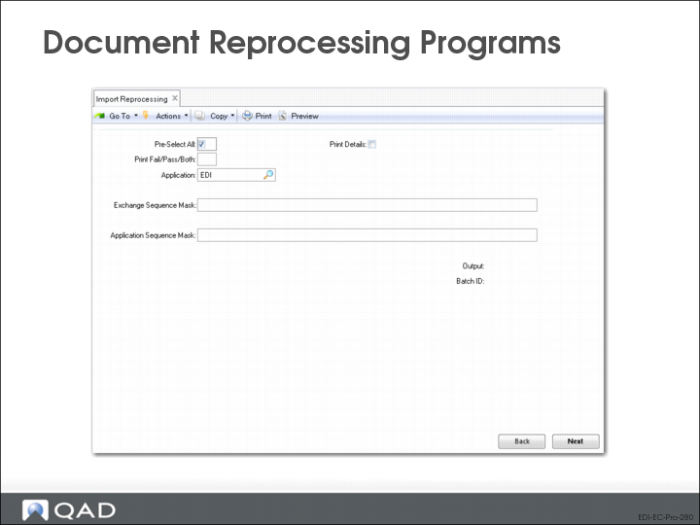
Separate programs for imported and exported documents:
• Import Reprocessing (35.9.21)
• Export Reprocessing (35.9.22)
UIs are identical.
Pre-Select All
Enter Yes to have all documents selected—that is, marked with an asterisk (*)—when displayed on the selection list. When this field is No, the documents still display, but none are initially selected.
When the list displays, you can select or deselect documents as needed.
Print Details
Enter Yes to include detailed information on the report that is output when this program is executed. If you enter No, the report includes only summary information.
Application
Enter a code representing the application that will have documents processed. The default is EDI.
Exchange, Application Sequence Mask
Specify one or more patterns, including wildcards (*), for the system to use in selecting records from the exchange or application repository for processing.
The system associates the values you enter with your user ID. Next time you run this program, the field defaults to the same values you entered previously.
Repository Maintenance Workbench Program
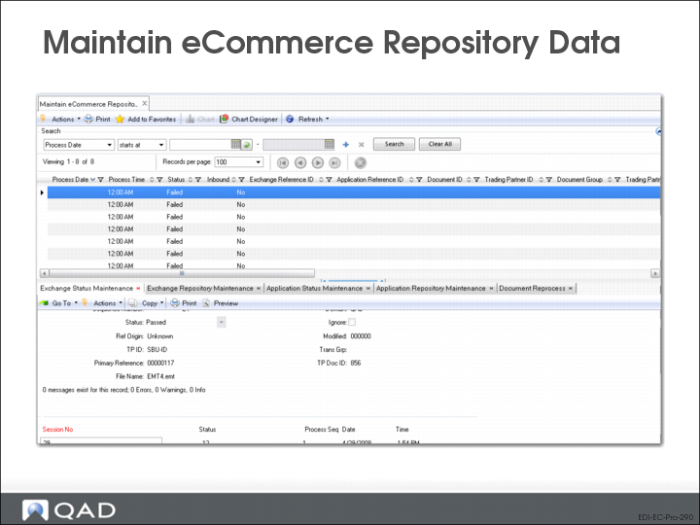
In the QAD .NET UI, Maintain eCommerce Repository Data allows you to view and update EDI eCommerce repository and status records from a single workbench-style access point.
In the initial browse window, you can use standard .NET UI filtering functions to limit the selection of documents displayed by process date, status, document direction, trading partner ID, and several other criteria. Next, select a record from the main browse window. The system populates the Sequence ID field in each of the five associated programs (shown as tabs below the browse window) based on the selected record. You can then:
• View status and processing messages in either the exchange or application repository. This is similar to the standard Exchange Doc Status Inquiry and Application Doc Status Inquiry programs, with some added functionality: You also can update the Passed/Failed status in either repository. Select Ignore to make the document unavailable for reprocessing.
• Modify information in the associated exchange or application repository document. The two workbench repository maintenance programs are very similar to the menu-level Exchange Data Repository Maint and Application Data Repository Maint functions. The main difference is that the workbench programs display less read-only data.
• Reprocess the updated records in both repositories using values that you have updated in the other programs. This is similar to the menu-level Import Reprocessing and Export Reprocessing functions. Note that reprocessing only takes place on the repository level. To re-import or re-export a file, use Document Import or the appropriate program—based on the document type—from the Document Export menu.
Importing Documents - Review