Related Functions
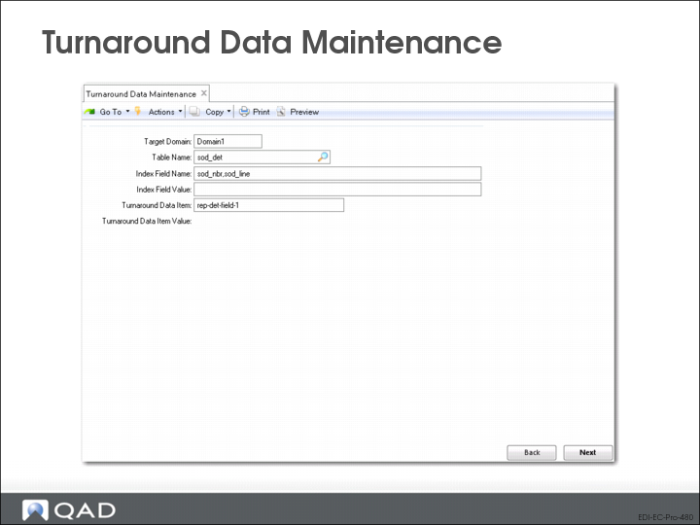
Turnaround Data Maintenance (35.9.17)
Import/Export Controller (35.17.5)
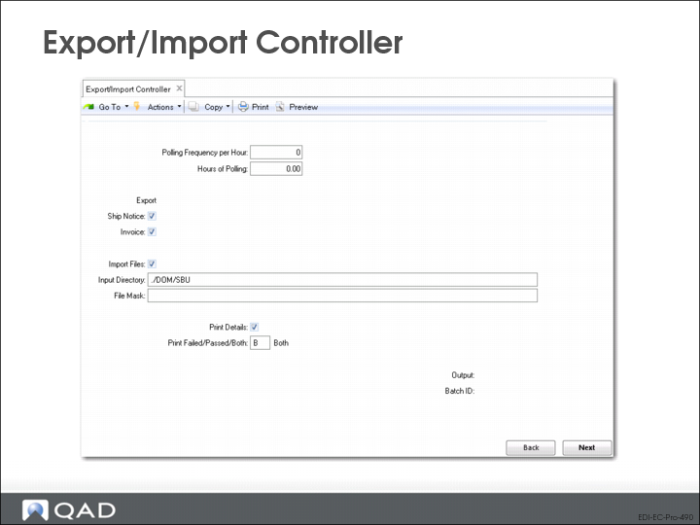
Use Export/Import Controller to export and import files on a regular schedule.
Based on the frequency and number of hours specified, the system searches the QAD Enterprise Applications database for confirmed shippers or invoices that have not been exported. When it finds a document, eCommerce begins processing automatically.
• If import = Yes, the system polls the import directory defined in eCommerce Control
Note: Outbound directories are specified in the destination field in Transmission Group Maintenance (35.13.13).
Polling Frequency per Hour
Number of times per hour the process should check for files to import or documents to export. Logical flags allow polling for various combinations of import and export functions.
Hours of Polling
Number of hours the process should check for files to import or documents to export.
• If zero, the process keeps checking for available items until manually interrupted
Ship Notice
When this is Yes, the system automatically searches for and processes confirmed shippers in the QAD Enterprise Applications database and generates ASNs.
Import Files
Yes = system automatically searches for and processes files in the inbound directory specified in the eCommerce Control.
Invoice
Yes = system automatically searches for and processes invoices in the QAD Enterprise Applications database.
Print Details
Yes = error and warning message detail appears on report that is output when program executes. No = report is limited to higher-level summary information.