AP Reporting
The most commonly used reports in Accounts Payable are:
• Supplier Activity Dashboard (28.18.1)
• Supplier Open Item Extended Report (28.17.5 or Basic Report 28.17.4)
• Supplier Aging Analysis Current (28.17.9)
• There are a wide range of AP reports, which are customizable to suit your reporting needs.
Supplier Activity Dashboard
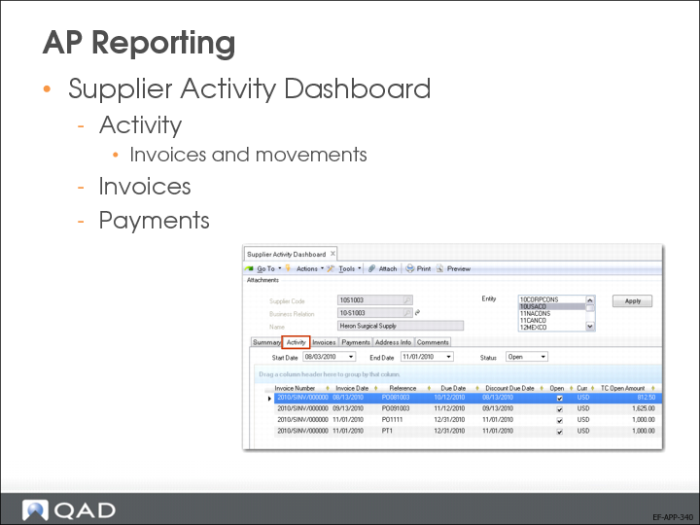
Supplier Activity Dashboard (28.18.1) offers a comprehensive overview of all activity related to a single supplier, in a single entity or over multiple entities. The drill-down generates read-only information that includes invoices, credit notes, and payments.
Supplier Open Item Extended Report
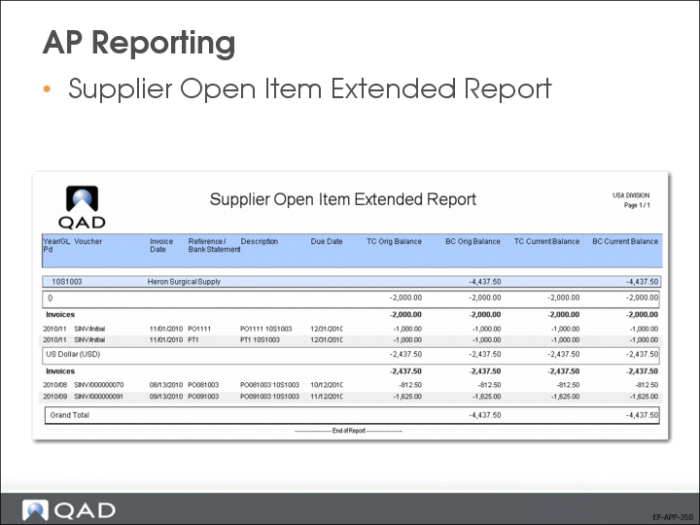
Select open or closed payments and display individual payment details, as well as total amounts for each selection you make. Optionally, you can filter by currency.
The Activity tab displays all invoices and associated payments for the supplier. Payments display as child rows beneath their associated invoices. View the invoice and payment information separately using the Supplier Invoices and Payments tabs.
Use grid features to group and sort information by key credit related details such as the number of weeks overdue, or see all invoices due in a certain week.
Supplier Aging Analysis Current
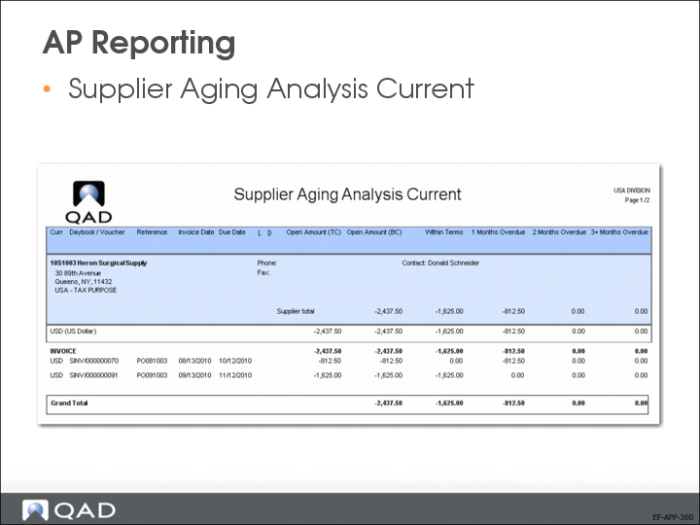
Lists all open items created in the specified time frame. Also lists the due supplier open items by number of periods overdue at the entered date for aging calculation. The supplier aging reports show both supplier postings (the supplier invoice posting and the matching posting) on the same report.
On the supplier aging reports, prepayments that are not allocated and remain as open items are included in the aging.