AR Processing
Invoicing Process and Highlights
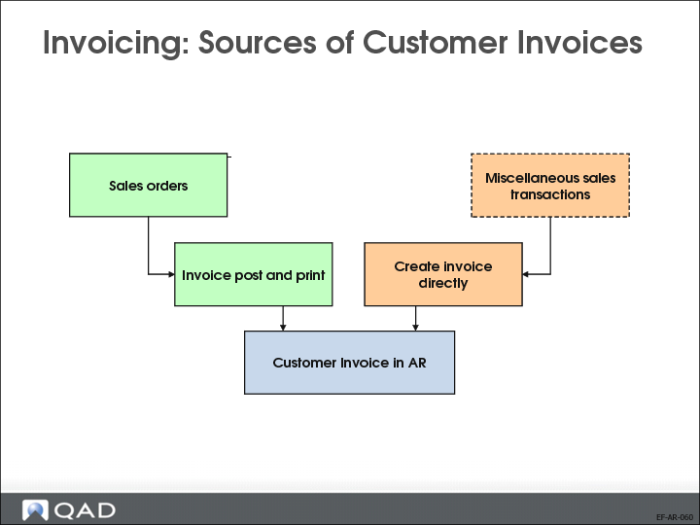
The Customer Invoice function is used for two purposes:
• You can view and modify invoices and credit notes created by Invoice Post and Print (7.13.4). Most of the information on these sales-related invoices defaults from the associated sales order and is set during invoice post; you can modify only a small subset of fields.
• You can directly create invoices for miscellaneous customer charges or credit notes. For this type of manual invoice, you must specify most of the fields that are automatically populated during invoice post.
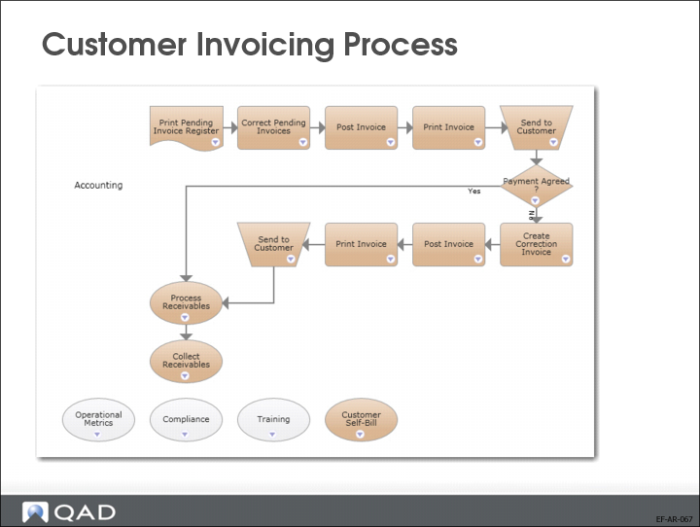
Customer Invoicing Process
Most customer invoices are generated from sales transactions in the Sales Orders/Invoices (7) module. The process of creating and modifying sales orders, shipping goods, and posting and printing invoices is described in detail in User Guide: QAD Sales.
Shipping a sales order creates a pending invoice, which can be printed using Preview Invoice Print (7.13.3), reviewed, and corrected using Pending Invoice Maintenance (7.13.1). Additionally, a credit controller can review credit-related information using Sales Order Credit Maintenance (7.1.13) and indicate that the order has been reviewed. A field in Sales Order Acct Control (36.9.6) determines if an order can be updated after it has been marked as reviewed. Once the pending invoice is reviewed, you can post and print the final invoice.
Posting the invoice creates the customer invoice in the AR module. Only a limited number of fields can be modified on customer invoices generated from sales orders; most corrections need to be made through the sales order functions.
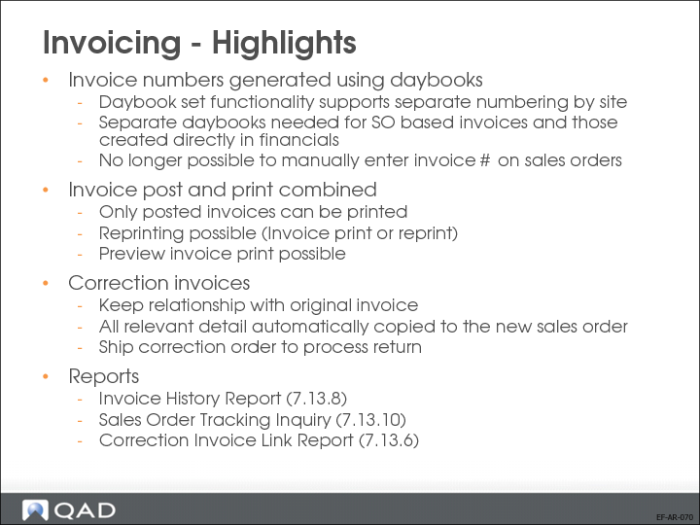
Invoicing - Highlights