Generalized Codes
QAD Enterprise Applications gives you the ability to restrict entries in certain fields by specifying what values are acceptable for a field. You do this by using generalized codes. Generalized codes are basically a list of acceptable values for a particular field. You determine what values are acceptable for a user to enter in a field. Then, if a user enters a value not on the list of acceptable values, the system does not accept the entry and displays an error message.
When using generalized codes, you can control three different conditions:
• What values are acceptable for a field. This list is maintained in Generalized Codes Maintenance (36.2.13)
• If a list of acceptable values displays. This is maintained in Drill Down/Lookup Maintenance Standard Edition (36.20.1) and in Drill Down/Lookup Maintenance Enterprise Edition (36.4.8.1)
• If the codes you have created are the only acceptable codes, that is, whether the list is validated. This may require that a validation expression be added to the data dictionary
To check whether a field draws on a list of codes for its values, put the cursor on the field and press Ctrl+F.
• If the message Generalized Codes Validation displays, then you can only enter the codes created and set up for this field in Generalized Codes Maintenance (36.2.13)
• If generalized codes have not been set up for this field, you can enter any value
Note: Not every field in an QAD Enterprise Applications database is available for validation.
Generalized Codes Display
Generalized Codes Validation
Generalized code validation requires a special validation expression in the database dictionary.
To see if this validation exists against a field, run the Generalized Codes Validation Report (36.2.15). If the field is listed on this report, the value of the field is validated against set values. You will also see a validation program listed under the column “Expression.” See the sample report above.
Note: There are many ways to validate the value of a field. If the field you want to put validation on does not appear on this list, it can still be validated at the program level.
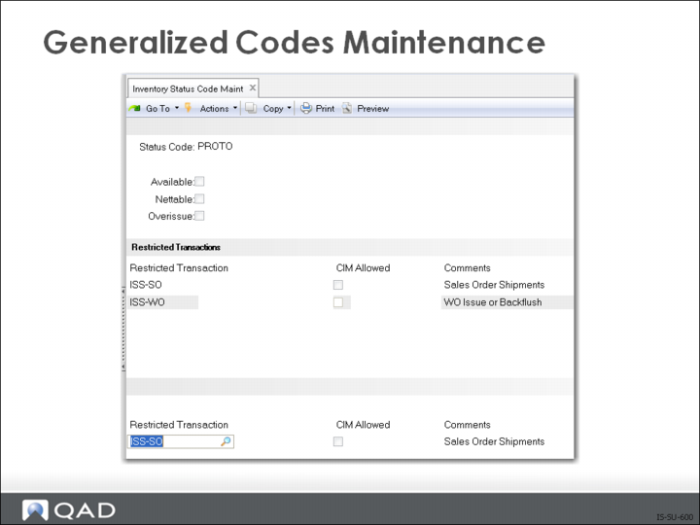
Generalized Codes Maintenance
Use to establish the acceptable values for a particular field.
Note: While blank codes can be set up as a valid code, it is not recommended. Coded fields are designed to convey information, a bank field creates a nebulous situation. This does not create the lookup browse. You do that using Drill Down/Lookup Maintenance Standard Edition (36.20.1) or Drill Down/Lookup Maintenance Enterprise Edition (36.4.8.1).
Before creating a list of generalized codes for a field, you must know:
• Field name
• Maximum number of characters accepted for the field
To find out the field name, press Control-F if you are using the Character or Windows interface. The field name displays in the lower left corner. If the message Generalized Codes Validation also appears, the system automatically verifies data entered in this field against the list of generalized codes.
Note: PROGRESS is not case sensitive.
Drill Down/Lookup Maintenance
• The lookup browse lists all the values set up in Generalized Codes Maintenance (36.2.13) as acceptable values for a field
• You set up a lookup browse by stipulating a procedure generating the display (gplu072.p) and indicating:
• The name of the field displaying the lookup browse
• You can also indicate the calling procedure (program)
• Use the following information when completing the fields:
Field Definitions
Field Name
Name of the field you want to display the lookup browse
Calling Procedure
Optional: The name of the calling procedure (program) you must be in for the lookup browse to display
By completing both the Field and Calling Procedure fields, you are stipulating that the procedure generating the display only runs for that field (Field) when it is called from within a certain program (Calling Procedure)
Example: You want to display a lookup browse for the field Unit of Measure (UM) in Item Master Maintenance (1.4.1). Unit of Measure is a critical value and should be controlled using Generalized Codes and Look Up. The field UM (pt_um) is used in several programs. By stipulating the calling procedure (program) for Item Master Maintenance (ppptmt.p), you stipulate the lookup browse only appears for the UM field when the user is in Item Master Maintenance. It does not appear for the UM field in a different procedure.
Note: You can create several different lookup browses for the same field by stipulating different calling procedures.
Procedure To Execute
gplu072.p
Description
Description you want to use as the header of the lookup browse
• Defaults from the data dictionary and can be changed
• If no description exists, the field name is a local variable
Lookup Starts At Row
The starting row number where the lookup browse displays, default is 7.
Lines In Lookup
Number of lines of information to display in the lookup browse, default is 6.
Note: gplu072.p is a basic program that gives you a general lookup. There are other lookup programs that can be substituted for certain fields on certain programs if necessary. A list of programs can be found at Lookup Browse. This can be sorted by “Procedure to Execute” to get a list of existing lookup browses.
Exercise 7: Generalized Codes
Instructions: Set up new, global, generalized codes validation for Unit of Measure.
1 Use Item Master Maintenance (1.4.1) to select item number 05-0579.
Position your cursor on the UM field.
If you are using .NetUI or Character User Interface press Ctrl+F. The field name will display in a pop up window in .NetUI or the lower left corner of the window. In some earlier versions of .NetUI the field name will appear as you hover the cursor over the field.
Make a note of the field name, pt_um.
2 Use Generalized Codes Maintenance (36.2.13) to enter the following:
Field | Data |
Field Name | pt_um |
Value | EA |
Comments | Each |
Click Next until you return to the Value field, enter KG, comments kilograms. Cycle through again and enter lb, pounds. Click Next and exit.
Exercise 8: Set Up a Look-Up Browse
Instructions: Set up a look-up browse for unit of measure in Item Master Maintenance.
1 Use Drill Down/Look Up Maintenance (36.4.8.1) in the Enterprise Edition, or use Drill Down/Look Up Maintenance (36.20.1) in the Standard Edition.
Accept the default Lookup.
Move your cursor to the Field Name field; enter pt_um.
Field | Data |
Calling Procedure | <blank> |
Procedure to Execute | gplu072.p |
Description | UM |
Accept the remaining defaults.
Note "gplu072.p" is a standard executable program for creating a look-up browse to display the generalized codes for any field.
2 Use Item Master Maintenance (1.4.1) Bring up item number 05-0579.
Move your cursor to the UM field and enter pc for piece.
The system rejects the entry with an error message.
From the list, select EA.