Configuration Tips
Configuration Tips
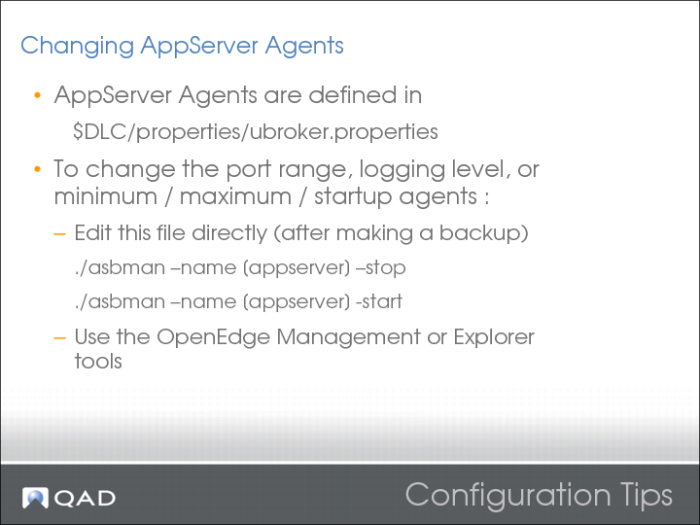
Example definition:
[UBroker.AS.qadfinpilot]
appserviceNameList=qadfinpilot
brokerLogFile=/dr02/ee2010.1/qdt/logs/qadfinpilot.broker.log
controllingNameServer=NS1
description=Financials AppServer
environment=
initialSrvrInstance=2
maxSrvrInstance=8
minSrvrInstance=2
operatingMode=Stateless
portNumber=53810
PROPATH=/dr02/ee2010.1/qdt/envs/pilot/configs:/dr02/ee2010.1/erp/fin/qxtend:/dr02/ee2010.1/erp/fin/patch:/dr02/ee2010.1/erp/qra:/dr02/ee2010.1/erp/qra/qra.pl:/dr02/ee2010.1/erp/fin:/dr02/ee2010.1/erp/fin/qadfin.pl:/dr02/ee2010.1/erp:/dr02/oe102b
srvrActivateProc=program/activate.p
srvrConnectProc=program/connect.p
srvrDeactivateProc=program/deactivate.p
srvrLogFile=/dr02/ee2010.1/qdt/logs/qadfinpilot.server.log
srvrMaxPort=52020
srvrMinPort=52011
srvrShutdownProc=program/shutdown.p
srvrStartupParam=-rereadnolock -s 512 -mmax 16000 -inp 32000 -tok 20000 -TB 31 -TM 32 -Bt 10000 -cpinternal utf-8 -cpstream utf-8 -cpcoll basic
srvrStartupProc=program/startup.p
sslEnable=0
uuid=23c88154b11c24d8:-63250668:12b569c785a:-7ffd
workDir=/dr02/ee2010.1/erp/fin
Configuration Tips 2
Configuration Tips 3
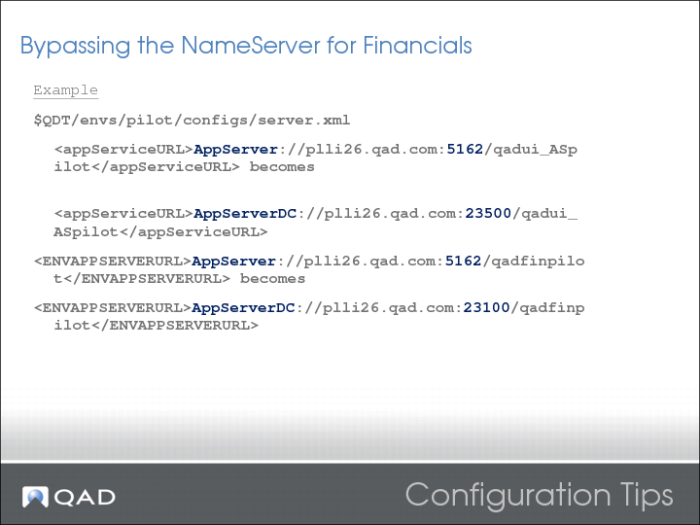
In this example, 23500 would be the qadui_Aspilot Appserver port and 23100 would be the qadfinpilot AppServer.
Configuration Tips 4
Configuration Tips 5
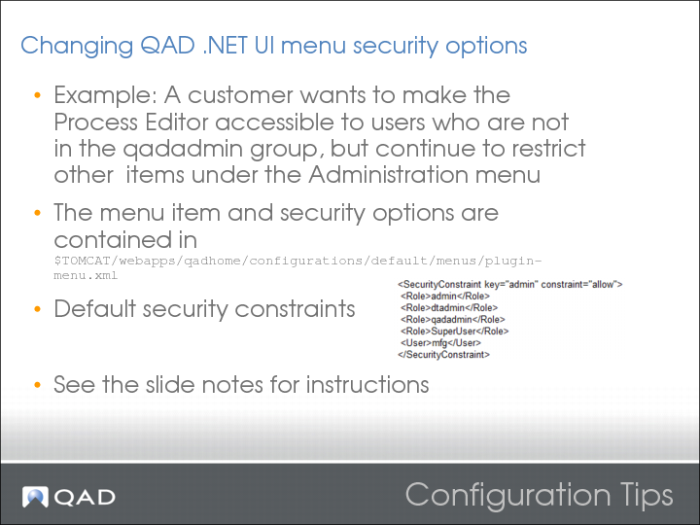
The Security constraint:
<SecurityConstraint key="admin" constraint="allow">
<Role>admin</Role>
<Role>dtadmin</Role>
<Role>qadadmin</Role>
<Role>SuperUser</Role>
<User>mfg</User>
</SecurityConstraint>
Add an additional one call processadmin and link it to an MFG/PRO role:
<SecurityConstraint key="processadmin " constraint="allow">
<Role>somerole</Role>
</SecurityConstraint>
This top-level menu folder is the current "Administration" folder:
<ShellMenu key="images" menuType="application" label="${Admin}"security="admin">
Add this one after the </ShellMenu> from the previous example:
<ShellMenu key="ProcessAdmin" menuType="application"label="ProcessAdmin" security="processadmin">
</ShellMenu>
Now add the desired Menu Item in the new folder. Copy the current ProcessAdmin reference into the code as follows:
<ShellMenu key="ProcessAdmin" menuType="application"label="ProcessAdmin" security="processadmin">
<ShellMenuItem key="menu.process.editor1"label="${ProcessEditor}" image="ProcessMap"> <Command type="QAD.Commands.WebBrowserCommand">
<Parametervalue="${DesktopBaseUrl}/ProcessEditor.jsp?apisource=AppShell"type="System.Uri,System"/>
<Property name="Title" value="${ProcessEditor}"/>
</Command></ShellMenu>
Note: Label terms are specified using ${SOME_TERM}. These label terms are translated if a label term is found in MFG/PRO at login. It is important that the "key=..." values be unique.
Controlling Browse Limits
Limiting User Connections
The menu item and its security options are contained in the plugin-menu.xml file. The file contains three relevant sections.
The Security constraint:
<SecurityConstraint key="admin" constraint="allow">
<Role>admin</Role>
<Role>dtadmin</Role>
<Role>qadadmin</Role>
<Role>SuperUser</Role>
<User>mfg</User>
</SecurityConstraint>
Add an additional one call processadmin and link it to an MFG/PRO role:
<SecurityConstraint key="processadmin " constraint="allow">
<Role>somerole</Role>
</SecurityConstraint>
This top-level menu folder is the current "Administration" folder:
<ShellMenu key="images" menuType="application" label="${Admin}"security="admin">
Add this one after the </ShellMenu>:
<ShellMenu key="ProcessAdmin" menuType="application"label="ProcessAdmin" security="processadmin">
</ShellMenu>
Now add the desired Menu Item in the new folder. Copy the current ProcessAdmin reference into the code as follow:
<ShellMenu key="ProcessAdmin" menuType="application"label="ProcessAdmin" security="processadmin">
<ShellMenuItem key="menu.process.editor1"label="${ProcessEditor}" image="ProcessMap">
<Command type="QAD.Commands.WebBrowserCommand">
<Parametervalue="${DesktopBaseUrl}/ProcessEditor.jsp?apisource=AppShell"type="System.Uri,System"/>
<Property name="Title" value="${ProcessEditor}"/>
</Command></ShellMenu>
Note: Label terms are specified using ${SOME_TERM}. These label terms are translated if a label term is found in MFG/PRO at login. It is important the "key=..." values be unique.
Visibility Tips
Visibility Tips 2