Inventory Status Codes
The system uses inventory status codes to determine if the inventory balance at a site or location is:
• Available for sales order and work order allocations. Allocations are used to reserve inventory and assist in picking inventory to be shipped or issued
• Nettable for MRP calculations
• Issued even if the site or location has a zero or negative inventory balance
• Not available for particular kinds of inventory transactions. For example, material located in scrap locations should not be used for sales order issues
Inventory Status Code Maintenance
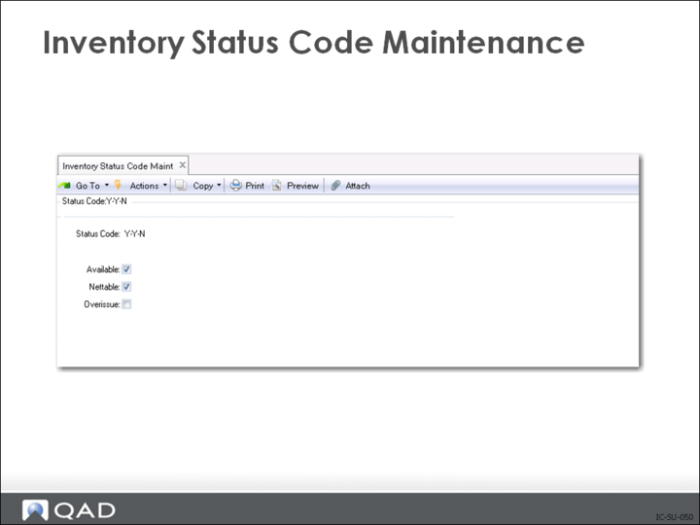
Use Inventory Status Code Maintenance (1.1.1) to create and modify inventory status codes.
• Use Site Maintenance (1.1.13) to assign default inventory status codes to sites
• Assign inventory status codes to locations using Location Maintenance (1.1.18)
• Optionally assign default inventory status codes for purchase order or work order receipts to individual items using one of the following:
• Item Master Maintenance (1.4.1)
• Item Inventory Data Maintenance (1.4.5)
• Item-Site Inventory Data Maintenance (1.4.15)
At least one inventory status code must be defined before you can enter site and item combinations. Set up an initial inventory status code (good or ok might be examples) that is available and nettable. Then set up other inventory status codes as needed. Sites, locations and items in inventory are required to have an inventory status code.
While it is a common practice to have a default code of blank, it is not recommended. Blank code fields create ambiguous situations. When printing inventory reports using the Inventory Status Code, blank does not work in the selection criteria.
Status Code
This code identifies the status of inventory in a specific site and location with a specific lot/serial number (if lot/serial controlled), and lot reference. Inventory status codes can restrict particular transactions at specific locations. For example, you can restrict issues from an inspection location.
Available
This field indicates whether inventory balances with this status code are available for allocations to sales orders and work orders. This does not affect the available-to-promise calculations.
If this field is Yes, on-hand inventory balances with this status are considered to be available.
When allocating inventory, the system calculates the quantity available to allocate as the total quantity on-hand at all inventory locations flagged Available Yes. Any locations flagged Available No are not considered by this calculation.
Most inventory will be assigned available status codes.
Unavailable inventory status codes identify inventory not to be shipped to customers or used in the manufacturing process at the current time, such as inventory waiting for inspection or defective material to be reworked.
Nettable
This field indicates whether MRP considers inventory balances with this status code as quantity-on-hand.
During the planning process, MRP calculates the net quantity on-hand as the sum of the quantity in all locations flagged Nettable Yes. Locations flagged Nettable No are not considered by this calculation.
Most inventory will be assigned nettable status codes.
Non-nettable inventory status codes identify inventory not to be shipped to customers or used in the manufacturing process because it is defective or reserved for some other use.
For multi-site implementations, Nettable must be set to No for in-transit locations. Otherwise, MRP will use supply in that location twice, once from the scheduled receipt, then from the nettable quantity in the location.
Set up inspection locations as nettable because you do not want MRP to plan to order more when you already have inventory on-hand. Inspection locations are controlled by restricting issue transactions.
Overissue
This field indicates whether inventory balances with this status code are allowed to go negative.
If Yes, then inventory can be issued from a location even if that issue results in a negative balance on hand: with only 5 items in stock at a particular location, the system would allow you to issue a quantity of 7, resulting in an on-hand balance of -2. To prevent this, set the Overissue field to No. This stops overissues in all inventory transactions.
However, in the case of two or more users simultaneously committing transactions to ship the same stock, it is possible that due to this close timing the balance will go negative despite a No setting. If the inventory is physically available, the operator should be able to record the issue transaction, even if the data entry for inventory receipt is delayed, as often happens when information is batched for data entry.
In a well-controlled stockroom, most items can safely be allowed overissues. As transactions are processed, balances may temporarily be driven negative, but will be resolved when all transactions are entered.
However, in a regulatory environment or where items are lot/serial controlled, you may want to set the Overissue field to No and develop data entry procedures that ensure the timely entry of inventory transactions.
Overissue should always be set to No when using Average Costing.
Restricted Transaction
Enter a code identifying the restricted inventory transactions for on-hand balances with this inventory status code. A complete list of available transaction type codes is available with the lookup icon on the restricted transaction field.
When you process an inventory transaction, the system checks the inventory status of the affected item and site or location to verify that the transaction is not restricted. If it is, an error message displays and you cannot proceed.
For example, you can create an inventory status that restricts the ISS-WO transaction and assign it to an inspection location. If a user tries to issue a component to a work order from this location, an error displays. To proceed, you must change the location status or transfer the item to another location.
When you define inventory statuses for inspection and scrap locations, restrict both ISS-WO and ISS-SO. This prevents items in these locations from being issued to work orders or shipped to customers. ISS-SO restricts both sales order shipments and RMA issues. Use ISS-RMA to restrict RMA receipts. You typically allow ISS-PRV and ISS-TR for items in inspection, since you want to be able to return them to the supplier or transfer them to a different location.
Some transactions are required by the system. You cannot prevent them from occurring, even if you list them as restricted.
A status code of MRB (material review board) means the material put in a location with this status code is being reviewed for its fitness for use. Set Available (for allocations) to No and Nettable (for MRP) to No.
If material is not fit for use, you do not want to book an order for it, ship it, or issue it to a work order, so the restricted transactions would be:
• ORD-SO Sales Order Booking
• ISS-SO Sales Order Shipments
• ISS-WO Work Order Issue or Backflush
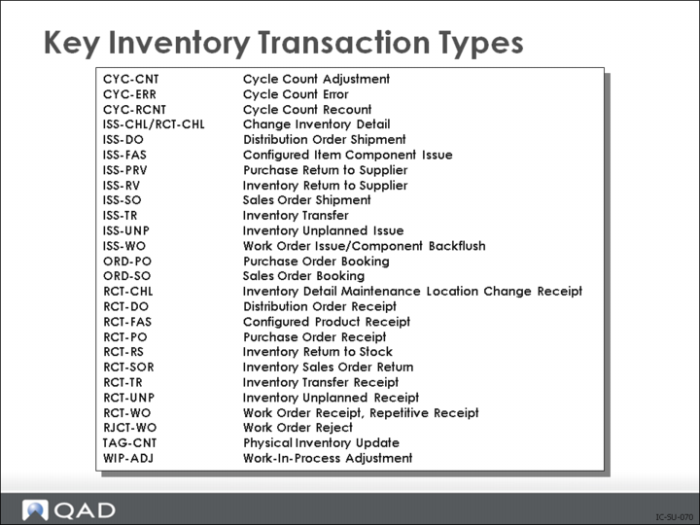
Key Inventory Transaction Types
This partial list of transaction types contains the types usually associated with inventory movement.