Sites
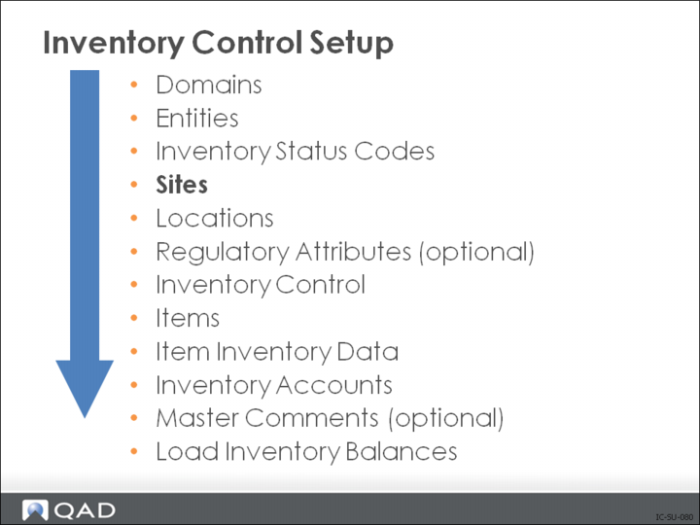
The site code identifies a specific warehouse or group of buildings at the same physical location. Inventory functions are processed by site, including:
• Inventory
• Forecasts and production schedules
• Production methods and costs
• Material and capacity plans
• Reports
Most functions work within one site. For example, manufacturing orders expect to find all components at the same site, and MRP or DRP calculates requirements one site at a time. A few functions deal with multiple sites such as multi-site purchase or sales orders, distribution orders, and distributed inventory inquiries. Site codes must be unique across all databases.
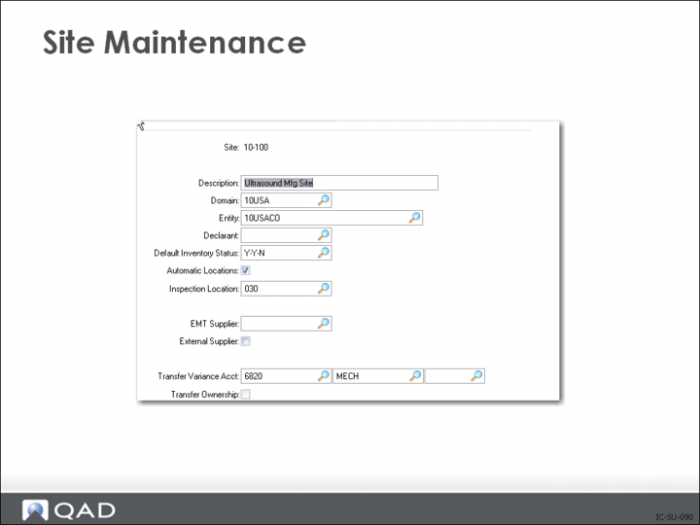
At each site, you can store inventory at multiple locations. A location defines an area, such as a shelf, bin, or tank within a site. Because inventory locations are a subset of site, the same location codes can be used for different sites. By setting the Automatic Locations field in Site Maintenance (1.1.13) to Yes, the system can create locations automatically as it processes receipts. Or you can define them manually in Location Maintenance (1.1.18)
Each site is assigned to a GL entity for financial reporting. You can have more than one site for each entity, and all locations within a site belong to the same entity.
Site Maintenance
Entity
This field indicates the GL entity tracking the financial aspects of activities at this site.
The entity to use on a transaction is determined based on site. Any transaction may reference more than one site, and possibly more than one entity. Intercompany transfer transactions are automatically created when more than one entity is involved.
Example: You have two sites (site 1000 and 2000) each at different companies (entity 1 and entity 2). If you have a work order at site 1000 and issue inventory from site 1000 to that work order, the resulting GL transaction only affects entity 1 (crediting inventory and debiting WIP).
Default Inventory Status
The inventory status code associated with a site sets the default for all locations within it. When inventory is received in a location, it takes on the inventory status of the location. Use Inventory Detail Maintenance to change the inventory status code for an individual item once it is in a location
Automatic Locations
You can control whether new inventory locations can be added automatically during an inventory transaction. If this field is No, then new locations must be set up using Location Maintenance (1.1.18).
Automatically adding locations is handy, but can get you into trouble because of typographical errors, especially if you allow overissues. For example, if you receive 100 units of an item into location STOCK, the system adds a new location record for STOCK.
If you receive an additional 50 units of the same item but accidentally enter the location STOKC, the system displays a warning “Location does not exist” and continues by adding a new location for STOKC. If you later issue 150 units from STOCK, and overissues are permitted, you will end up with a quantity of -50 in STOCK and +50 in STOKC.
It is recommended that Automatic locations should always be set to No. If you have complex location identification schemes, consider using the lot reference field to specify the sub-location, such as the:
• Row
• Shelf
• Bin
• Pallet
• Spool
EMT Supplier
This field in Site Maintenance (1.1.13) is used in the EMT order processing environment and specifies the default supplier for this site. If left blank, memo items will be created as non-EMT memo items. When a valid supplier is specified, memo items will be created as EMT memo items.
The default supplier must exist in Supplier Maintenance (2.3.1). The default handler will not accept a blank entry in this field until it has checked the last element in the sequence and found no valid default supplier.
An enhancement to EMT supports the handling of orders across multiple levels within an organization. This functionality is called multi-level EMT.
External Supplier
When you are using the direct allocation feature of EMT, specify whether this site corresponds to a secondary business unit (SBU) in an external, connected database.
With direct allocation, the primary business unit (PBU) can make a special, temporary allocation of an EMT sales order or material order line item in the SBU’s database by changing the line-item site to one that corresponds to the SBU’s connected database. When the SBU imports the PBU’s EMT purchase order to create a secondary sales order, the system automatically converts this temporary allocation to a general allocation.
• If this field is No, it indicates that this is an internal supply site.
• If this field is Yes, this site corresponds to an SBU in the connected external database specified in the Database field. The PBU can directly allocate the SBU’s inventory.
Transfer Variance Account
This is the GL account code normally used to track cost variances on inventory transfers between two sites.
Inventory activity typically occurs at the site where the order is processed, known as the primary site. However, in a multi-site environment, you can ship, receive, or issue inventory from a different site. If the other site has different costs for the item, a variance occurs.
This variance is posted to the Transfer Variance account. If the two sites are in different entities, an intercompany transaction may also be posted. The system automatically updates costs at both the central and remote sites.