Item Inventory Data
Inventory control is responsible for the security, movement, accuracy, and in some cases the allocation of inventory.
Every item has inventory control information associated with it used to track and control the movement of the item. For example, if an item has an expiration date, the system does not issue the item after that date.
You can make sure that codes are entered consistently by entering the allowed codes into Generalized Codes Maintenance (36.2.13). The system verifies entered codes against these predefined values, preventing incorrect codes from being entered.
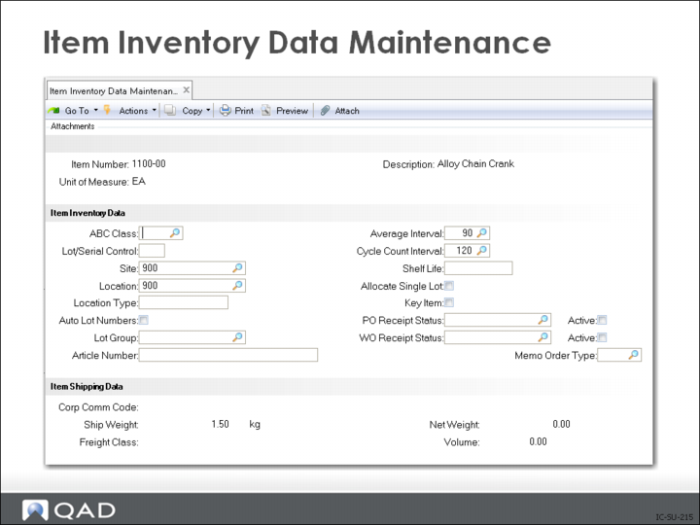
Item Inventory Data Maintenance
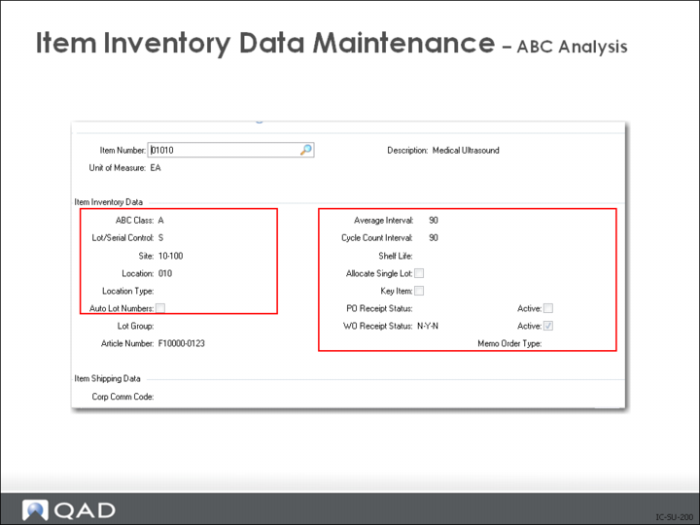
ABC Analysis
Enter a code classifying and ranking this item. This field is validated against predefined values entered in Generalized Codes Maintenance (36.2.13) for field pt_abc, if any.
ABC classification codes determine the cycle count frequency and the error tolerance allowed for each item. ABC class can also determine how an item is managed.
Class A items often require tighter physical control, such as a locked stocking area, and tighter planning parameters, as well as more frequent cycle counts.
You can generate some reports, such as the Inventory Valuation Report, for ranges of ABC classes.
The value entered in Item Master Maintenance is used as the default for all sites. You can set up site-specific values in Item-Site Inventory Data Maintenance (1.4.16).
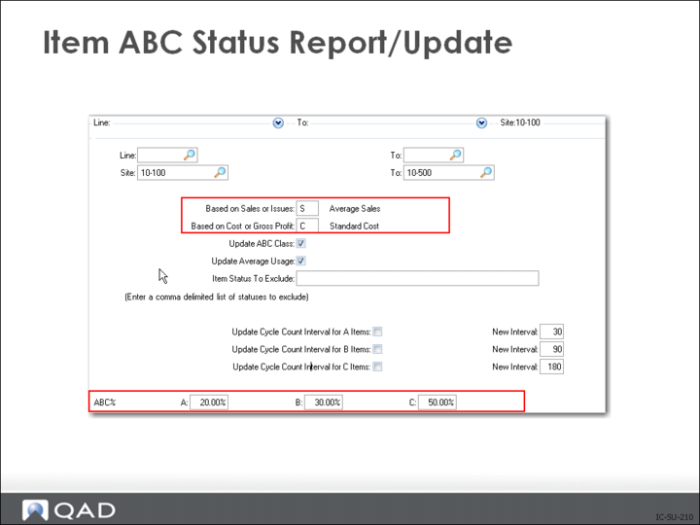
You can use Item ABC Status Report/Update (1.5.9 or 3.6.3; in Enterprise Edition, the enhanced .NET UI version is available at 1.5.32 and 3.6.25) to calculate ABC codes automatically based on annual item usage amounts.
The default percentages are:
• The top 20% are given class A
• The next 30% are given class B
• The rest are class C
However, you can adjust these percentage as needed.
Any quantity below C is assigned a blank ABC code. For example, when A is 10%, B is 20%, and C is 30%, the remaining 40% is set to blank. You can also classify items manually. You might do this for an item that has low use but is expensive or theft-prone.
Note: When you first implement the system, load ABC classes either from the old system or manually. The Item ABC Status Report/Update or produces meaningful results only when it analyzes at least six-month’s data.
While you can assign other class codes, Item ABC Status Report/Update only reports and updates items with a class of A, B, C, or blank. Be careful not to assign a non-blank and non-ABC code to any item that may become an A, B, or C item.
Assign any non-inventory items such as configured products, pseudo items, or planning parts a different ABC class.
ABC analysis is based on Pareto’s law, which says that in any group of items to be controlled, a small percentage accounts for the largest percentage of the total effect. This is also known as the 80/20 rule, which says that 20% of the items have 80% of the effect.
In inventory management, 20% of the items generally hold 80% of the inventory value. Usually this value is monetary, but it can also include:
• Usage
• Lead time
• Scarcity
• Shelf life
Value can be any factor that makes this item more important than the average item.
Item ABC Status Report/Update
The system sets the classification of inventory items when you run the Item ABC Status Report/Update (1.5.9). The calculation is based on annual usage, either sales or issues, and cost or gross profit.
The Item ABC Status Report/Update identifies the item’s relative importance and how tightly controlled it should be. More important A items are cycle counted more often and more carefully than C items. Count frequencies and error tolerances are identified by ABC Class. Normally ABC classifications are reviewed and updated at least once a year.
You can choose different methods of classification for different product lines. For example, the top 50% of the items by gross profit of sales may be class A in one product line, but only the top 20% may be class A in another product line. After the ABC analysis is run, you may want to change the system suggestions for classification for some items. A key $0.10 item that takes six months to buy and a $100 item may both be class A items.
Only items with a class of A, B, C, or blank are reported and updated by the Report/Update. Items you assign to any other class are not included. Do not apply a non-blank and non-ABC code to any item that may ever become A, B, or C items. Assign a different ABC class to any non-inventory items, such as warranties, configured products, pseudo items, planning parts.
Important: Item ABC Status Report/Update does not update Item Master Maintenance or Item Inventory Data Maintenance, but does update Item-Site Inventory Data Maintenance. Make manual adjustments in Item-Site Inventory Data Maintenance.
Item Inventory Data Maintenance
Lot/Serial Control
L for lot control S for Serial Control blank for no control.
Site
The default site code for this item. Displays in the site code field on transactions and should be the site that will generate the most transactions.
Location
The default location code for this item. Displays in the location code field on transactions and should be the location that will generate the most transactions.
Location Type
The location type where this item should be stored, such as tank, silo, freezer. It is matched against location type for the inventory location the item is being received or transferred into.
Auto Lot Numbers
Should the system assign lot numbers automatically, check for yes. Only valid if Lot Control is L. For work orders they system puts the work order ID number in the Lot Number field upon receipt into an inventory location. Not available for purchase items.
Lot Group
If the Regulatory Attributes Module is in use Lot Group Maintenance may be used to create configured lot numbers with leading or trailing characters, defined sequence length and beginning number. Numerous lot group formats may be defined. This field on the item defines which format will be used. The lot number is assigned at inventory receipt and is available for both manufactured and purchased items.
Average Interval
The system maintains an average issues per day value for all items. This field determines how many days of issues should be used in the calculation.
Cycle Count Interval
How often should this item be cycle counted? Normally reset by the ABC Status Report/Update based on the items ABC code.
Self Life
Number of days from receipt before item expires or becomes questionable. This number of days is added to the receipt date to determine the expire date, after which the item cannot be allocated or issued.
Allocate Single Lot:
For Lot Control items only, requires sale order and work order issues of this item be from a single lot. Can be over ridden with manually allocations.
Key Item:
If yes, prevents release of a work order if there is insufficient quantity of a key item.
PO Receipt Status
For purchased items sets the default status upon receipt. The Active check box turns this function on or off.
WO Receipt Status:
For manufactured items sets the default status upon receipt. The Active check box turns this function on or off.
Memo Order Type
Memo items do not generate inventory transactions. Items not defined in the Item Master placed on a sales or work order have their line type set to M for memo. You may have items set up in Item Master Maintenance that are memo items, such as sales literature, use this field to code the different types of memo items you create Item Master records for.