Obsolete Inventory Analysis
Obsolete Inventory Analysis Overview
Note: The features of Obsolete Inventory Analysis are only available in QAD EE.
Current Surplus Inventory Report
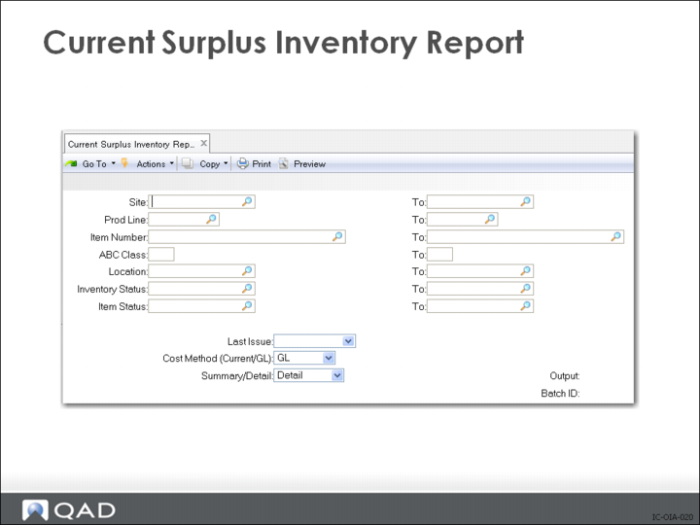
The Current Surplus Inventory Report reads inventory transaction history (tr_hist) records to determine when each item in the selected range was last issued to a work order, a sales order, or an unplanned order. Inventory in locations that has not been issued since the selected Last Issue date is reported as surplus. If no appropriate tr_hist records are available, the less precise last issue date in the inventory master (in_mstr) is used. If the last issue date is not set, indicating there have been no issues for this item, the last receipt date from the inventory master is used to determine if the inventory qualifies as surplus.
The Current Surplus Inventory Report displays, by site and product line, the last issue date for an item, the expired quantity and valuation, and the quantity on hand and valuation. The expired quantity is the sum of all quantities with location detail records that are beyond the expiration date. The quantity on hand is the total available quantity on hand minus expired quantities. Each affected item is printed; totals are printed for each product line, site and for the report itself.
The Cost Method setting determines whether the valuations use current or GL costs. The Summary/Detail, when set to Summary, excludes item detail.
Projected Surplus Inventory Report
Different companies have different criteria for surplus inventory. The most common criteria is that anything over one year’s supply is surplus so effective date would be set to today + 365.
The other common definition of surplus is end of run. For example, I am going to make 200 of item A and then close down the line. In this case you would make sure that you had forecasts covering 200 of item A and sufficient quantity of all other end items so that those items will be fully consumed between now and the effective date that you select. You run MRP and then run the Projected Surplus Inventory report at that effective date. All non-surplus items are consumed (either by forecasts for other end products, or by forecasts for 200 A’s). Any remaining items print on the Projected Surplus Inventory report and are those items left over after 200 sets of A have been built and that are not consumed by other demands.
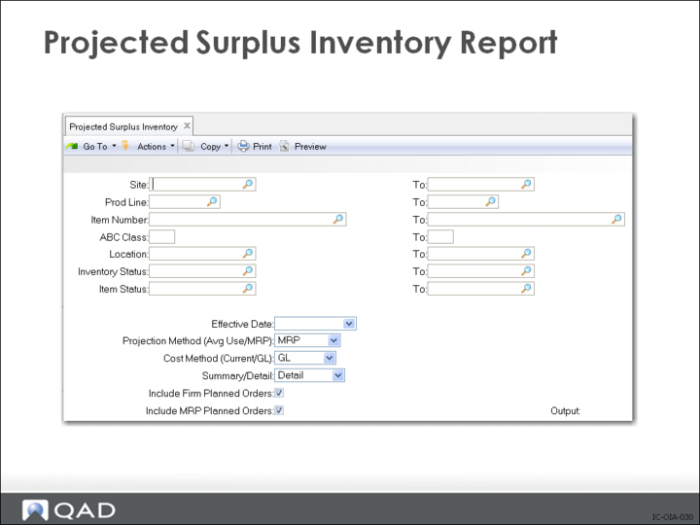
The Projected Surplus Inventory displays, by site and product line, the quantity on order for an item, the expired quantity and valuation, and the ending quantity (depending on projection method) and valuation. Each affected item is printed; totals are printed for each product line, site and for the report itself.
• The quantity on order is the sum of all outstanding planned and scheduled supply orders.
• The expired quantity is the sum of all quantities with location detail records beyond the expiration date.
• The ending quantity and the items reported are controlled by the Project Method setting.
If you select the MRP projection method, the formula is:
ending quantity = today's onhand_balance - (MRP demand between now and effdate) + (MRP supply between now and effdate) > 0
When using MRP, run the Regenerate Materials Plan first to make sure that all supply and demand records are current. It is typical when using the Projected Surplus Inventory report in this way to create a forecast for unscheduled production and to make sure that the MRP horizon exceeds the selected date.
If you select the Average Usage projection method, the formula is:
ending quantity = today's onhand_balance - ((effdate - today) * (avg usage)) > 0
When using Average Usage, run Item ABC Status Report/Update first in order to flush the accumulated Issue Change to Average Issues. Average issues is an exponentially smoothed average (see the APICS dictionary) with the Averaging Interval (in_avg_int) used as the smoothing constant.
The Cost Method setting determines whether the valuations use current or GL costs. The Summary/Detail, when set to Summary, excludes item detail. You can also include or exclude firm planned and planned orders.