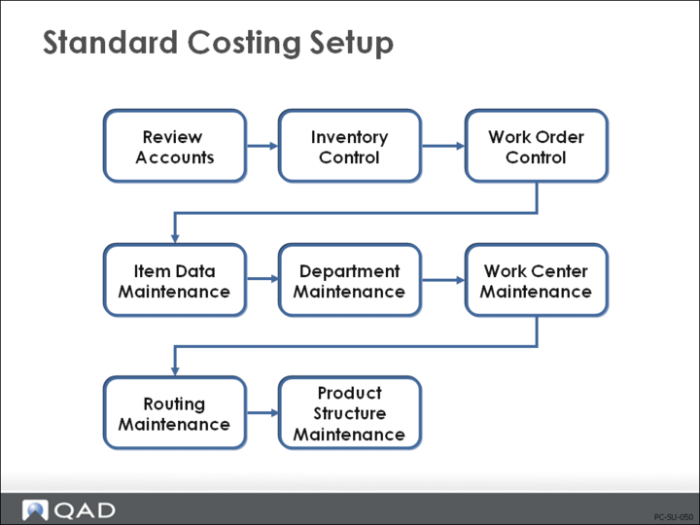
Product Costing: Summary of Setup
The steps that are covered in this chapter are summarized below.
1 Review accounts
These accounts are discussed in detail in the Introduction to Costing training guide.
2 Set up work order and inventory control programs
Several fields pertain to cost accounting in these control programs, including how current costs are maintained (as average, last, or none) and the accounts for intersite transfers; both are set in Inventory Accounting Control (36.9.2).
Another important setting is in Work Order Accounting Control (36.9.11), which lets you determine when labor and burden rate and usage variances get posted if you are reporting labor in the Shop Floor Control module.
3 Enter/review data in Item Master Maintenance (1.4.1)
Manually enter this-level costs (purchased materials and associated overhead) in the current cost set using Item Data Maintenance, Item Master Maintenance (1.4.1), Item Cost Maintenance (1.4.9), or Item Site Cost Maintenance (1.4.18).
Fields particularly relevant to item costing in the item planning frame are order quantity (identifies the standard order size for setup cost allocation), purchase/manufacture field, phantom field, and yield percent.
4 Set up departments in Department Maintenance (14.1)
The system creates general ledger transactions using the accounts associated with the department code to collect labor, burden, and subcontract costs. (The individual department accounts are discussed in detail in the Introduction to Costing training guide.)
5 Set up work centers in Work Center Maintenance (14.5)
The work center provides hourly labor rates, labor burden rates, labor burden percent, and machine burden rates, which are used in routing cost roll-ups.
6 Set up routings in Routing Maintenance (14.13.1)
Routings provide setup and run times per operation, machines per operation, and operation yield percent. Subcontract cost per unit is entered for each subcontracted operation.
7 Set up product structure in Product Structure Maintenance (13.5)
The product structure attaches components to the parent item and defines the quantity per. Scrap rates are entered. Product structure type codes are entered.