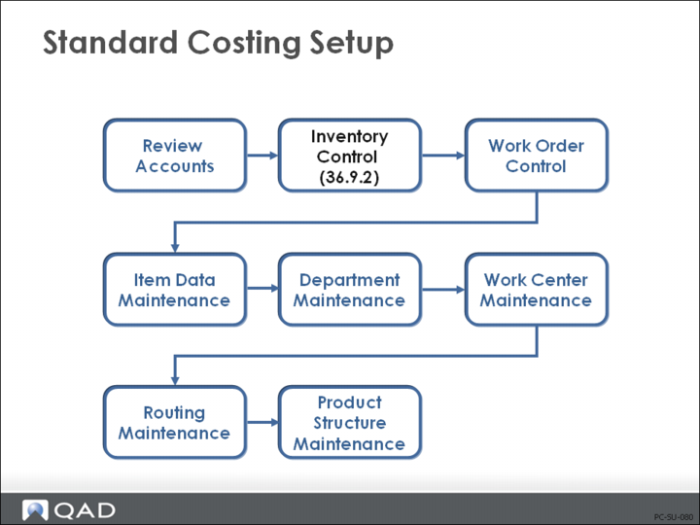
Set Up Inventory Control
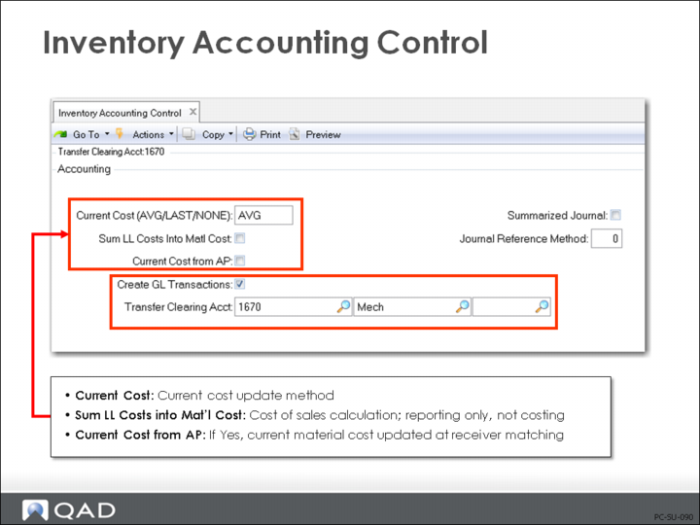
Several settings in Inventory Accounting Control (36.9.2) control how costs are calculated and how they are posted to the general ledger.
Inventory Accounting Control
Current Cost
Current material, labor, and burden costs are maintained as Average, Last, or None.
None: Current costs are not maintained by the system. This must be done manually. Even if purchase line items have the field Update Avg/Last Cost set to Yes, an Inventory Control setting of None takes precedence, so no update will occur.
Average: Current costs are updated using a simple weighted average. This occurs for purchased items when the purchase order is received. For manufactured items, labor and burden are updated by the work order accounting close to reflect the actual hours spent.
Last: The current cost is simply set to the last cost on the purchase order or work order.
This is a domain-wide setting; all current costs for any site in the domain will be maintained using the setting selected None, Average, or Last unless you use the Cost Management module.
Note: With the Cost Management module, you can use different cost sets with different costing methods at each site. Then use cost set to site assignment to specify which sites use which cost sets.
Sum Lower Level Costs into Material Cost
Cost of Goods Sold (COGS) is posted to the GL as the total (this-level plus lower-level) cost for each of the five cost categories: material, labor, burden, overhead, and subcontract. To report all lower-level costs as COGS-Material (as if all components were bought from outside suppliers), set Sum LL into Mtl Cost to Yes.
• Usually this field is set to No. Cost of goods sold amounts are maintained separately for each cost component. However, in some companies, the material cost for an end item is considered to include all costs associated with purchasing or manufacturing components, as well as any direct material costs. Then this field is set to Yes.
Current Cost from AP
If the Current Cost from AP field is set to Yes, then the current material cost is updated at vouchering. If the invoice price differs from the purchase order price, the current material cost is adjusted.
Transfer Clearing Account
Enter the general ledger (GL) account code used to track transfers within a site or between sites in the same entity. This field cannot be blank when multiple sites are defined. This must be a valid, active account of type Standard.
Transfers between sites in different entities are tracked using the Cross-Company Inventory Control account defined for the domain and the intercompany codes of the appropriate entities.
In a single-site environment, the Purchase account is used when this field is blank.
Create GL Transactions
Indicates if general ledger transactions are to be created by inventory activities.
Yes: All inventory issues, receipts, count adjustments, and transfers will create a general ledger transaction reflecting the change in inventory asset balances. In addition, any transactions that affect work-in-process inventory will create general ledger transactions. This includes work order issues and receipts.
No: General ledger transactions will not be created by any of these activities.
This field does not impact Memo item transactions. These do not create inventory GL transactions regardless of this field.
Companies that do perpetual inventory accounting should set this field to Yes, taking advantage of the automatic journal transactions created by the system.
Companies using periodic inventory accounting normally set this field to No. With period accounting, the accountant manually calculates ending inventory based on beginning inventory plus purchases less cost of goods sold. Manual journal entries must be made to post the purchases and cost of goods sold amounts, since these will not be posted automatically by the system.
Mirror Accounting
Indicates whether mirror accounting is to be used.
Yes: Mirror accounts are used. Whenever an inventory transaction is processed, the system checks the Mirror Account Table to see if there are mirror accounts set up. If there are, the mirror GL transaction is created automatically.
No: Mirror accounts are not used. Any entries in the Mirror Account Table are ignored.
Mirror accounting is used in some European countries where changes in inventory are required to be immediately reflected in the income statement. With mirror tables, you can combine the creation of balance sheet inventory entries with the creation of related entries to income statement accounts by associating a pair of source accounts with a pair of mirror accounts.
Mirror accounting only applies to inventory (IC) transactions. Whenever an inventory transaction creates a general ledger (GL) entry for a specified combination of source accounts, the system automatically creates GL entries to the related mirror accounts.