Product Costing Setup > Exercise 4: Add New Item
  PPT
Exercise 4: Add New Item
1 Marketing has decided there is demand for a field upgrade kit for older ultrasound machines.
Use Item Master Maintenance (1.4.1) to add a new item, Ultrasound Upgrade Kit, item number 01050, assign it to Product Line 10. The site code should default to 10-100. In the item planning data frame set its Order Quantity to 10 and its Purchase/Manufacture code to M. For the time being no other data need be added.
Note: Item 90070 Box Assortment has a default site 10-300, use Item Inventory Data Maintenance (1.4.5) to change the default site to 10-100.
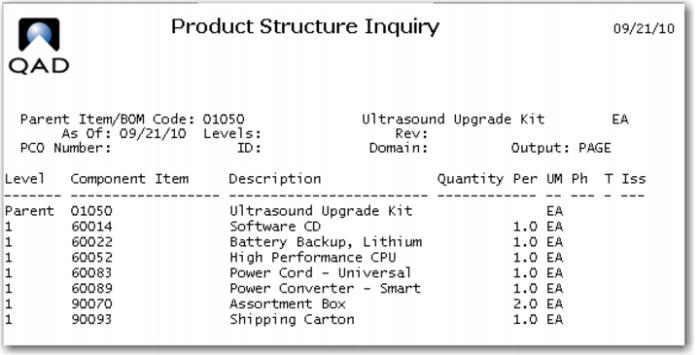
2 Use Product Structure Maintenance (13.5) to add the following components to item 01050: 60014, Software CD; 60022, Lithium Battery; 60052, High Performance CPU; 60083 Power Cord-Universal; and 60089 Power Converter-Smart:
 
Item Number
Description
Qty
Material Cost
60014
Software CD
1
50.00
60022
Battery Backup, Lithium
1
50.00
60052
High Performance CPU
1
500.00
60083
Power Cord, Universal
1
20.00
60089
Power Converter
2
50.00
90070
Box, Assortment
2
5.00
90093
Box, Shipment
1
10.00
Use Product Structure Inquiry. (13.6) to check your work. It should look like this:
3 Use Item Cost Maintenance (1.4.9) to change the Current Cost Set material cost for the above items per the chart. Be sure to update the current cost set. All of these components are purchased therefore have only the purchase material cost.
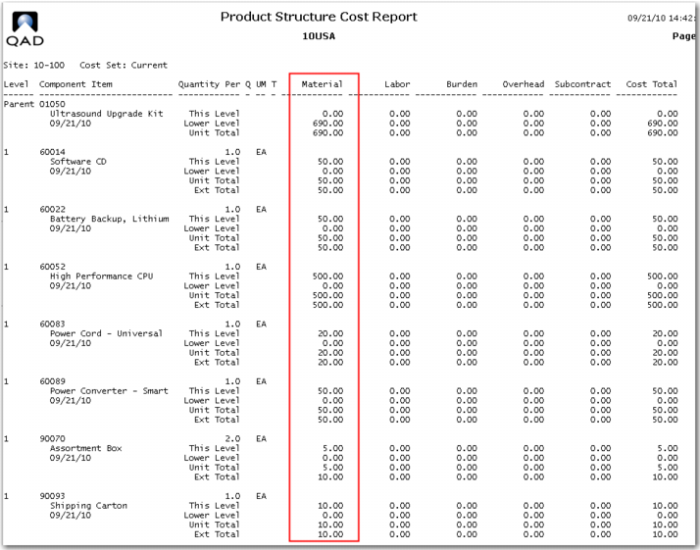
4 Use Product Structure Cost Roll Up (13.12.13) to roll up these material costs for the current cost set at site 10-100 for the item 01050. Use the Product Structure Cost Report (13.12.4) to review your work. It should look like the report show here. The total lower level material cost for the top level 10050 is 690.00.
5 It has been decided to add an overhead cost of 10% to the cost of purchased materials.
Use Item Overhead Cost Update (1.4.21) set the Pur/Mfg code to P, the site to 10-100, the Cost Set to current, the Cost Element to Overhead and set the Material field to 10%, and the Add To/Replace field to Replace. The Overhead field will be at 100% meaning 100% of the overhead will be 10% of the material cost. Be sure to check the update field, leaving the field unchecked will produce a report showing what will happen if you check the update field. This is useful if you are not sure of the effect of the change you are about to make.
Note in reviewing the report you have updated items in the range of item numbers other than the ones in our product structure.
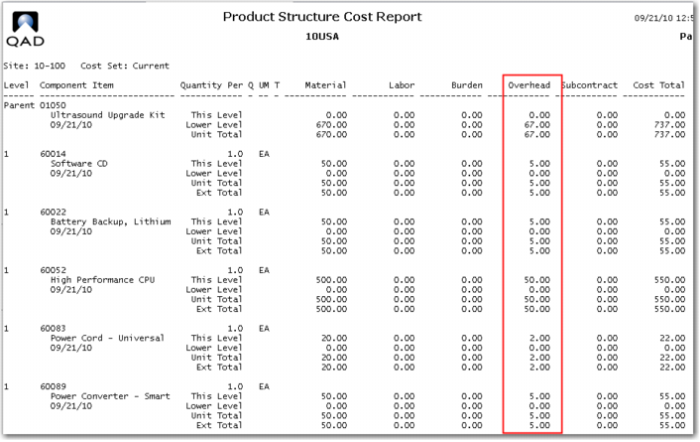
If you to run the Product Structure Report at this time you would see the Item level Overhead costs but they are not yet rolled up to the top level.
6 Run the product structure cost roll up and review the Product Structure Report for item 01050. It should now look like this.