Exercise 8: Engineering Change in Product Structures
1 The latest upgrade to the software exceeds the capacity of a CD disk, necessitating a change to a DVD disk. Marketing is anxious to implement the change as soon as possible.
Use Item Master Copy 1.4.12 to copy the current Software CD, 60014, to a new item number 60014.1 Software DVD. Cycle through the screens for the copy function, until you reach the Current Cost Set screen and change the material cost of the DVD to 55.00, all other attributes for the DVD are the same as the CD.
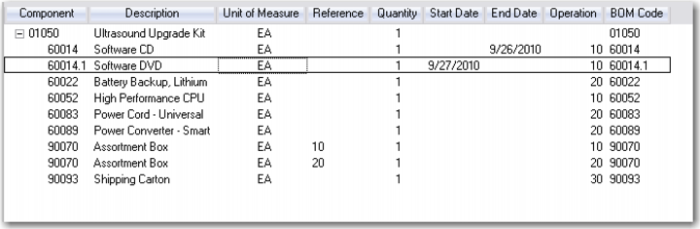
2 Use Product Structure Maintenance to set the End Date of the 60014 to next Sunday. Add the item 60014.1 to the structure at operation 10 with a Start Date of next Monday. Your Product Structure Maintenance screen should look like this.
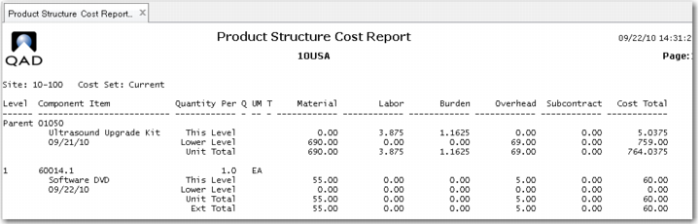
3 Review the Product Structure Cost Report for the 01050 using the default As Of Date: (today’s date) you see the costs as of today. The CD cost of 50.00 rolled up to the lower level cost of the 01050. Remember you are using the Current Cost set.
Run the report again setting the As Of Date to next Monday. Now you see the new item 60014.1 and it's cost of 55.00. Because you have not yet done the Cost Roll Up the new cost is not yet reflected in the cost of the 01050. Note: The date shown on the report header is the date the report was run. The As Of Date is displayed in the report trailer.
If you were going to make this change permanent you would now run the cost roll up sequence. However marketing has learned there are a large number of CDs in inventory and have decided to use those up before switching to the DVD.